


Student resources for getting into CAD
 View
View
I personally started out with Fusion 360 by Autodesk. Back then, I had joined an edtech course where they were teaching SolidWorks—but they asked us to download a cracked version, which didn’t sit right with me.
So I did a bit of research and found out about Autodesk’s official student license. That turned out to be a much better option since it gives free access to tools like Fusion 360 and Inventor for students.
To apply, you just need to be an active student (school, college, or university). You can register using your college ID or student email. Once your account is verified, you can directly download and start using the software.
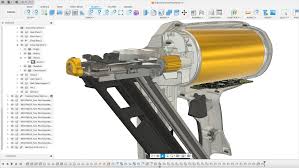
Fusion 360 is widely designed to be beginner-friendly compared to tools like SolidWorks and NX, especially for people from non-mechanical backgrounds and hobbyists. At the same time, it still has all the capabilities needed for serious work and is currently being adopted by many industries—especially for its CAM features.
I mostly learned the basics on my own since the interface is quite intuitive, but there are also some great resources online. One series I’d highly recommend is “Fusion 360 in 30 Days” by Product Design Online.
If all this feels a bit overwhelming, I’d suggest starting by designing some basic parts. The series I mentioned really helps with that. You can also check out Tinkercad if you want something even simpler to get started.
Fusion 360 in 30 Days:
https://www.youtube.com/watch?v=d3qGQ2utl2A&list=PL2fGAHZdlxHOZfYOupIXibtlFG1WCl-ta
Autodesk student license:
https://www.autodesk.com/in/education/edu-software/overview
#CAD# #Fusion360# #Student Resources#
 #CAD#
#Fusion360#
#StudentResources#
#CAD#
#Fusion360#
#StudentResources#
Sign In Or Register Comment after
No comments yet. Be the first to comment!