


Making PCB Silkscreen More Useful During Assembly and Debugging
 View
View
Silkscreen is often one of the last things designers review before exporting Gerber files. If the reference designators are visible, it may seem good enough.
However, a well-designed silkscreen can make assembly, testing, and future maintenance much easier. Spending a few extra minutes improving labels during the PCB design stage can save valuable time once the board is manufactured.
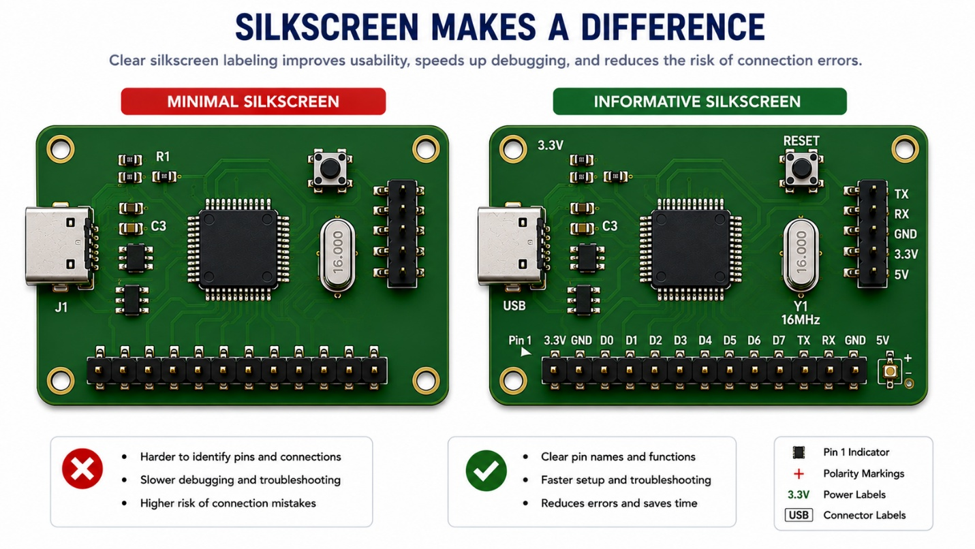
Information That Is Worth Printing
Not every detail needs to appear on the PCB, but certain labels can be extremely helpful during assembly and troubleshooting.
Examples include:
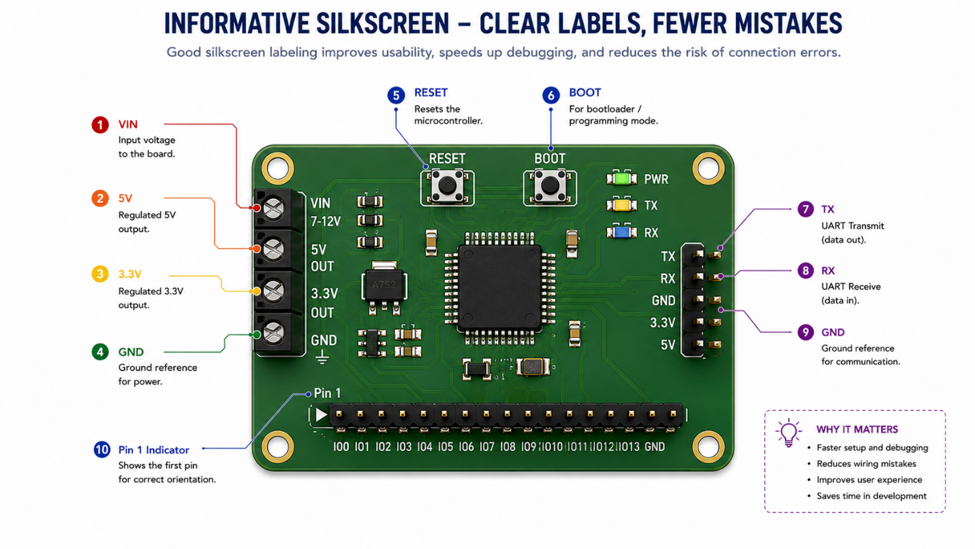
- Power rail names
- Ground connections
- Connector functions
- Pin 1 indicators
- LED polarity
- Test point names
These markings allow engineers and technicians to identify important connections without constantly referring to the schematic.
Thinking About the Next Person
The person assembling or debugging the PCB may not be the one who designed it.
A clear silkscreen helps anyone working with the board understand connector orientation, voltage rails, and signal names more quickly. Even if you revisit the project several months later, good labeling makes the board much easier to work with.
Avoid Overcrowding
Adding more labels does not always make a PCB better.
Too much text can overlap with components or become unreadable after assembly. Focus on information that will actually be useful during testing, programming, and maintenance.
A clean, organized silkscreen is usually more effective than filling every available space with text.
Engineering Tip
Before generating your Gerber files, imagine using the PCB six months from now without opening the schematic. If the silkscreen already answers your most common questions, it is probably doing its job well.
Silkscreen is more than just a place for reference designators. Clear labels can simplify assembly, reduce mistakes, and make debugging much faster throughout the product's lifetime.
Sometimes, one well-placed label is more valuable than an extra page of documentation.
#DesignAndManufacturing# #PCBDesign# #PCBLayout# #Silkscreen# #Electronics# #HardwareDesign#
 #DesignAndManufacturing#
#PCBDesign#
#PCBLayout#
#Silkscreen#
#Electronics#
#HardwareDesign#
#DesignAndManufacturing#
#PCBDesign#
#PCBLayout#
#Silkscreen#
#Electronics#
#HardwareDesign#
Sign In Or Register Comment after
No comments yet. Be the first to comment!