


 View
View
Hi makers!
Description
-
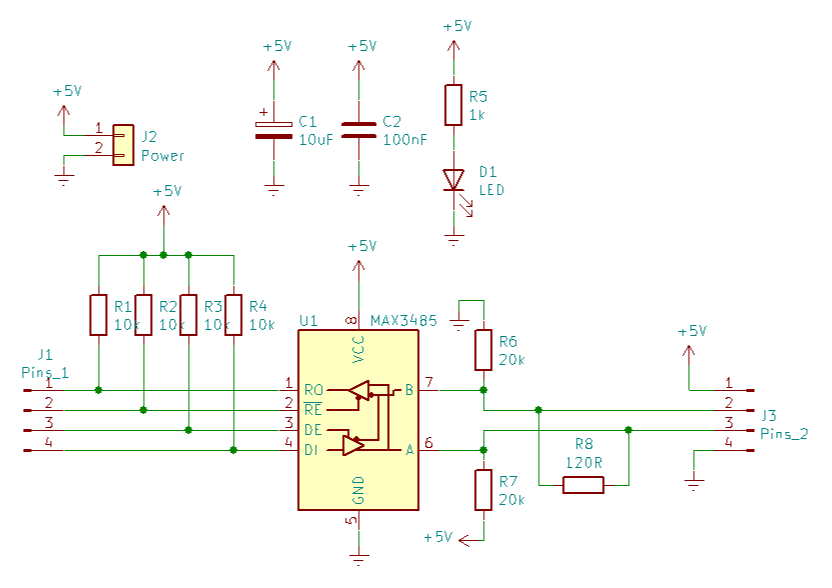
Circuit Overview: RS-485 Transceiver Module
This circuit is a design for an RS-485 communication interface module. Its primary purpose is to convert standard serial logic levels (TTL/CMOS, like those from a microcontroller) into differential RS-485 signals. This allows for robust, long-distance communication (up to 1200 meters) and communication between multiple devices on the same bus (multi-drop). -
Functional Blocks Description
• Power Supply Section:
J2 (Power): The input connector for 5V power.
C1 (10µF) & C2 (100nF): These are decoupling capacitors. They smooth out voltage fluctuations and filter noise from the power supply to ensure the chip operates stably.
R5 (1k) & D1 (LED): A simple power indicator circuit. When 5V is applied, the LED lights up to show the module is powered.
• The Transceiver (U1 - MAX485/LTC485):
This is the heart of the circuit. It is a half-duplex transceiver, meaning it can either transmit or receive data at one time, but not both simultaneously.
Pins 1 (RO) & 4 (DI): Receiver Output and Driver Input. These connect to the microcontroller's RX and TX pins.
Pins 2 (RE) & 3 (DE): Receiver Enable (active low) and Driver Enable (active high). These control the direction of data flow.
Pins 6 (A) & 7 (B): The differential bus lines.
• Control Interface (J1 - Pins_1):
This 4-pin header connects to the microcontroller (Arduino or any other).
Resistors R1, R2, R3, R4 (10k): These are pull-up resistors connected to +5V.
R2 & R3: Pull RE and DE high. Since DE is active-high and RE is active-low, pulling them both high puts the chip in Transmit Mode by default.
R4: Pulls DI high. This ensures that when the chip is transmitting (default state), it sends a logic "1" (Mark state). This is crucial for RS-485 to keep the bus in a known "idle" state when no one is talking.
• RS-485 Bus Interface (J3 - Pins_2 & Right Side):
R8 (120Ω): This is the termination resistor. It matches the characteristic impedance of standard twisted-pair cables to prevent signal reflections (echoes) at the end of the line.
R6 (20k) & R7 (20k): These are bias resistors. R7 pulls line A high and R6 pulls line B low. This creates a "fail-safe" condition. If all devices on the bus stop transmitting, the voltage difference (A > B) ensures the receiver reads a logic "1" (idle state) rather than random noise.
J3: The connector that plugs into the actual RS-485 network cables. -
Arduino Usage Case
This module is commonly used to connect an Arduino to industrial equipment (like PLCs, VFDs, or sensors using Modbus) or to create a long-distance network between multiple Arduinos.
Wiring to Arduino
You would connect the J1 header to your Arduino as follows:
• Arduino TX → DI: Serial data out.
• Arduino RX → RO: Serial data in.
• Arduino Control Pin (e.g., Pin 2) → RE and DE. Why connect them together? When the Arduino pin is HIGH: DE=1 (Driver On), RE=1(Receiver Off). The Arduino is Transmitting. When the Arduino pin is LOW: DE=0(Driver Off), RE=0 (Receiver On). The Arduino is Receiving.
Before sending a PCB off for manufacturing, I prefer to experiment using either a breadboard or a test board. After that, an order is placed with JLCPCB.
*This description was created using AI.
*Most of the time I use salvaged components or buy from local store, but I tried to build a BoM for you too using LCSC.com supplier.
*The project is presented as is, made for hobby projects.

#PCB# #RS485#
 #PCB#
#RS485#
#PCB#
#RS485#
Sign In Or Register Comment after
No comments yet. Be the first to comment!