One Simple Circuit That Lets a Microcontroller Measure High Voltages

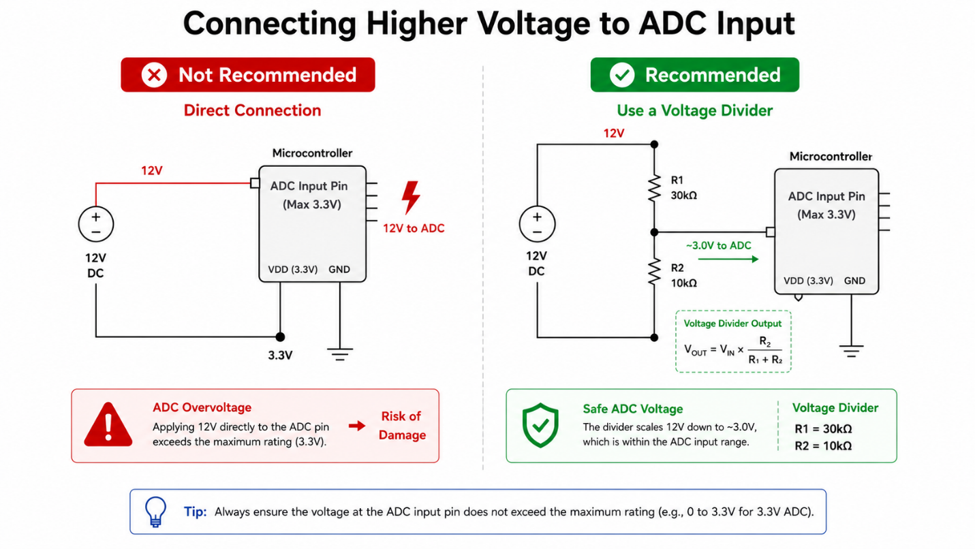
Microcontrollers are excellent at measuring analog voltages through their built-in Analog-to-Digital Converter (ADC). However, there's one important limitation: the ADC input can only tolerate voltages within the operating range of the microcontroller, typically 3.3V or 5V.

Connecting a higher voltage directly to an ADC pin can produce incorrect readings and, in many cases, permanently damage the microcontroller. Fortunately, solving this problem requires only two resistors arranged as a voltage divider.

Although the circuit is extremely simple, understanding how and when to use it correctly is essential for anyone working with embedded systems or measurement applications.

image.png

How a Voltage Divider Works

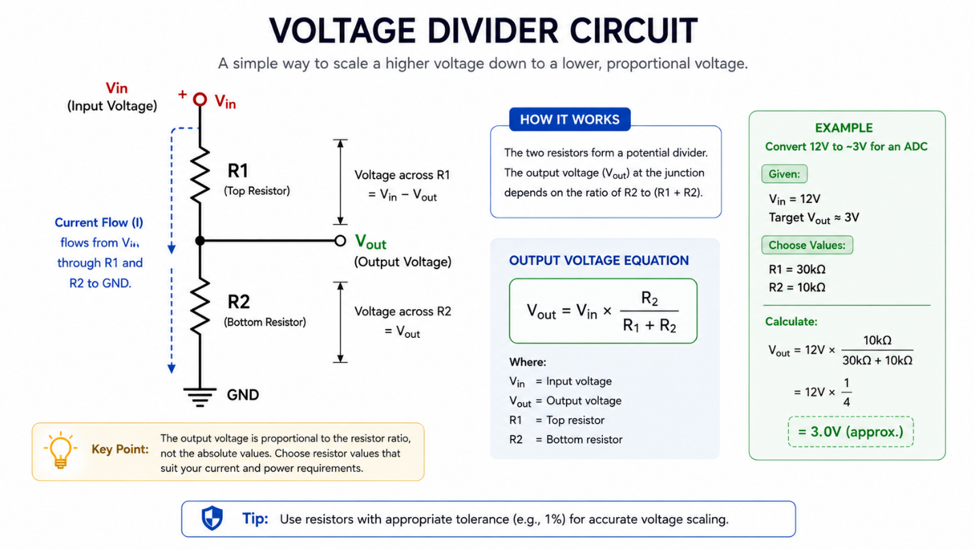
A voltage divider consists of two resistors connected in series. The output voltage is taken from the connection between the two resistors, producing only a fraction of the input voltage.

By selecting the proper resistor values, a higher voltage can be scaled into the safe operating range of the ADC without requiring additional active components.

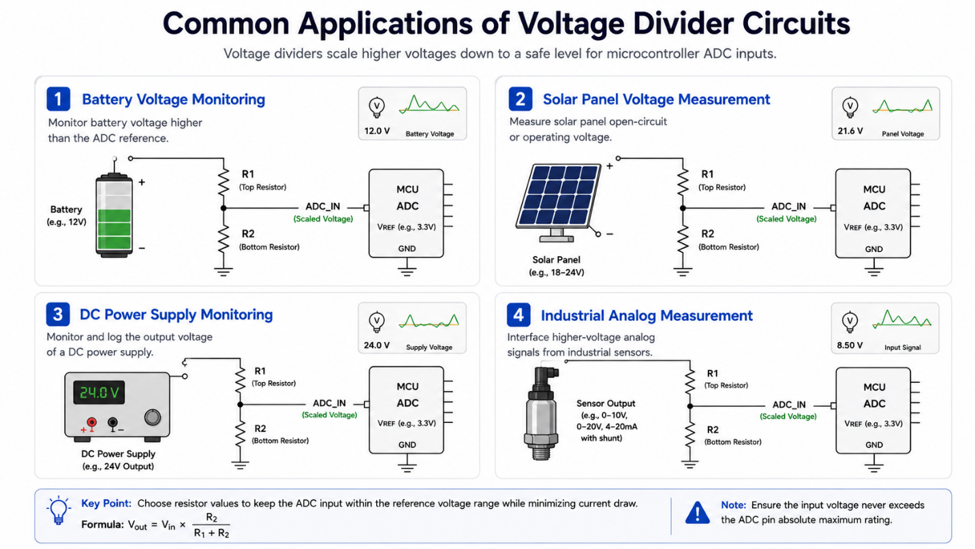
This principle is widely used in battery monitoring, power supply measurement, solar energy systems, and many industrial sensing applications.

image.png

Common Applications

Voltage dividers appear in far more projects than many people realize.

They are commonly used to monitor battery voltage in portable devices, measure power supply levels in IoT systems, detect automotive battery voltage, and provide analog feedback in industrial control systems.

When combined with an ADC, a simple pair of resistors allows a microcontroller to monitor voltages that would otherwise be far beyond its measurement range.

image.png

One Thing I Always Check

Whenever I design a voltage measurement circuit, I verify two things before connecting it to the ADC.

First, I calculate the maximum output voltage to ensure it never exceeds the ADC input limit. Second, I select resistor values that provide accurate measurements without unnecessarily increasing current consumption.

These quick checks help protect the microcontroller while producing reliable analog readings.

Conclusion

A voltage divider is one of the simplest circuits in electronics, yet it enables a microcontroller to measure voltages far beyond its own operating range. Understanding this basic technique is an essential skill for anyone designing embedded systems, battery-powered devices, or electronic measurement circuits.

#ElectronicTips# #Microcontroller# #ADC# #VoltageDivider# #EmbeddedSystems# #Electronics#

Electronic Tips & Projects
When Pull-up and Pull-down Resistors Actually Matter

Pull-up and pull-down resistors are among the smallest and least expensive components in digital electronics, yet they solve one of the most common causes of unstable digital inputs. Because these resistors don’t actively amplify signals or drive loads, beginners often underestimate their importance or even omit them entirely.

The problem appears when a digital input is left unconnected. Instead of reading a stable HIGH or LOW, the input becomes floating, allowing electrical noise from the surrounding environment to influence its voltage. As a result, a microcontroller may detect random button presses, unstable sensor outputs, or unexpected interrupts that are difficult to troubleshoot.

Fortunately, preventing floating inputs requires only a single resistor placed in the right location.
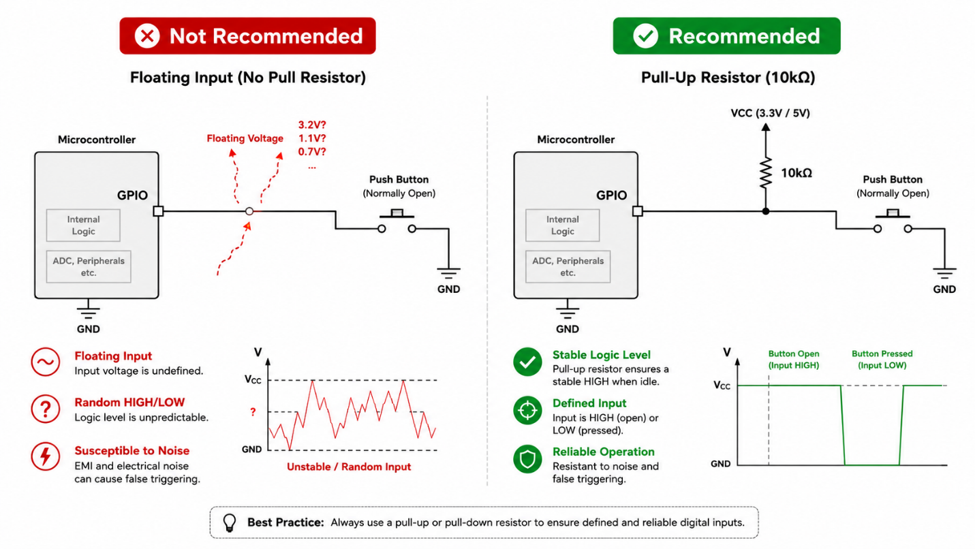
image.png

How Pull-up and Pull-down Resistors Work

A pull-up resistor gently connects a digital input to the supply voltage, causing the input to read HIGH whenever no external device is driving the line. When a switch closes, the input is pulled LOW.

A pull-down resistor performs the opposite function. It connects the input to ground so the default state remains LOW until an external signal drives it HIGH.

Neither resistor is intended to force current through the circuit continuously. Instead, they provide a weak default reference voltage while allowing another device to override the logic level whenever necessary.
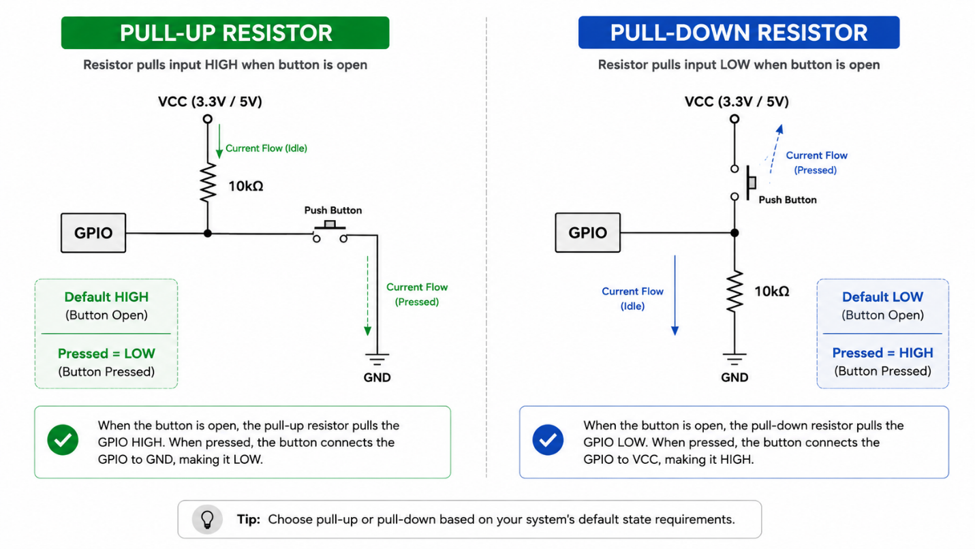
image.png

Where You’ll Commonly Find Them

Pull resistors appear in many digital circuits, even if they’re not immediately obvious. Push buttons, limit switches, open-drain outputs, and interrupt inputs all rely on a defined default state to operate reliably.

One well-known example is the I²C communication bus. Because I²C devices use open-drain outputs, neither SDA nor SCL can drive the signal HIGH by themselves. External pull-up resistors are therefore required for normal communication.

Many modern microcontrollers also include configurable internal pull-up resistors. While these are convenient for many applications, external resistors may still be preferred when stronger pull strength or better noise immunity is required.
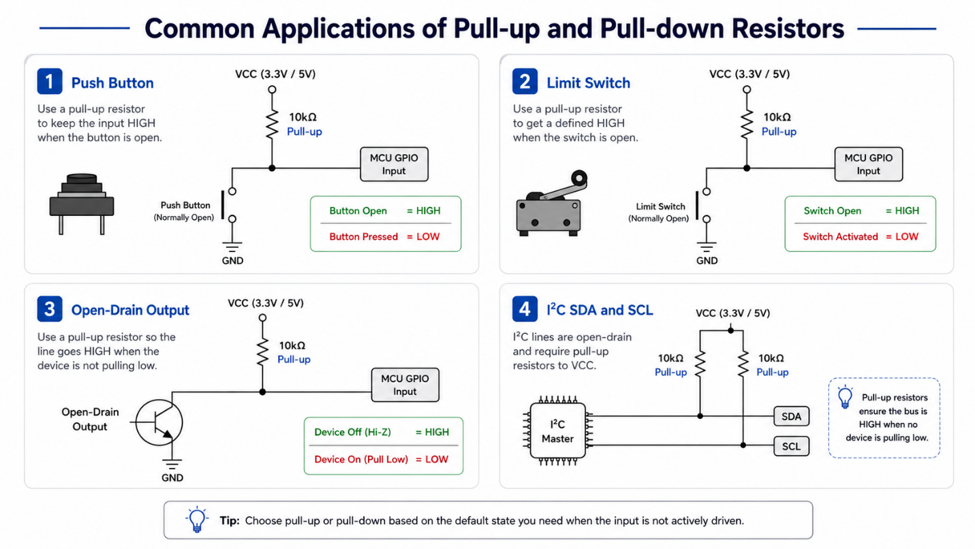
image.png

One Thing I Always Check

Whenever I review a schematic, I make it a habit to look at every digital input that connects to a switch, jumper, or external signal.

If the input doesn’t have a clearly defined default state, I immediately check whether a pull-up or pull-down resistor has been included. This quick review only takes a few minutes, but it often prevents intermittent problems that are much harder to diagnose after the hardware has been assembled.

Conclusion

Pull-up and pull-down resistors may be simple components, but they play an essential role in digital circuit reliability. By ensuring that every input has a defined logic level, they help eliminate floating inputs, reduce unpredictable behavior, and make embedded systems far more stable during everyday operation.
#Electronics# #Microcontroller# #EmbeddedSystems# #DigitalElectronics# #PullUpResistor# #PullDownResistor# #ElectronicTips#

Electronic Tips & Projects
Industry Applications
Why Clock and Reset Signals Deserve Extra Protection

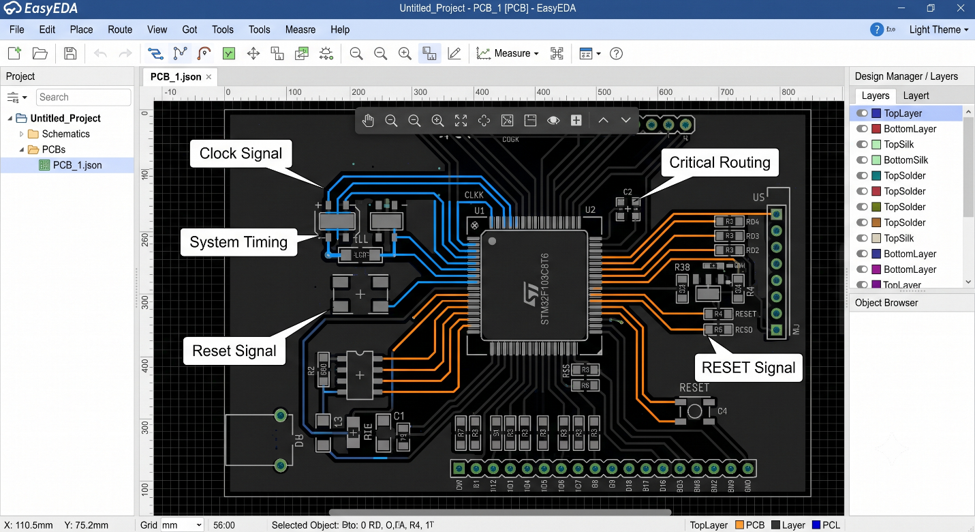
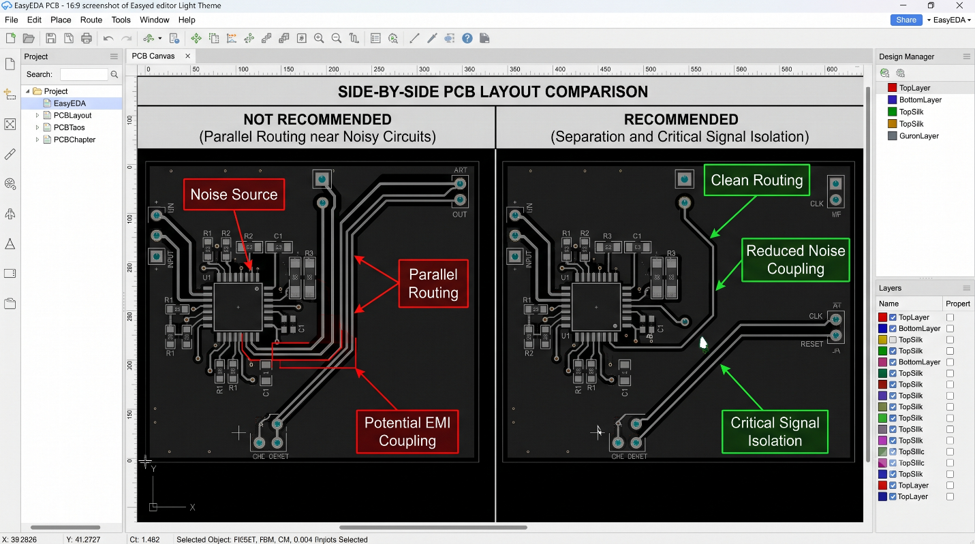
Not every signal on a PCB requires the same level of routing attention. While many digital signals can tolerate small routing imperfections, clock and reset lines often play a much more critical role in overall system stability.

A noisy clock signal may introduce timing uncertainty, while an unstable reset line can lead to unexpected resets or unreliable startup behavior. These issues are often difficult to reproduce because they depend on switching activity, electromagnetic interference, and the PCB layout itself.

For this reason, experienced PCB designers usually give clock and reset nets a higher routing priority than ordinary digital signals.

Why Clock and Reset Signals Are Different

Clock signals provide timing reference for processors, microcontrollers, memory devices, and communication peripherals. Every rising and falling edge must arrive with minimal distortion and predictable timing.

Reset signals may switch only occasionally, but they are extremely sensitive during power-up and system initialization. Noise coupled into a reset line can unintentionally reset the processor or prevent the system from starting correctly.

Because both signals influence the entire system rather than a single peripheral, their routing deserves additional protection.

image.png

Common Design Mistakes

One common mistake is routing clock and reset signals alongside noisy switching circuits or parallel to high-current traces for long distances.

Another issue is leaving these signals completely exposed without any consideration for nearby interference sources.

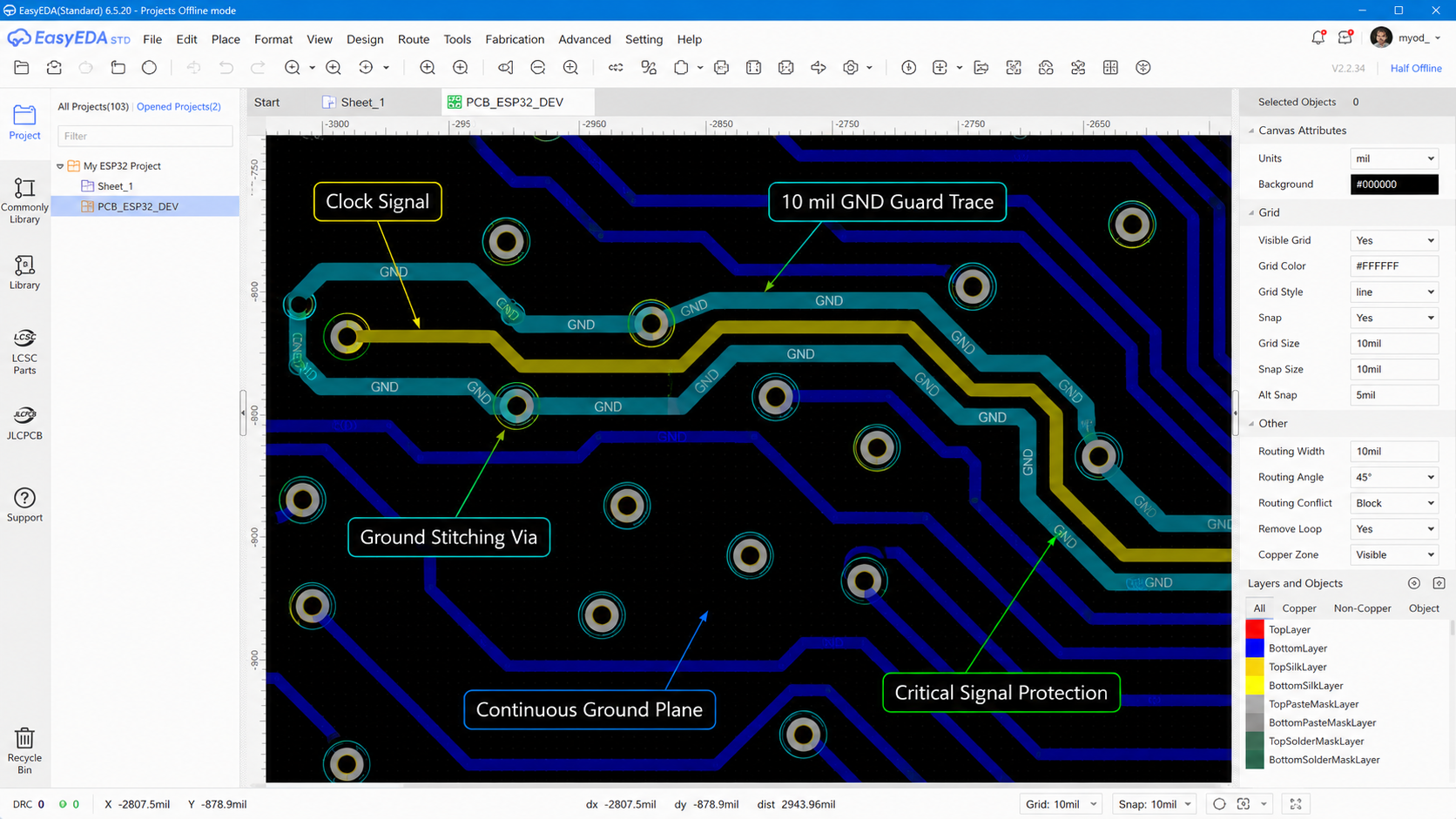
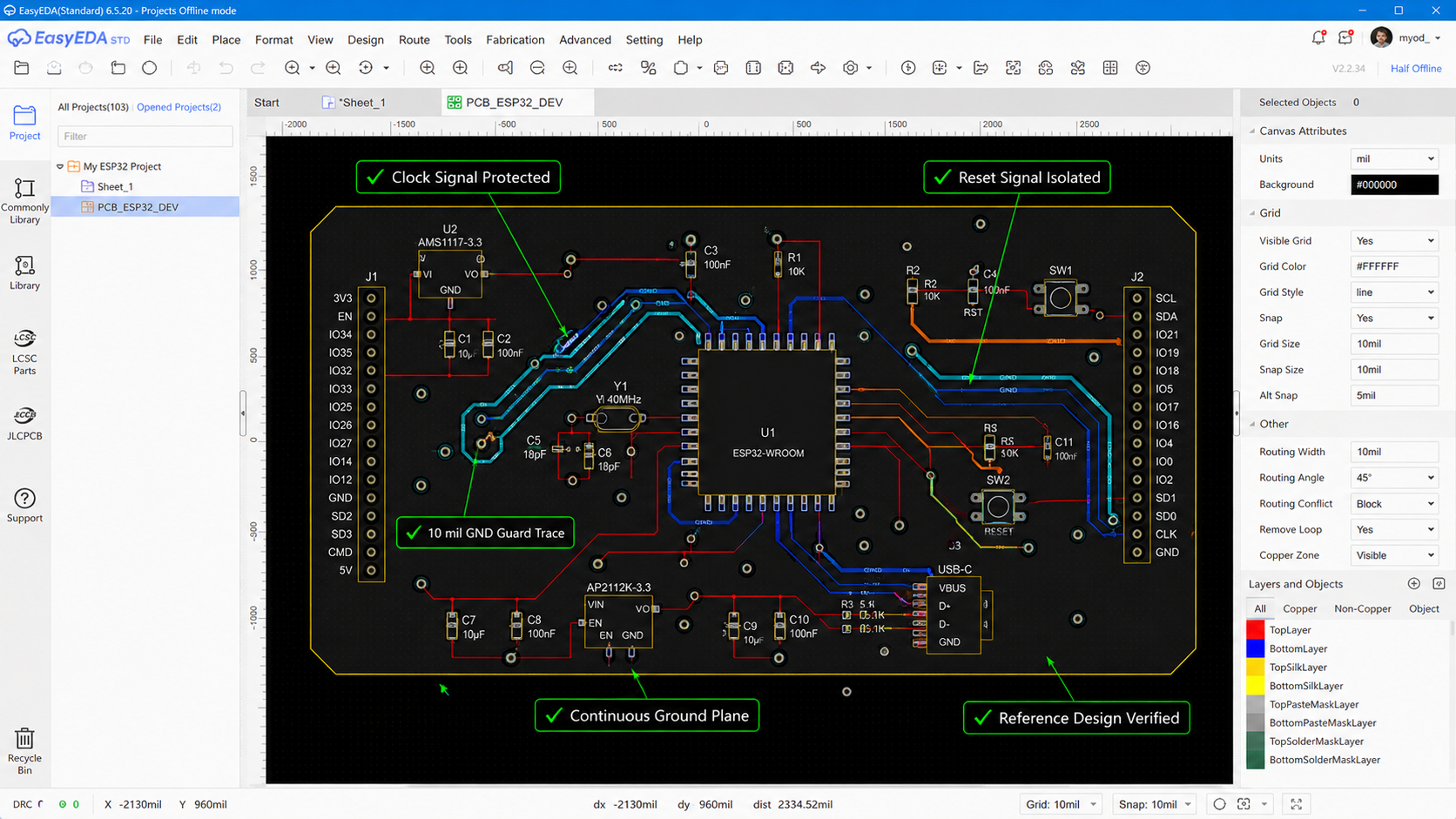
The Pattern Design Guide recommends enclosing clock signals with a grounded guard trace or ground shape. It also recommends protecting critical signals such as CLK and RESET using approximately 10 mil GND guard traces where appropriate.

image.png

Recommended Design Practice

One practical technique used in many designs is surrounding critical signals with grounded guard traces or adjacent ground copper connected through stitching vias.

The guard trace does not eliminate every source of interference, but it helps reduce electromagnetic coupling from nearby switching activity. Combined with a continuous reference plane and careful component placement, this creates a cleaner routing environment for critical timing signals.

As always, the final routing should follow the reference layout recommended by the component manufacturer whenever one is provided.

img3.png

Design Review Checklist

Before releasing the PCB for manufacturing, I review every critical timing signal using a few simple questions.

  • Is the clock routed through a quiet area?
  • Is the reset line separated from noisy power circuits?
  • Does the routing remain above a continuous reference plane?
  • Is a ground guard implemented where recommended?
  • Does the layout follow the device reference design?

These checks only take a few minutes but often prevent difficult debugging work after assembly.

img4.png

Clock and reset signals occupy only a small portion of most PCB layouts, yet they influence the stability of the entire system. Giving these nets extra routing attention, protecting them from nearby noise, and following the reference design can significantly improve system reliability without adding much complexity to the PCB.

#JLCPCB# #EasyEDA# #PCBLayout# #ClockSignal# #SignalIntegrity# #HighSpeedPCB#

Layout
Why High-Speed Signals Shouldn't Run Under a Crystal Oscillator

A crystal oscillator may occupy only a small area on a PCB, but it provides one of the most important signals in the entire system, clock reference. Every instruction executed by a microcontroller, every communication interface, and every timer depends on the stability of this signal.

Because the oscillator operates with relatively small signal amplitudes at high frequencies, the surrounding PCB layout has a significant influence on its performance. Even with a correct schematic, poor routing around the crystal can introduce unwanted noise, increase clock jitters, or make the design more susceptible to EMI.

For this reason, many hardware manufacturers include dedicated layout recommendations for the crystal circuit in their reference designs. Following these recommendations is often more important than trying to optimize the routing based on board space alone.

Why Crystal Placement Matters

One of the first things I check during PCB review is the distance between the crystal oscillator and the MCU.

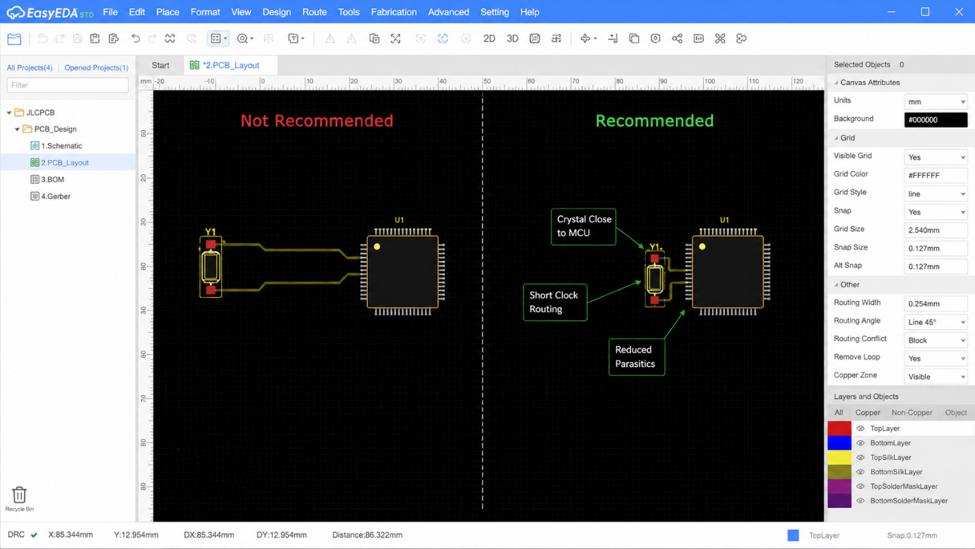
The crystal should be placed as close as possible to the oscillator pins, so the clock traces remain short and symmetrical. Longer traces introduce additional parasitic inductance and capacitance, making the oscillator more sensitive to external interference.

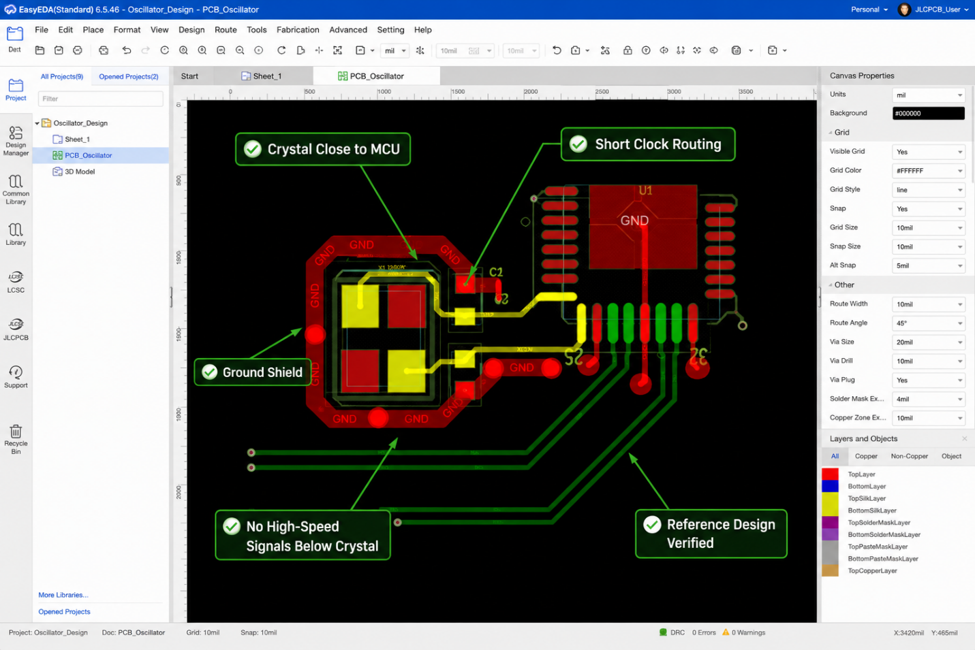
The Pattern Design Guide also recommends keeping the crystal routing as short as possible and surrounding the oscillator with a grounded shield whenever appropriate.

image.png

Common Design Mistakes

Another layout issue that deserves attention is routing high-speed signals beneath the crystal oscillator.

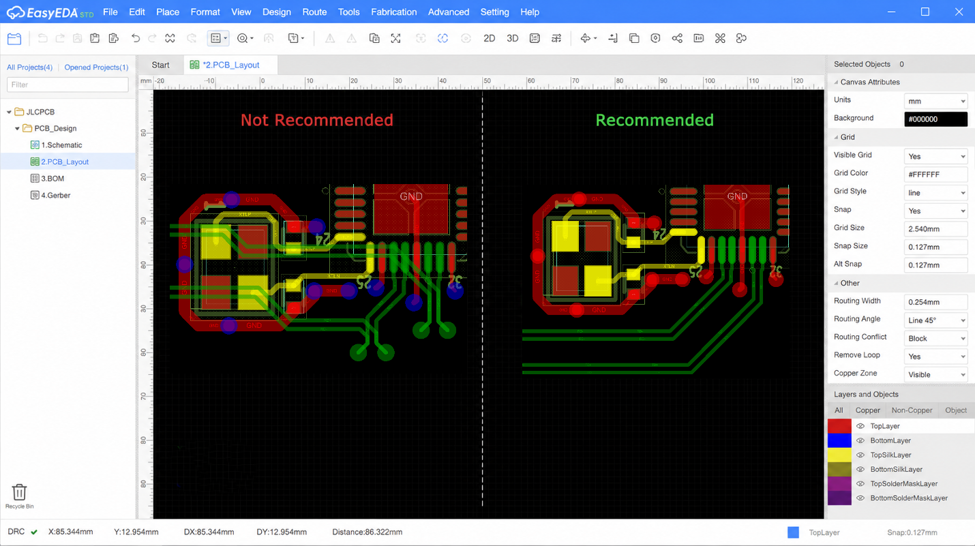
Although this may seem like an efficient use of available PCB space, the crystal area is intended to remain electrically quiet. High-speed signals routed directly below the oscillator can increase electromagnetic coupling and inject unwanted noise into the clock circuit.

The Pattern Design Guide specifically recommends not routing high-speed signals under the crystal oscillator, helping preserve clock stability and reduce potential interference.

image.png

Recommended Design Practice

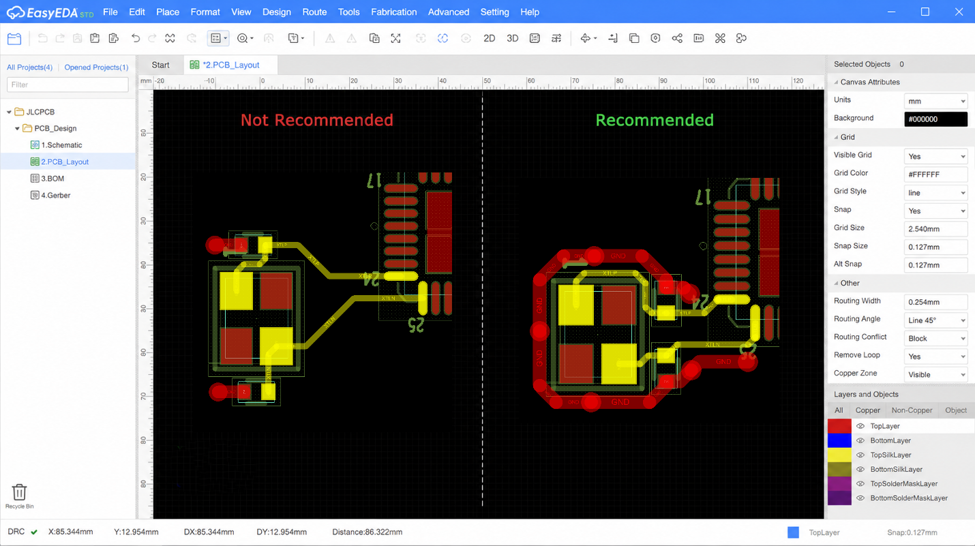
In addition to short routing, many reference designs also surround the crystal oscillator with grounded copper connected through stitching vias. This grounded shield helps isolate the oscillator from nearby digital activity and provides a cleaner electromagnetic environment.

It's important to remember that the exact implementation should always follow the MCU manufacturer's layout recommendations. Some devices require specific ground patterns or keep out regions around the crystal, while others may not recommend a complete ground shield.

image.png

Design Review Checklist

Before generating Gerber files, I usually spend a few minutes reviewing the crystal circuit.

Instead of only checking connectivity, I verify that the crystal is positioned close to the MCU, the routing remains short and symmetrical, the surrounding area is free from unnecessary high-speed signals, and the layout follows the reference design provided by the component manufacturer.

These simple checks often prevent difficult-to-diagnose clock problems later in development.

image.png

Crystal oscillator routing is often overlooked because the circuit occupies very little board space. However, its layout has a direct influence on the stability of the entire system. Keeping the crystal close to the MCU, maintaining short clock traces, avoiding high-speed routing underneath the oscillator, and following the manufacturer's reference design are simple practices that can significantly improve the reliability of a high-speed PCB.

#JLCPCB# #EasyEDA# #PCBLayout# #CrystalOscillator# #HighSpeedPCB# #SignalIntegrity#

Layout
Why Differential Pair Spacing Matters More Than You Think

When engineers first start learning about high-speed PCB design, the discussion often revolves around length matching. While matching the lengths of a differential pair is important, it's only part of what makes the routing perform well. One detail that's often underestimated is maintaining consistent spacing between the two traces.

For interfaces such as USB, Ethernet, LVDS, CAN FD, or PCIe, differential pairs are designed to carry equal and opposite signals. As these signals travel together, they create electromagnetic fields that couple with each other. This coupling is one of the reasons differentials signaling offers better noise immunity and lower EMI than single-ended routing.

image.png

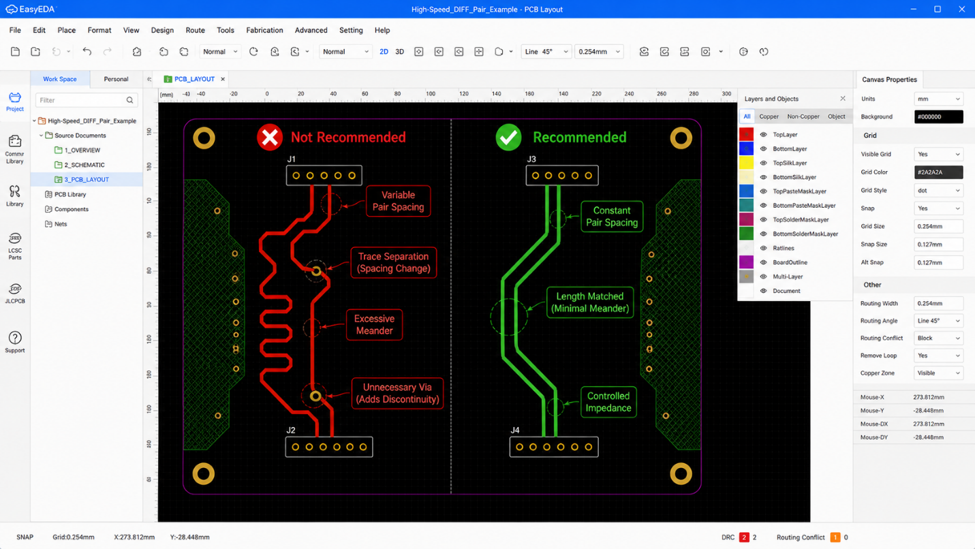
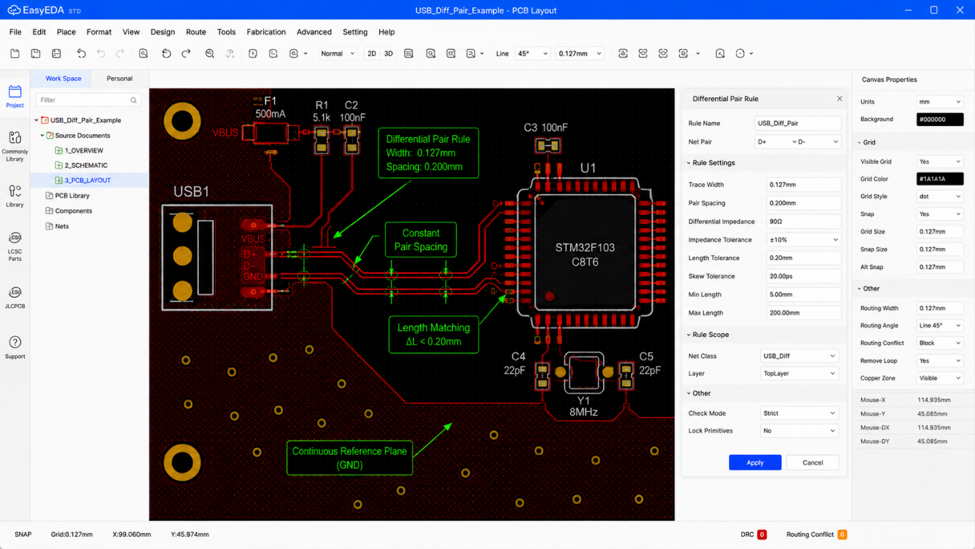
Although spacing may only change by a fraction of a millimeter, its effect can be significant in high-speed circuits. Every change in spacing modifies the coupling between the traces, which directly affects the differential impedance. Instead of behaving as one transmission structure, the pair begins to behave differently along different sections of the route.

This doesn't necessarily mean the PCB will fail immediately, but it reduces the design margin and makes signal integrity more difficult to predict, especially as data rates continue to increase.

Good differential pair routing therefore focuses on maintaining a consistent geometry rather than simply producing equal trace lengths.

image.png

During PCB layout, maintaining constant spacing is not always easy. Connectors, BGAs, vias, and mechanical constraints often force designers to adjust routing. Modern PCB software provides differential pair routing tools to help preserve width and spacing automatically, but engineering review is still essential.

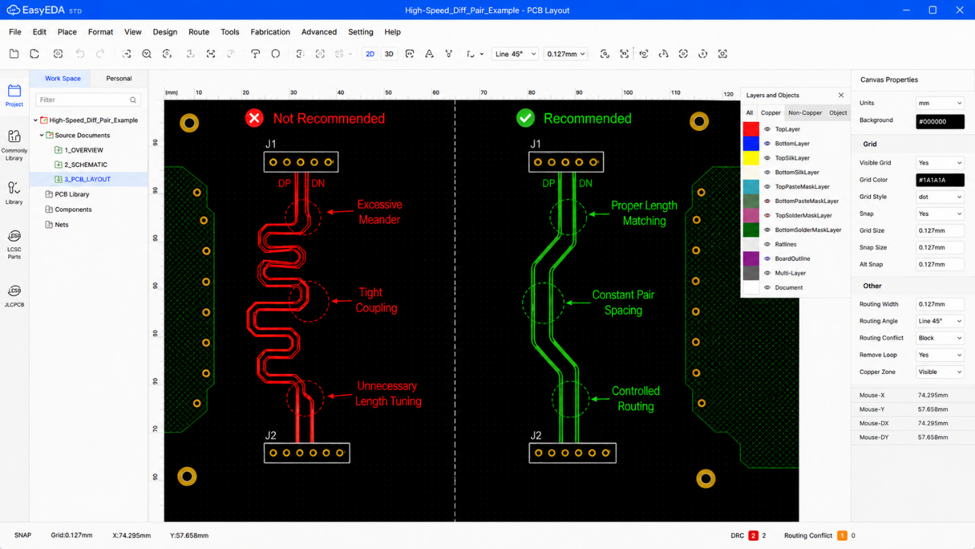
Another common misconception is that adding more serpentine routing automatically improves length matching. Excessive meanders placed too closely together may increase intra-pair coupling and create additional signal integrity issues. Length tuning should only be applied where necessary and should follow the recommendations provided by the PCB manufacturer or signal integrity requirements.

image.png

One habit that has helped me during PCB reviews is to stop looking only at trace length. Instead, I review the differential pair as a single transmission path. I check whether both traces remain together, whether their spacing changes unexpectedly, and whether they stay referenced to the same continuous ground plane.

These small reviews only take a few minutes but often catch routing issues before the design reaches manufacturing.

Differential pair routing is not just about making two traces reach the destination at the same time. Consistent spacing, controlled impedance, and a continuous reference plane all contribute to maintaining signal integrity. By treating the pair as a single transmission structure rather than two independent traces, engineers can build more reliable high-speed PCB designs with fewer surprises during testing and production.

#JLCPCB# #EasyEDA# #PCBLayout# #DifferentialPair# #HighSpeedPCB# #SignalIntegrity#

Layout
Ripple ≠ Noise. They’re Not the Same Thing

We've noticed that power ripple and power noise are often used interchangeably, especially by beginners. While both affect power quality, they have different causes and characteristics.

Here's a simple way to think about it.

Ripple is like ocean waves.

The waves rise and fall in a predictable pattern.

Similarly, power ripple is a periodic AC component superimposed on a DC output. It is mainly caused by switching regulators or incomplete filtering after rectification.

Typical characteristics:

· Predictable and repetitive waveform

· Usually appears around the switching frequency and its harmonics

· Common waveforms include triangular or sawtooth shapes

Noise is like raindrops hitting the water.

The surface is disturbed randomly, with no fixed pattern.

Likewise, power noise consists of random high-frequency disturbances superimposed on the DC output. It can originate from external EMI, component parasitics, switching transients, or PCB layout issues.

Typical characteristics:

· Random waveform

· Wide frequency spectrum, often extending into the MHz or even GHz range

· Difficult to predict and analyze

A quick comparison

Ripple Noise
Periodic Random
Mainly caused by switching or rectification Caused by EMI, parasitics, and switching transients
Concentrated near the switching frequency Wide-band high-frequency interference
Easier to observe and quantify More difficult to isolate and suppress

Although both appear on the power rail, they require different measurement methods and mitigation strategies.

When debugging a power supply, do you usually check ripple first, or look for high-frequency noise with an oscilloscope?

#PCB #PCBDesign #PowerElectronics #PowerIntegrity #Electronics

PCB
🔧 The Physics Behind a Great Solder Joint

Most beginners think a good solder joint is simply "more solder."
In reality, the strongest joints often use just enough solder—and the real magic happens where you can't even see it.
💡 What's really happening?
✔ Capillary Action
When both the lead and the plated-through hole are heated properly, molten solder is pulled into the hole by capillary action. This creates a reliable metallurgical bond between the lead, the barrel, and the pad—not just a blob of solder sitting on top.
✔ Good Wetting
A smooth, concave fillet with a low contact angle is usually a sign that the solder has properly wetted the metal surfaces. Good wetting is one of the keys to both mechanical strength and electrical reliability.
✔ Stable Solidification
Once the solder starts to solidify, leave it alone. Moving the joint before it fully cools can disturb the grain structure and result in a cold solder joint, leading to intermittent failures and higher contact resistance.

⚠ Common Mistakes
❌ Too Much Solder
More solder doesn't mean a stronger joint. Excess solder can actually hide poor wetting and make inspection more difficult.
❌ Cold Solder Joint
Usually caused by insufficient heat or movement during solidification, resulting in poor wetting and unreliable electrical contact.
❌ Solder Bridge
Excess solder connects adjacent pads or leads, creating an unintended short circuit.

A good solder joint isn't about using more solder—it's about achieving proper heat transfer, good wetting, and controlled cooling.
Every reliable PCB starts with reliable solder joints.
💬 What's the most common soldering mistake you've seen (or made)?
#PCB #Electronics #Soldering #Hardware #PCBA #Engineering #DIYElectronics

Design & Manufacturing