Electronic Community Mechanical Community OSHWLab JLCPCB JLC3DP JLCCNC JLCMC JLCONE EasyEDA JLCCAN LCSC Cable LCSC Panel


Your CNC tool has a secret teammate. 🫱🏻🫲🏼
Cutting fluid may not get much attention, but it plays a big role in cooling, lubrication, chip removal, and tool life.
So which type should you use for different machining jobs?
We break down the types, functions, applications, and selection tips here ↓
CNC Cutting Fluid: Types, Functions, Applications, and Selection Guide
#CuttingFluid# #CNC# #MachiningTips# #ToolLife# #Engineering# #JLCCNC#

JLCMC Drawer Slides provide stable extension and durable support for industrial cabinets, equipment drawers, and custom mechanical structures.
✔ Multiple load capacities
✔ Full-extension options
✔ Durable metal construction
Designed for engineers who need dependable motion in every detail.
Explore Drawer Slides:
🔗 https://jlcmc.com/product/D05/drawer-slides?from=Ds08
#JLCMC# #Engineering# #DrawerSlides# #Automation # #MechanicalEngineering# #Makers#

Don’t miss this chance to win a big discount at JLCMC!
🏆 200 random winners → $10 OFF Coupon
🔥 3 X winners → $50 OFF Coupon
HOW TO ENTER:
1️⃣ Follow or subscribe to JLCMC on any 3 platforms: X, Facebook, Instagram, LinkedIn, TikTok or YouTube
2️⃣ Like this post and comment “JLCMC”
3️⃣ Scan the QR code & submit the form to enter
💥 Want a shot at the $50 Coupon?
Quote this post on X with @JLCMC_official + #JLCMCGiveaway.
Repost & Keep It Until the Giveaway Ends
Top 3 by Likes Win | Min. 50 Likes
The Top 3 quote posts by likes will each win a $50 OFF Coupon!
📅 Aug 17 – Sep 15, 2026
New to JLCMC? Register & explore precision mechanical components:
👉 Register Now: https://passport.jlcmc.com/#/register?from=register08
Good luck! 🍀
#JLCMCGiveaway# #Engineering# #JLCMC# #Automation# #MechanicalEngineering# #Makers#

Full article on JLCPCB: https://jlcpcb.com/blog/ground-symbols-explained
Four ground marks are numbered in IEC 60417: 5017 earth, 5018 functional earth, 5019 protective earth, 5020 chassis. Only 5019, the earth mark inside a circle, may identify a protective earth terminal. Use 5018 there instead and you have not made a drafting slip, you have made a compliance failure.
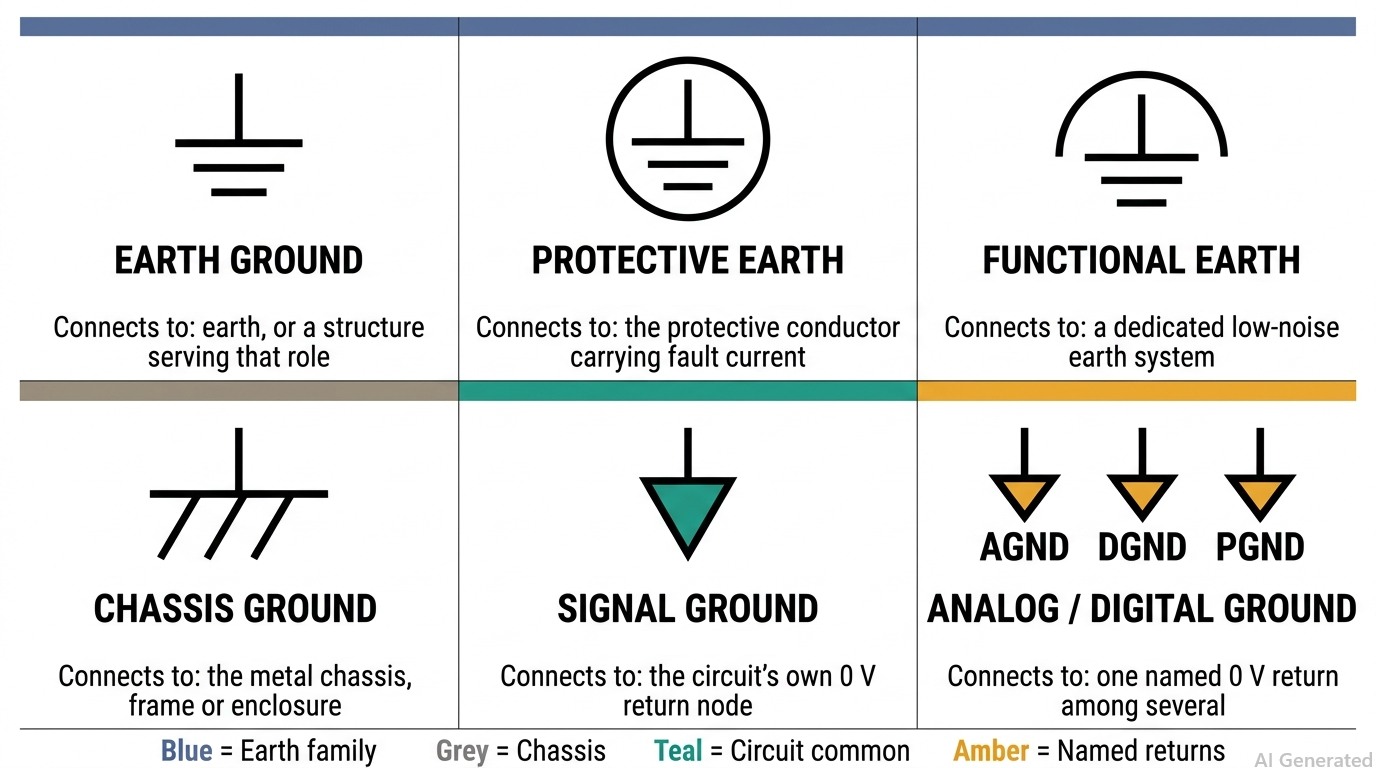
Quick-reference chart of all six ground symbols with their standard numbers
The Six Marks
Six symbols cover almost every schematic and equipment label. Four are numbered by IEC 60417, which standardises markings placed on equipment; the other two come from IEEE 315, which standardises symbols drawn on diagrams.
· 5017, three shrinking bars — earth, general (IEEE 315 clause 3.9.1)
· 5018, earth mark under an arc — functional or noiseless earth (3.9.1.1)
· 5019, earth mark inside a circle — protective earth (3.9.1.2)
· 5020, bar with three angled strokes — chassis or frame (3.9.2)
· Triangle, solid or hollow — signal or common ground (clause 3.9.3)
· Triangle lettered AGND, DGND or PGND — one named 0 V return among several
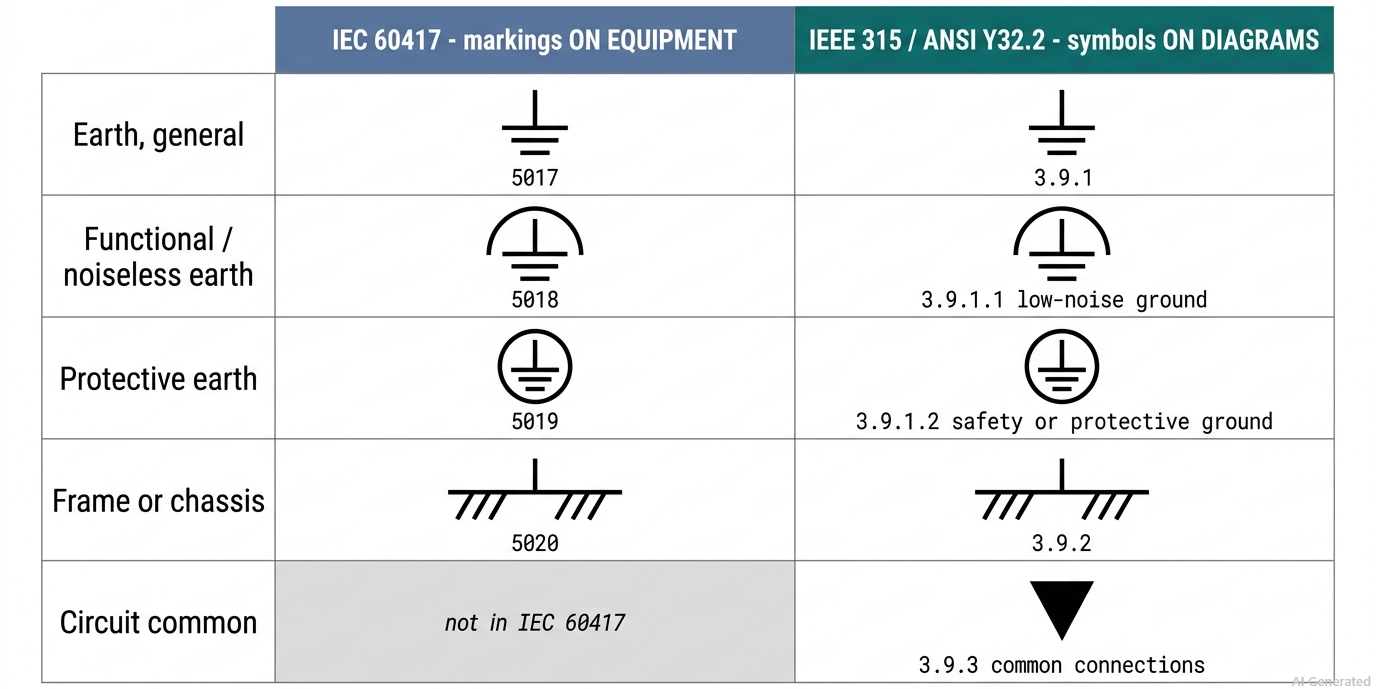
IEC 60417 and IEEE 315 ground symbols compared side by side
Where the Stem Stops
One drawing detail separates a correct protective earth mark from the most widely copied error in the industry. In IEC 60417-5019 the vertical stem stops inside the circle and never touches it. The 2011 edition of NFPA 70, the US National Electrical Code, carried an informational note figure for an equipment grounding conductor termination point drawn with the bar touching the circle. Two further tells: the 5017 bars must shorten as they descend, and 5018 never substitutes for 5019.
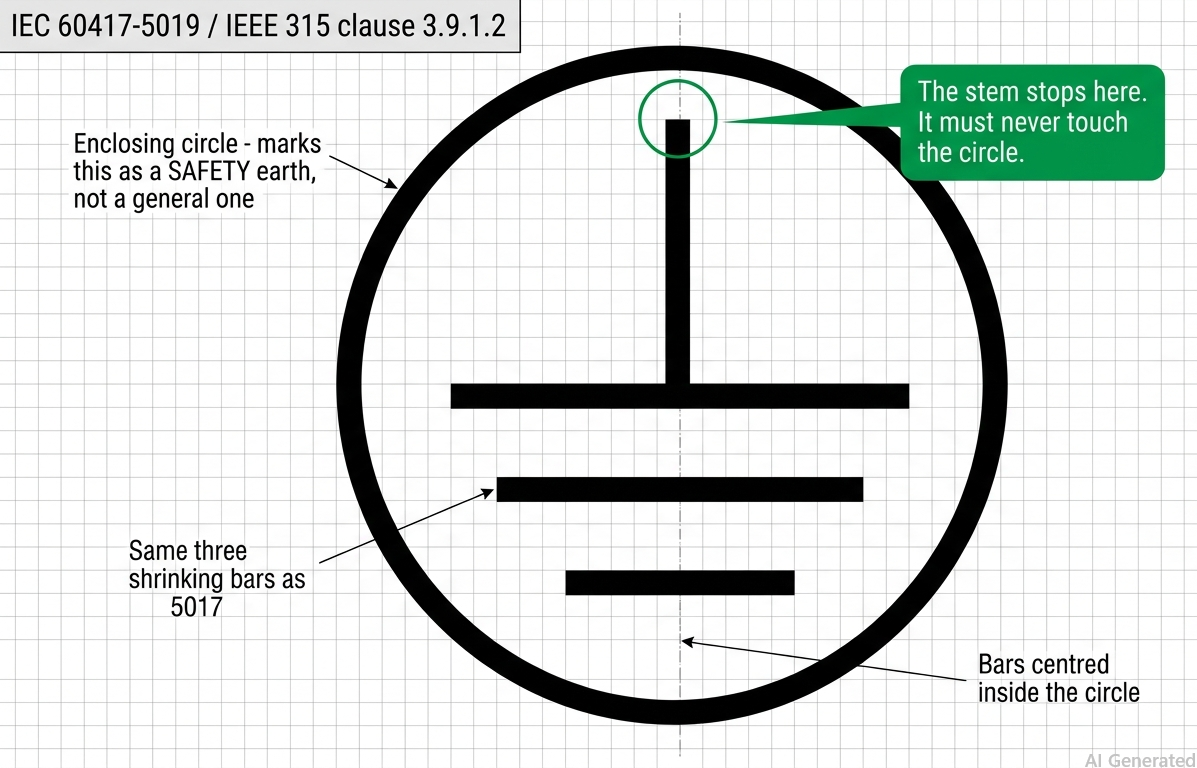
The protective earth symbol, stem stopping short of the circle
Net Names Win
In every mainstream EDA tool the net name decides what connects, not the picture. Altium states it plainly: the net name determines which net a power port joins, not the style of the symbol. Three ports drawn as Earth, Bar and Signal Ground all land on GND if all three are named GND. To create a genuinely separate return, name it AGND everywhere it belongs, join it to GND at exactly one point with a 0 Ω link or net tie, then run ERC and confirm two nets joined once.
The full six-symbol chart, the IEC 60417 versus IEEE 315 mapping and the tool-by-tool net rules for KiCad, Altium and EasyEDA are in the complete guide: Read the full guide
Full article on JLCPCB: https://jlcpcb.com/blog/complete-guide-to-resistor-types
Tolerance is a day-one, room-temperature number. TCR is what you actually live with. A ±1% resistor at 200 ppm/°C can move another ±1% across a 50 °C rise, so its real in-circuit accuracy is worse than its label — and TCR is the column most engineers never filter on.
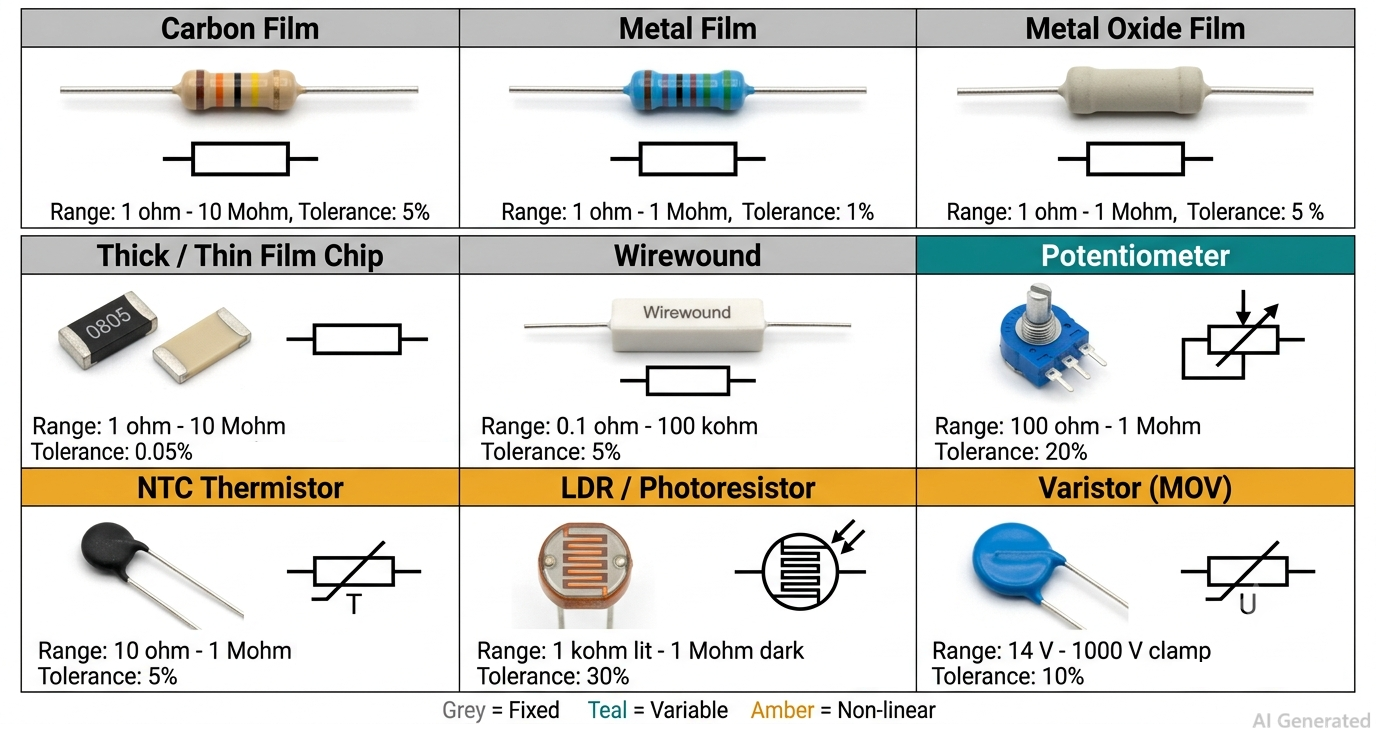
Resistor types chart — fixed, variable and non-linear families with their symbols
Three Families
Every resistor sorts into one of three branches. Fixed types hold a value, judged on tolerance, TCR and power. Variable types expose a wiper, judged on track material and rotational life. Non-linear types are transducers — read the curve, not a tolerance figure.
· Carbon film: ±2% to ±5%, TCR −200 to −1000 ppm/°C
· Metal film: ±0.1% to ±1%, TCR ±25 to ±100 ppm/°C
· Thick film chip: ±1% to ±5%, TCR ±100 to ±200 ppm/°C
· Thin film chip: ±0.05% to ±0.5%, TCR ±5 to ±25 ppm/°C
· Wirewound: ±0.005% to ±5%, 1 W to 300 W and beyond
· Metal foil: ±0.001% to ±0.01%, TCR 0.2 to 2 ppm/°C
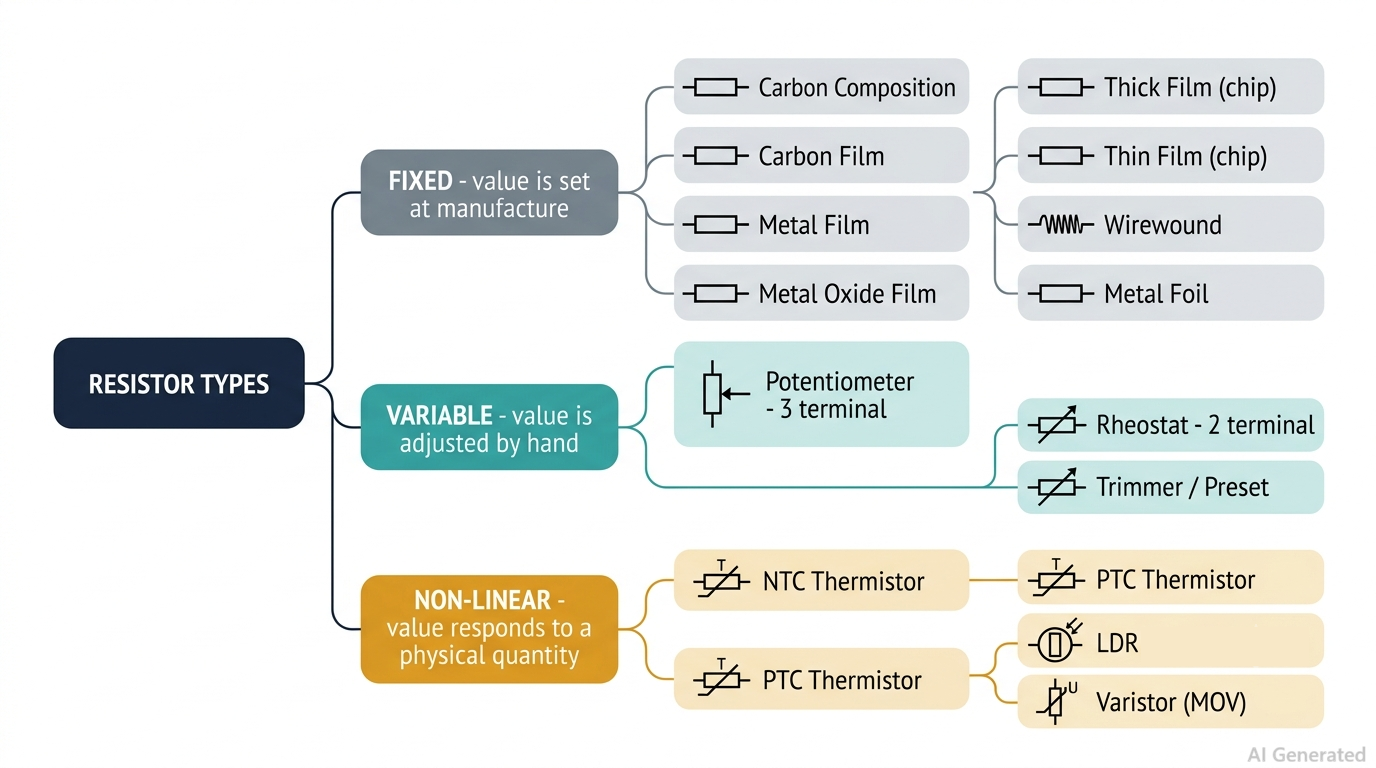
Classification tree from fixed, variable and non-linear down to each resistor type
The 200-Cycle Trap
Track material sets the quality, but the specification nobody prints is rotational life. A panel potentiometer is rated for 10,000 to 1,000,000 cycles. A trimmer is often rated for 200. Put a trimmer behind a user-accessible knob and the track wears through inside a year, and a worn track produces a scratchy, intermittent, open-circuit wiper that gets blamed on everything except the pot. Trimmers are set-once parts; a 25-turn cermet trimmer exists to null an offset and then be left alone.
Choosing Fast
Work five filters in order and you finish choosing between two parts, not twenty. Fix value and tolerance first, rounding to a stocked E-series value under IEC 60063 — E24 for ±5%, E96 for ±1% and tighter. Size power at worst-case I²R and pick a part rated for at least twice it, because ratings are quoted at 70 °C ambient and fall from there. Filter on TCR before tolerance whenever the resistor sets a measured quantity. Surge-exposed inputs get metal oxide or thick film, never thin film.
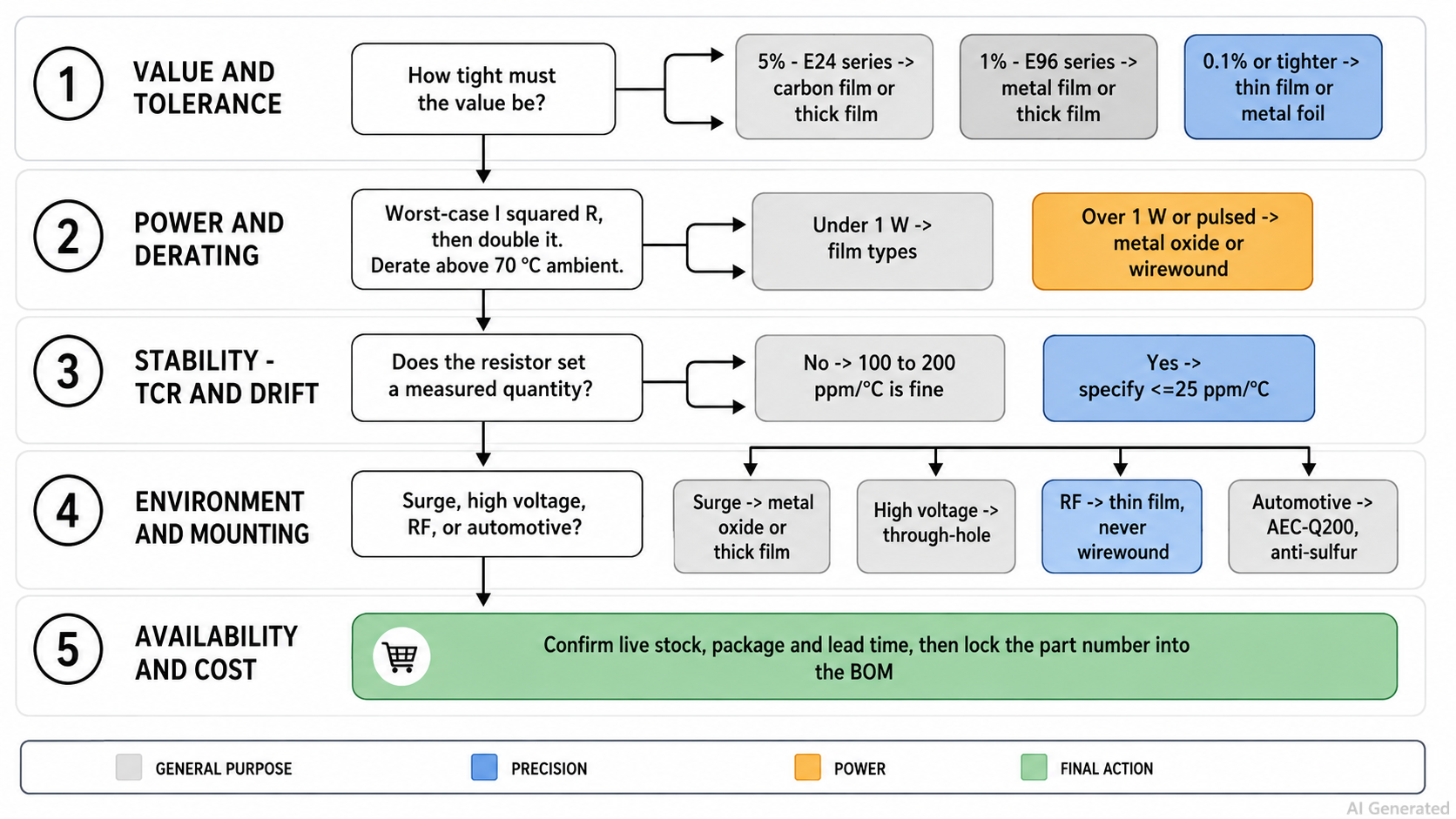
The five-step resistor type selection flowchart
The full resistor types chart, all seven fixed families and the application-by-application selection table are in the complete guide: Read the full guide
Full article on JLCPCB: https://jlcpcb.com/blog/power-supply-symbols-ultimate-guide
A circle, a diamond, and three shrinking horizontal bars. Three power supply symbols, three different meanings, and only one of them is an independent source. Draw a controlled source as a circle and your simulation settles on a completely wrong operating point. Neither that error nor an implicit chassis-to-earth tie trips a design rule check.
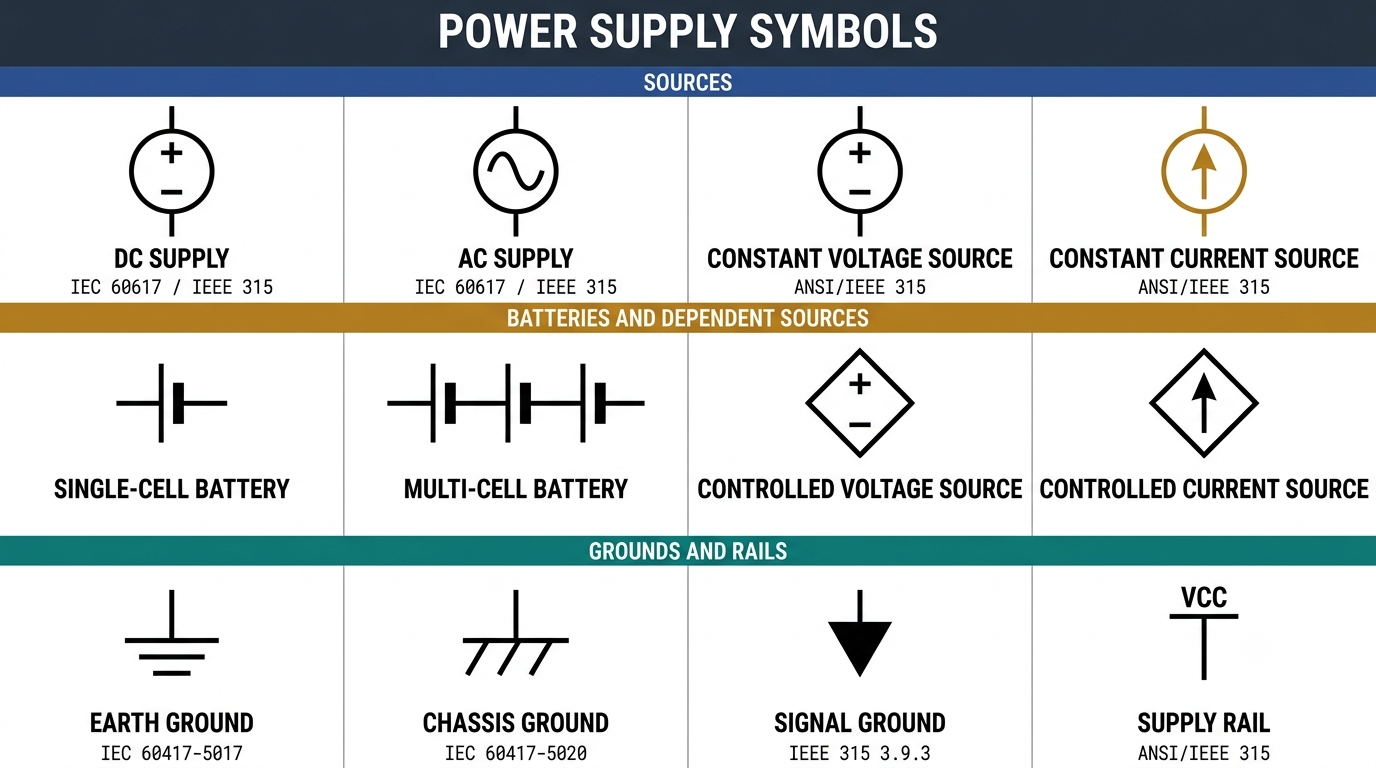
The power supply symbol chart: DC, AC, source, battery and ground symbols side by side
Four Symbol Families
Fourteen symbols cover almost every power source you will meet on a schematic, and they sort into four families: sources, batteries, grounds and rail labels. The outline answers the first question before you read a single label.
· Circle: independent source. Polarity marks for DC, a sine wave for AC, an arrow for current
· Diamond: dependent source, output set by another circuit quantity
· Unequal bar pairs: battery. The long thin bar is positive, one pair per cell
· Earth ground: three shrinking bars, IEC 60417-5017, IEEE 315 clause 3.9.1
· Chassis ground: one bar with three angled strokes, IEC 60417-5020, clause 3.9.2
· Signal ground: downward triangle, IEEE 315 clause 3.9.3
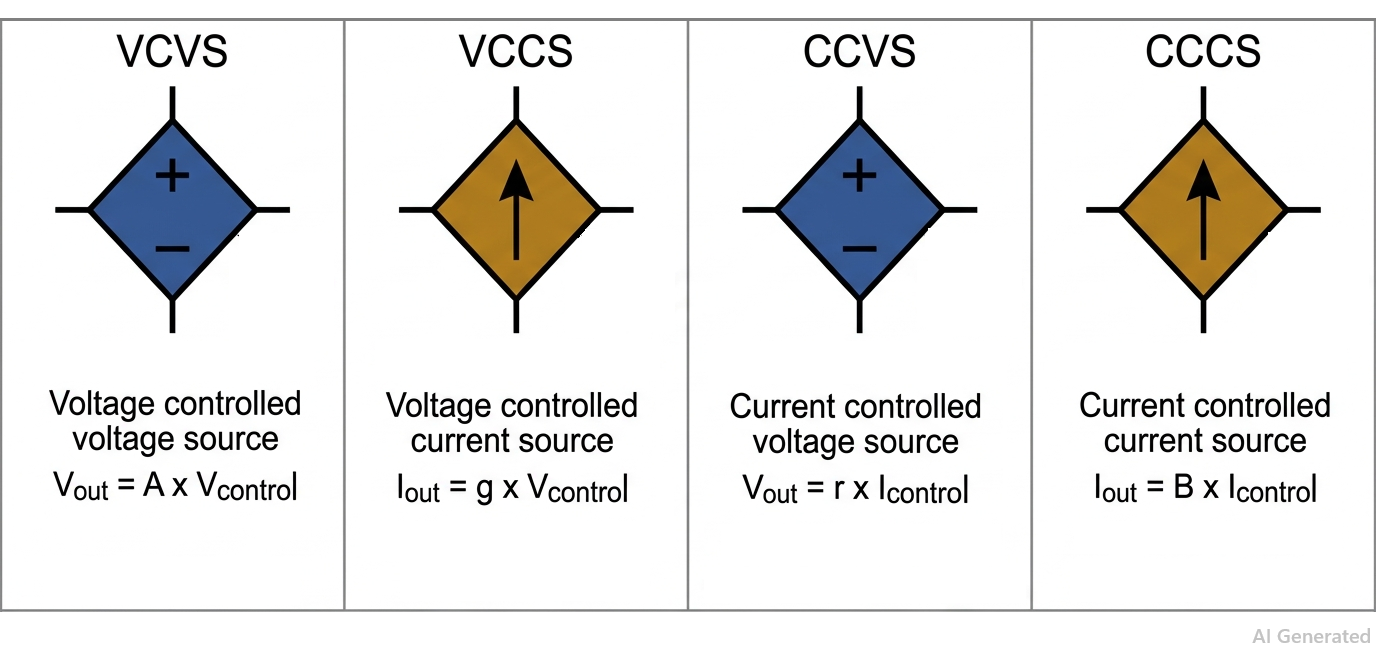
The four dependent source symbols drawn as diamonds with their controlling variables
Why A Diamond
The diamond outline is the only visual difference between a controlled source and an independent one. VCVS and CCVS carry polarity marks; VCCS and CCCS carry an arrow. This is how every active device is modelled: a bipolar transistor is a CCCS, a MOSFET is a VCCS, an ideal op-amp is a VCVS, and a current-sense amplifier behaves as a CCVS. One caveat. The diamond is a drafting convention, not a numbered entry in IEC 60617 the way the earth mark is numbered in IEC 60417, so treat it as binding practice but never cite a clause number for it.
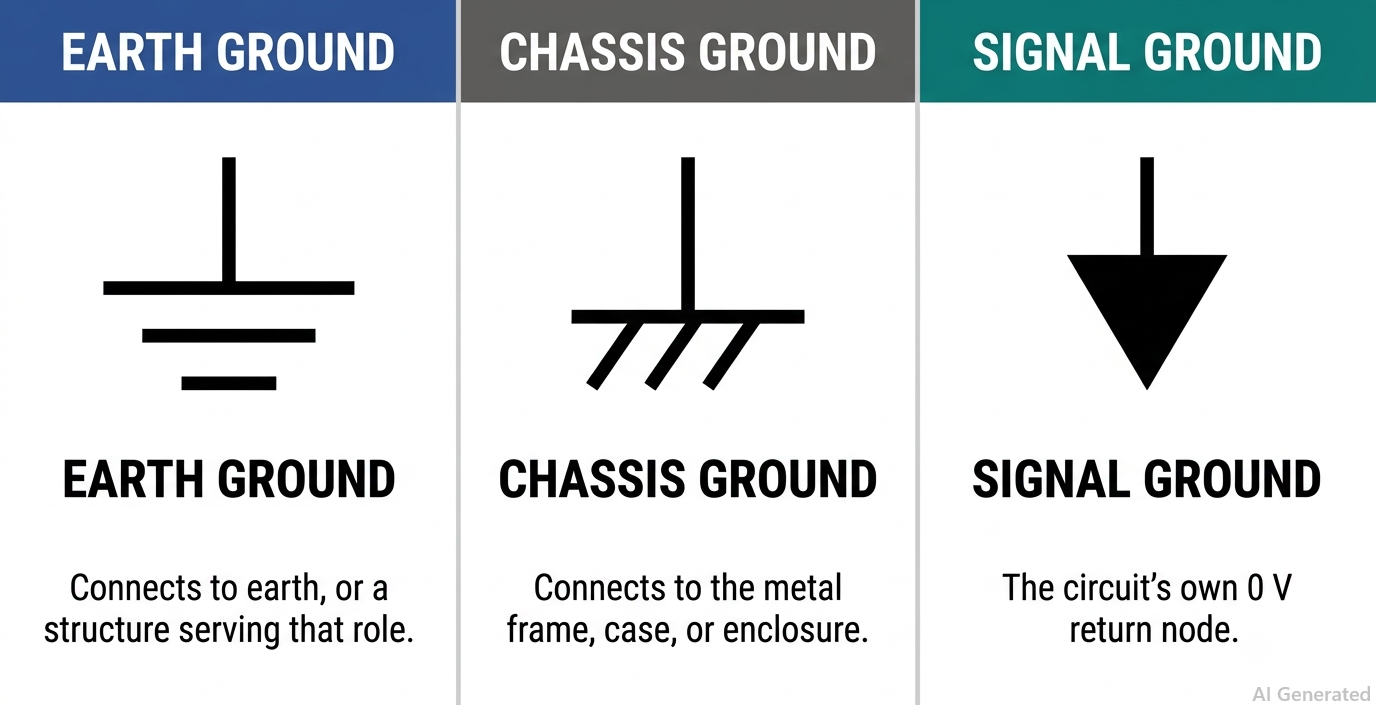
Earth, chassis and signal ground symbols drawn at equal scale for comparison
Three Grounds
Earth, chassis and signal ground are three separate nets. IEEE 315 clause 3.9.2 notes explicitly that a chassis may sit at a substantial potential relative to the earth around it, so placing both glyphs on one net without an explicit bond creates a ground loop that shows up as a failed EMC scan rather than a DRC error. AGND, DGND and PGND all reuse the signal ground triangle, and only the label changes. That is what lets a layout tool keep three returns apart and join them at one defined tie point. If you cannot find that tie point, the schematic has a defect.
The full 14-symbol chart, the IEC 60617 versus ANSI/IEEE 315 comparison, the four dependent source equations and the symbol-to-footprint table are in the complete guide: Read the full guide
Full article on JLCPCB: https://jlcpcb.com/blog/logic-gate-symbols-guide
The same NAND gate appears as a bubbled D-shape in one schematic and a rectangle marked & in the next. Neither is wrong. ANSI/IEEE Std 91-1984 defines both families, so calling the rectangle the non-ANSI form is a review comment worth dropping. What actually flips your output is the bubble.
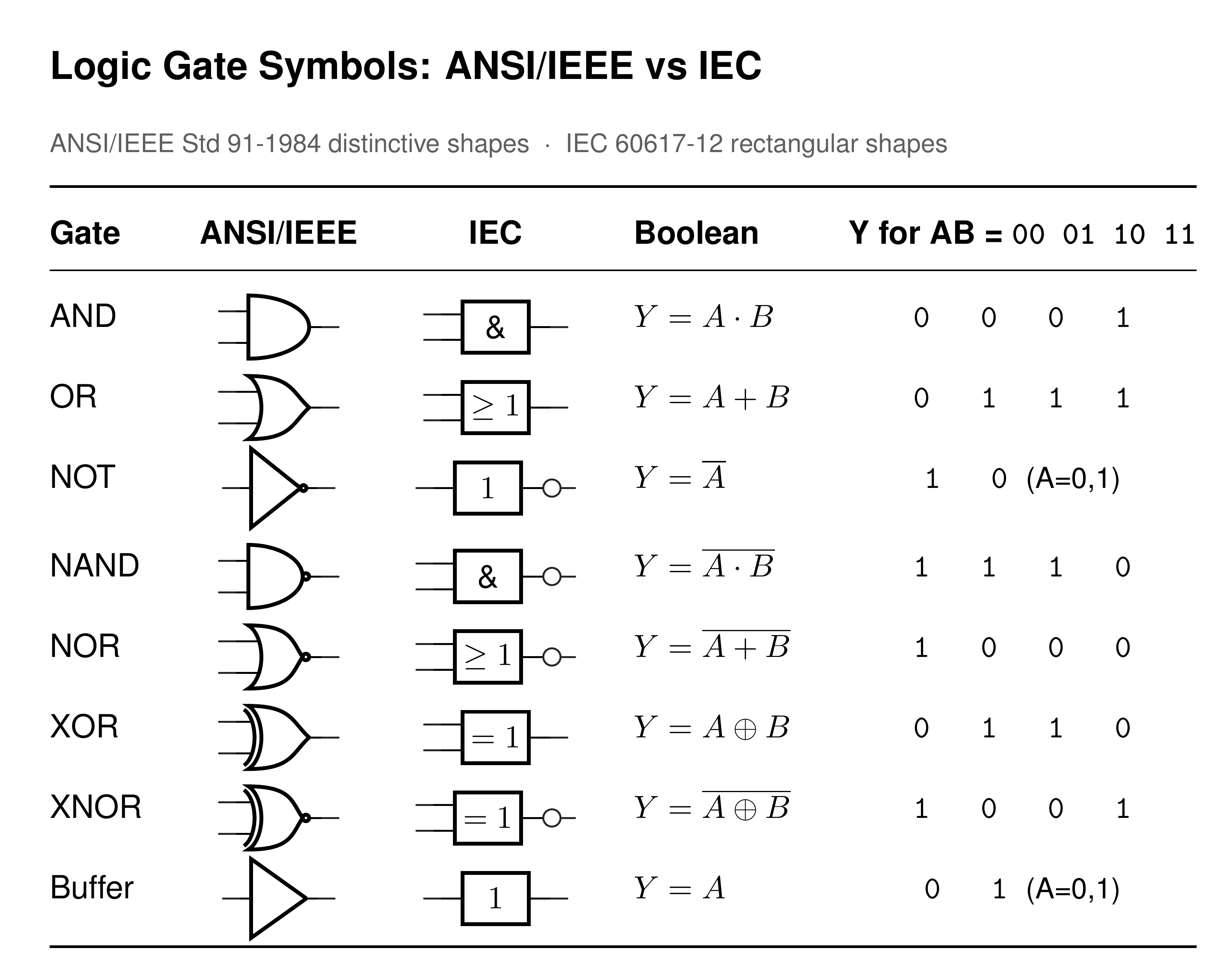
Every logic gate in ANSI distinctive shape and IEC rectangular form, side by side
Two Symbol Sets
The distinctive shapes came from MIL-STD-806 in the early 1960s and passed into ANSI/IEEE Std 91-1984. IEC 60617-12 standardised the rectangle, which names the function with a qualifying symbol printed inside it rather than by outline. Pick one set per drawing set, and never mix both on a sheet: a reviewer scanning for shapes will skip a rectangle.
· AND: flat back, curved nose. IEC qualifier &
· OR: curved back, pointed nose. IEC qualifier at least 1
· XOR: OR shape, doubled input line. IEC qualifier =1
· NOT and buffer: triangle, with and without the bubble. IEC qualifier 1
· NAND, NOR, XNOR: the same outlines with an output bubble
· Rail range decides the family: 74HC runs 2 V to 6 V, 4000B runs 3 V to 18 V
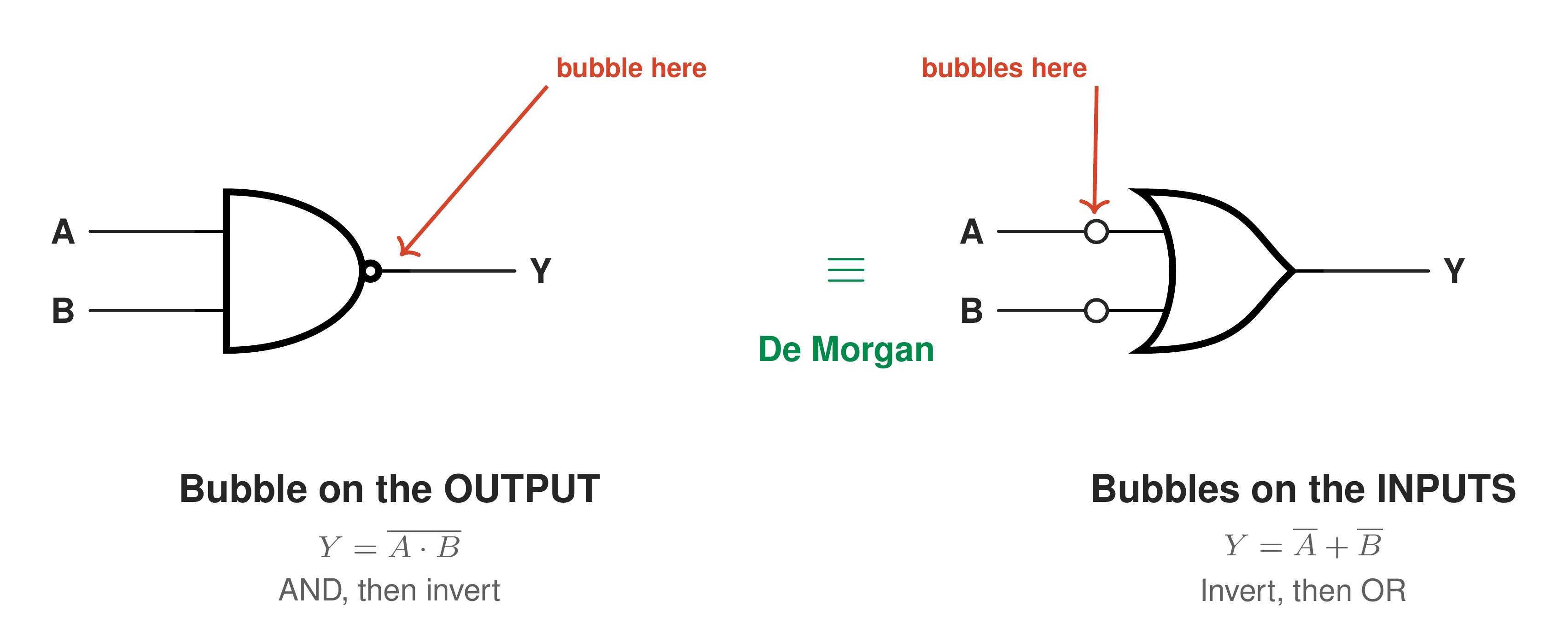
Inversion bubble anatomy, output bubble compared with input bubbles on the same gate
Reading The Bubble
The small circle is a negation indicator, not decoration. On an output it complements the function, so AND becomes NAND and OR becomes NOR. On an input it marks that pin active LOW, and the gate sees the inverted net. An OR shape with bubbles on both inputs is the same gate as a NAND, because (A · B)' = A' + B'. That De Morgan equivalent is drawn deliberately, so the bubbles line up with active-low net names such as nCS or /OE. A wedge instead of a circle marks an active-low pin without inverting the function.
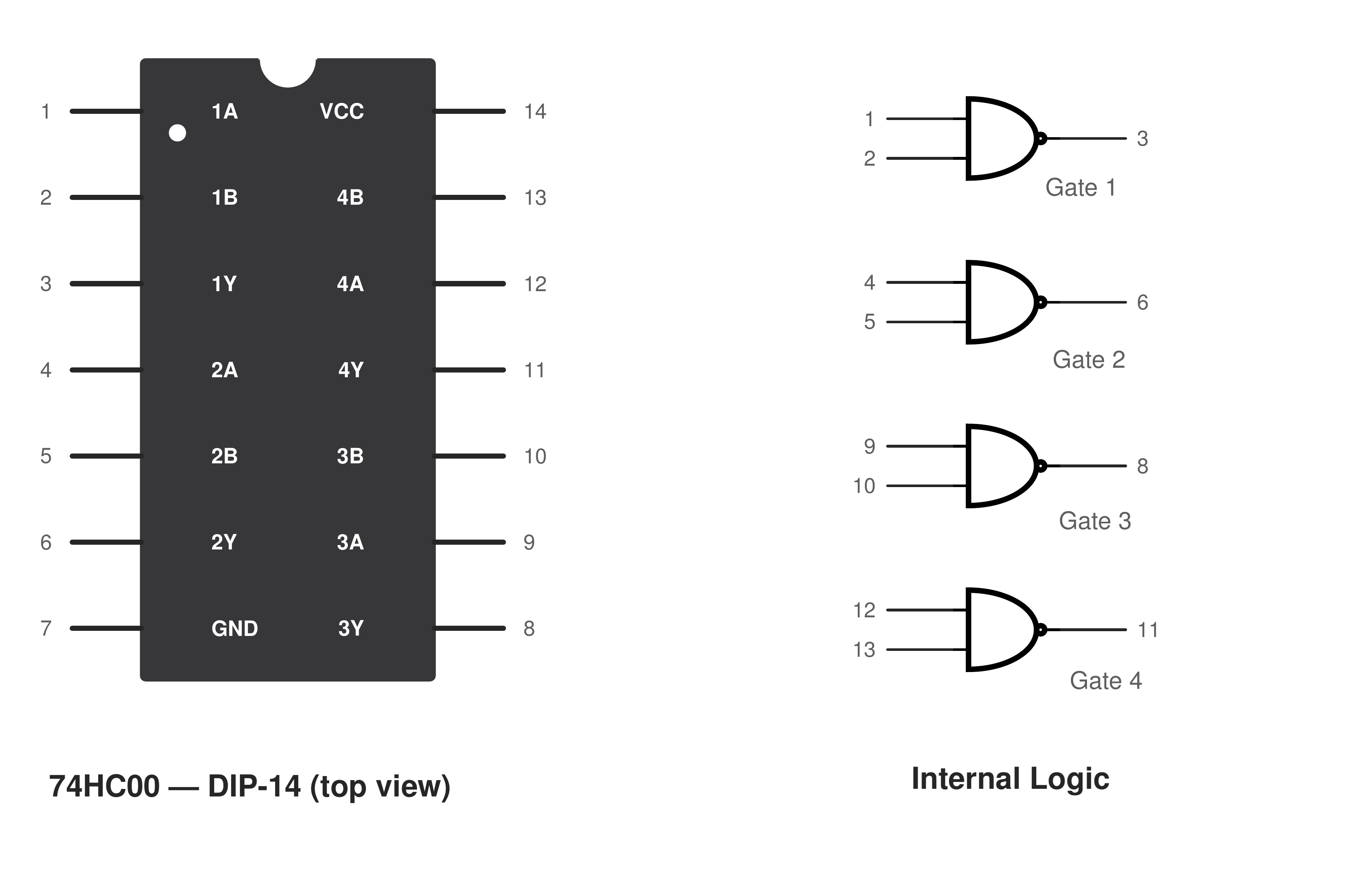
74HC00 quad 2-input NAND pinout, 14-pin package
Symbol To Package
One symbol is rarely one part. A 74HC00 quad NAND is U1A to U1D on the schematic and a single SOIC-14 on the layout, sharing one VCC pin and one decoupling capacitor. Tie every unused CMOS input to VCC or GND, because a floating input self-biases, oscillates and raises supply current. Do not assume pin compatibility either: the 74HC02 places its outputs on pins 1, 4, 10 and 13, so it cannot share a 74HC00 footprint.
The full ANSI and IEC chart, all eight truth tables, the NAND-only gate counts and the 74xx to 4000-series part lookup are in the complete guide: Read the full guide
Roughly two dollars separates the ESP32-C3 from the ESP32-S3, and that gap decides whether your board can hold a camera frame. The C3 has 400 KB of SRAM and no PSRAM support at all. A single VGA frame or a modest TensorFlow Lite model clears that in one step, so the decision is made before you write any firmware.
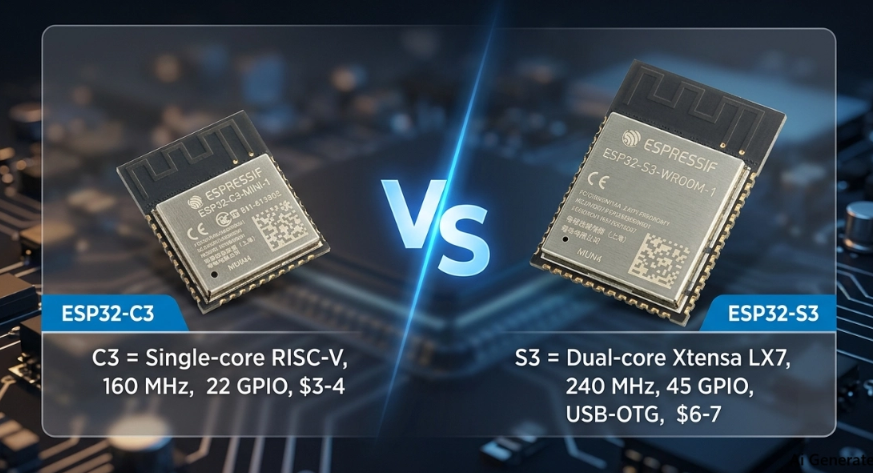
ESP32-C3-MINI-1 and ESP32-S3-WROOM-1 modules side by side with key specs
The Spec Split
Both parts run the same radio, so connectivity never breaks the tie. Everything else does. The C3 is a lean single-core RISC-V part built for cost and battery life; the S3 is a dual-core Xtensa LX7 with PSRAM, USB-OTG, and camera and display interfaces.
· CPU: single-core RISC-V at 160 MHz vs dual-core Xtensa LX7 at 240 MHz
· SRAM: 400 KB vs 512 KB, plus up to 16 MB Octal PSRAM on the S3 only
· GPIO: 22 vs 45
· USB: Serial/JTAG only vs native USB-OTG, host and device
· AI: none vs 128-bit SIMD vector instructions
· Deep sleep: about 5 µA vs about 7 µA
· Price: about $3 to $4 vs about $6 to $7 per module
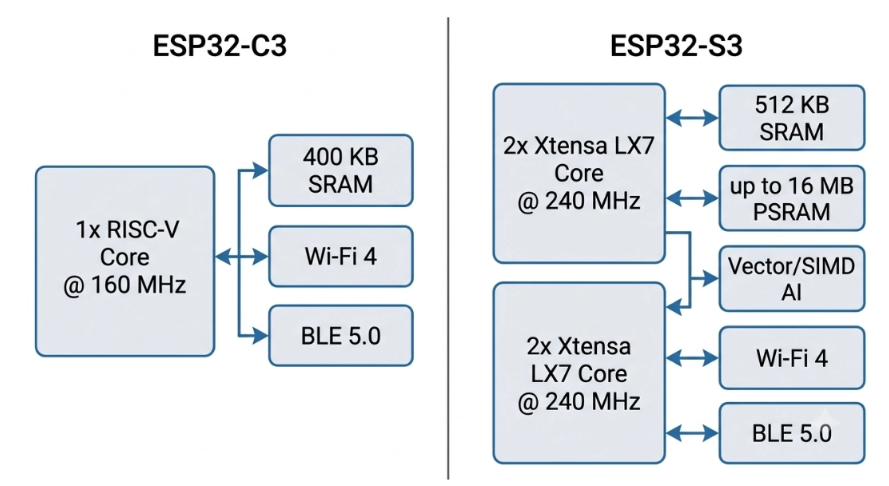
Single-core RISC-V and dual-core Xtensa LX7 block diagrams compared
The Dual-Band Myth
Several ranking articles claim the S3 offers dual-band or 5 GHz Wi-Fi. It does not. Both chips are 2.4 GHz Wi-Fi 4 (802.11 b/g/n) with Bluetooth LE 5.0, with no dual-band, no Wi-Fi 6 and no classic Bluetooth. The same care applies to USB. The C3 does have USB, but only a Serial/JTAG controller for flashing, logging and debugging. It cannot enumerate as a keyboard or mass-storage device, and it cannot act as a host. Full USB-OTG is S3-only.
On The Board
The two modules are not pin-compatible, so swapping the ESP32-C3-MINI-1 for the larger ESP32-S3-WROOM-1 mid-project means a new footprint. Both need the same RF discipline: keep the antenna zone free of copper on every layer and push it to the board edge, hold a continuous stitched ground plane under the module, and decouple close to the 3V3 pins. Two rules are S3-only, namely short length-matched Octal PSRAM traces, and USB D+/D- routed as a 90 ohm differential pair.
The full spec tables, the decision flowchart and the complete PCB layout checklist are in the full comparison: Read the full comparison
A fine-pitch FFC contact is rated for 0.5 A. A screw terminal block on the same board handles up to 41 A. Both are just "a connector" on the schematic, and choosing from the wrong end of that range is one of the fastest ways to turn a working prototype into a field failure.
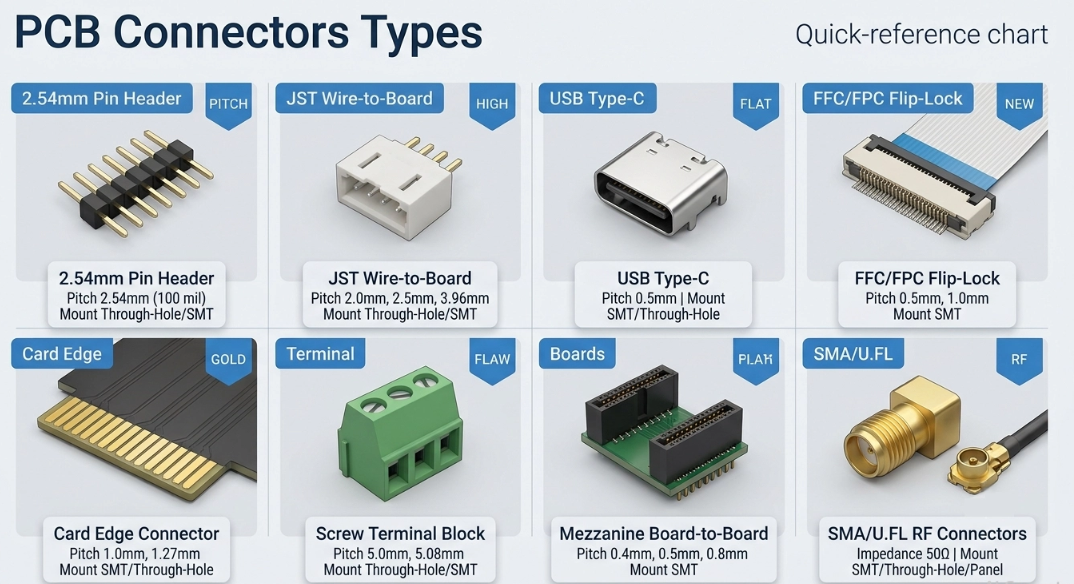
Quick-reference chart of the main PCB connector types with pitch and mount
Three Connector Families
Sort by what the connector joins and the catalog collapses into three families: board-to-board, wire-to-board, and I/O. Mounting method is the second axis, through-hole, surface-mount, or press-fit, and it decides your assembly process as much as your circuit does. The numbers that actually shortlist a part:
· Pin header/socket: 2.54mm to 1.27mm pitch, 1A to 3A per pin, 25 to 100 cycles
· Board-to-board mezzanine: 0.4mm to 2.54mm, 0.5A to 2A per pin, 20 to 50 cycles
· Wire-to-board (JST): 1.0mm to 3.96mm, 1A to 5A per pin, 20 to 50 cycles
· FFC/FPC: 0.3mm to 1.0mm, 0.5A per contact, 10 to 30 cycles
· Edge connector: 0.8mm to 2.54mm, 1A to 3A per contact, 50 to 100+ cycles
· Terminal block: 3.5mm to 7.62mm, 10A to 41A, 100 to 500+ cycles
· I/O (USB, HDMI, RJ45): standard-defined pitch, 1,500 to 10,000 cycles
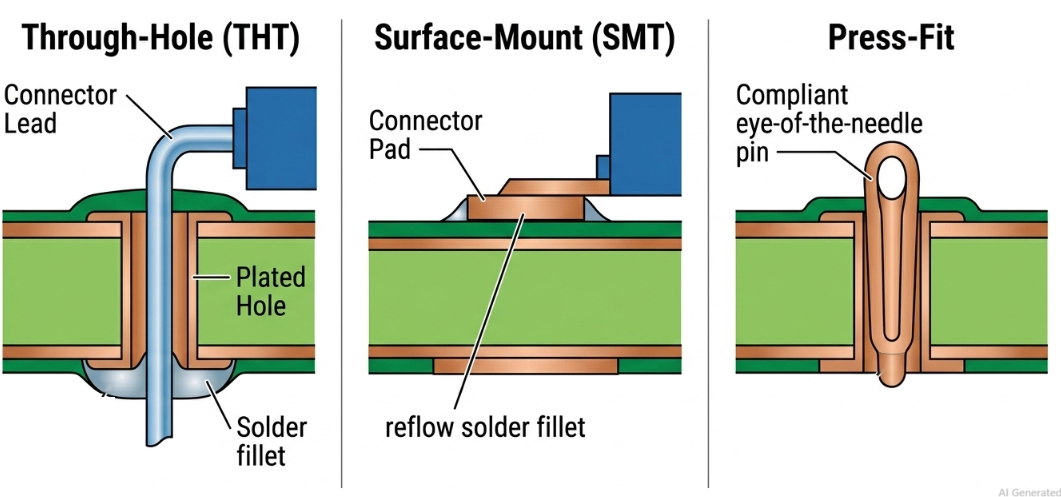
THT vs SMT vs press-fit connector mounting methods in cross-section
Reflow Rating
This is the step most connector guides skip. An SMT connector must be explicitly rated for reflow, because not every plastic housing survives the oven peak, and a non-rated body warps and ruins contact alignment. Many are also moisture-sensitive (MSL) parts that need baking if the reel has been exposed to humidity. THT connectors avoid that, but they need drilled holes and a separate hand, wave, or selective soldering step, and that extra operation is what raises your assembly quote at volume.
Choose In Order
Eliminate, do not browse. Check current and voltage first, sized for peak load rather than average, and split the current across parallel pins if one contact cannot carry it. Fix pitch second: take the coarsest pitch that still fits, because 0.5mm packs contacts tightly but demands accurate automated placement. Count mating cycles third, since an internal link may need only 10 to 30 while a daily-use USB port is rated to 10,000. Add temperature, vibration and IP rating last, and drop anything that fails.
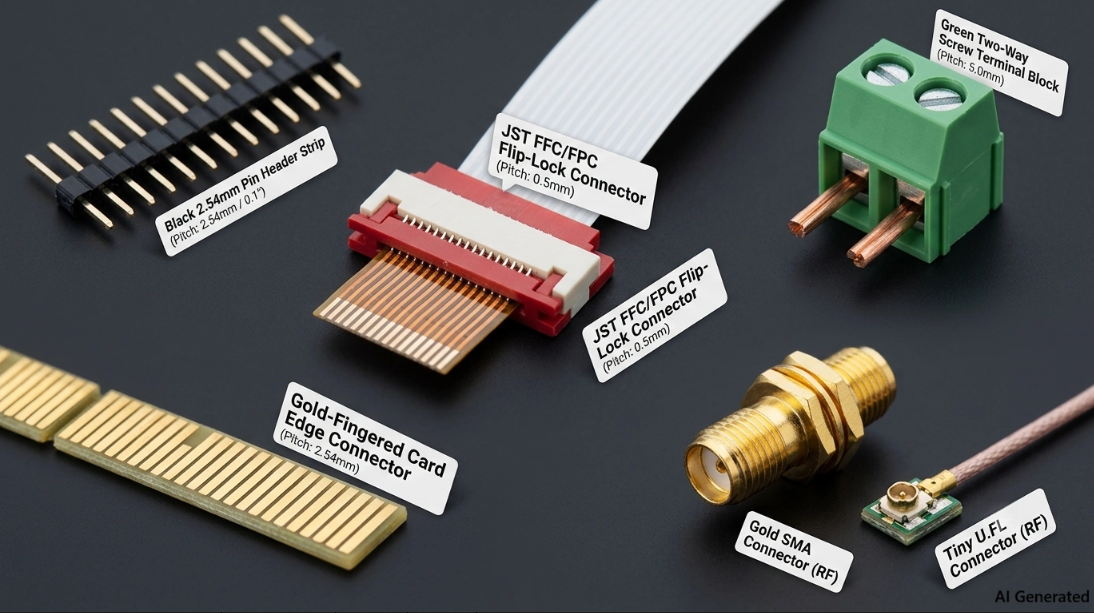
Connector pitch compared to scale: 2.54mm, 1.27mm and 0.5mm
The full comparison chart, the mounting-method breakdown and the schematic-symbol-to-footprint-to-assembly walkthrough are in the complete guide: Read the full guide