How traces talk to each other ||Crosstalk

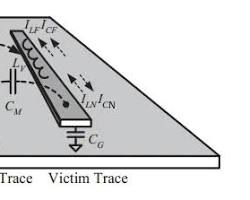
Crosstalk is a phenomenon where a signal transmitted on one copper trace on a PCB creates an unwanted effect on a neighboring trace. This happens because of electromagnetic coupling between the conductors.

In any high-speed design, crosstalk is a critical factor because it can lead to signal integrity issues, data errors, and EMI (Electromagnetic Interference) problems.

How Crosstalk Happens

When a signal moves through a trace (the Aggressor), it creates an electromagnetic field around it. If another trace (the Victim) is close enough, that field induces a current and voltage in it. This happens through two primary mechanisms:

  • Capacitive Coupling (Electric Field): Mutual capacitance between two traces allows a change in voltage on the aggressor to "inject" current into the victim.

  • Inductive Coupling (Magnetic Field): Mutual inductance between two traces allows a change in current on the aggressor to induce a voltage on the victim, similar to how a transformer works.

    8722937279376523264

Types of Crosstalk

Crosstalk is generally categorized based on where it is measured on the victim trace:

  • Near-End Crosstalk (NEXT): This is the crosstalk that travels back toward the signal source (the transmitter) on the victim trace. It is often the more significant of the two in many digital designs.

  • Far-End Crosstalk (FEXT): This is the crosstalk that travels in the same direction as the signal on the aggressor trace, reaching the receiver side of the victim trace. In homogeneous environments (like an internal layer with a consistent dielectric), FEXT can actually be zero.

    #PCB#

Build with JLCPCB
My 2026 Workflow: EasyEDA Pro to JLCPCB One-Click Ordering

Let’s be honest: back in 2022, the "design to delivery" workflow still had friction. We generated Gerbers, double-checked BOMs, manually synced LCSC part numbers, and crossed our fingers during the final upload. But it’s 2026, and that entire headache has evaporated.

I just finished a tight-deadline project: a dense, 6-layer BGA development board (remember those impedance rules we set up?). Here is exactly how I went from final routing to 'order confirmed' in under two minutes using EasyEDA Pro and JLCPCB.

The Design Is Done (and Verified)

The design phase is complete. I've finished routing the high-speed lines on TOP and L3, using solid ground planes for reference. In 2026, EasyEDA Pro will have real-time DRC, so I know it's ready. I'm looking at my completed layout, the 3D view confirms everything fits, and I'm ready to pull the trigger.

The old workflow required exporting dozens of files. In 2026, I just looked at the top toolbar and found the icon that changed everything: the direct link.

8722563627816853504

8722563627703472128

Push, Verify, and Confirm

I hit that 'One-Click JLCPCB Order' button, and a seamless data sync takes over. There’s no secondary file upload anymore. My 6-layer structure (with those Via-in-Pad/POFV rules), the BOM, and the CPL (Pick-and-Place data) are instantly and accurately pushed directly to the JLCPCB manufacturing interface in my web browser.

The screen immediately shows a visualization of the final board (which is identical to what I designed, just manufactured). Crucially, the system confirms: 'Stackup Verified: 6-Layer, Via-in-Pad (POFV) enabled from EasyEDA Rules'. Every part is matched from LCSC, the DRC runs automatically on JLCPCB’s side using their actual machine capabilities, and I have perfect confidence.

Fast Production and Perfect Delivery

From the delivery order, the workflow is invisible, yet flawless. In 2026, JLCPCB will use full automation to speed up my 6-layer ENIG order. Just a few days later, my completed boards arrive. The manufacturing quality is superb, handling the complex BGA and POFV structures without issues. What used to be a point of stress is now just... handled.

Build with JLCPCB
6-Layer vs. 4-Layer: When Does the Signal Integrity Justify the Cost?

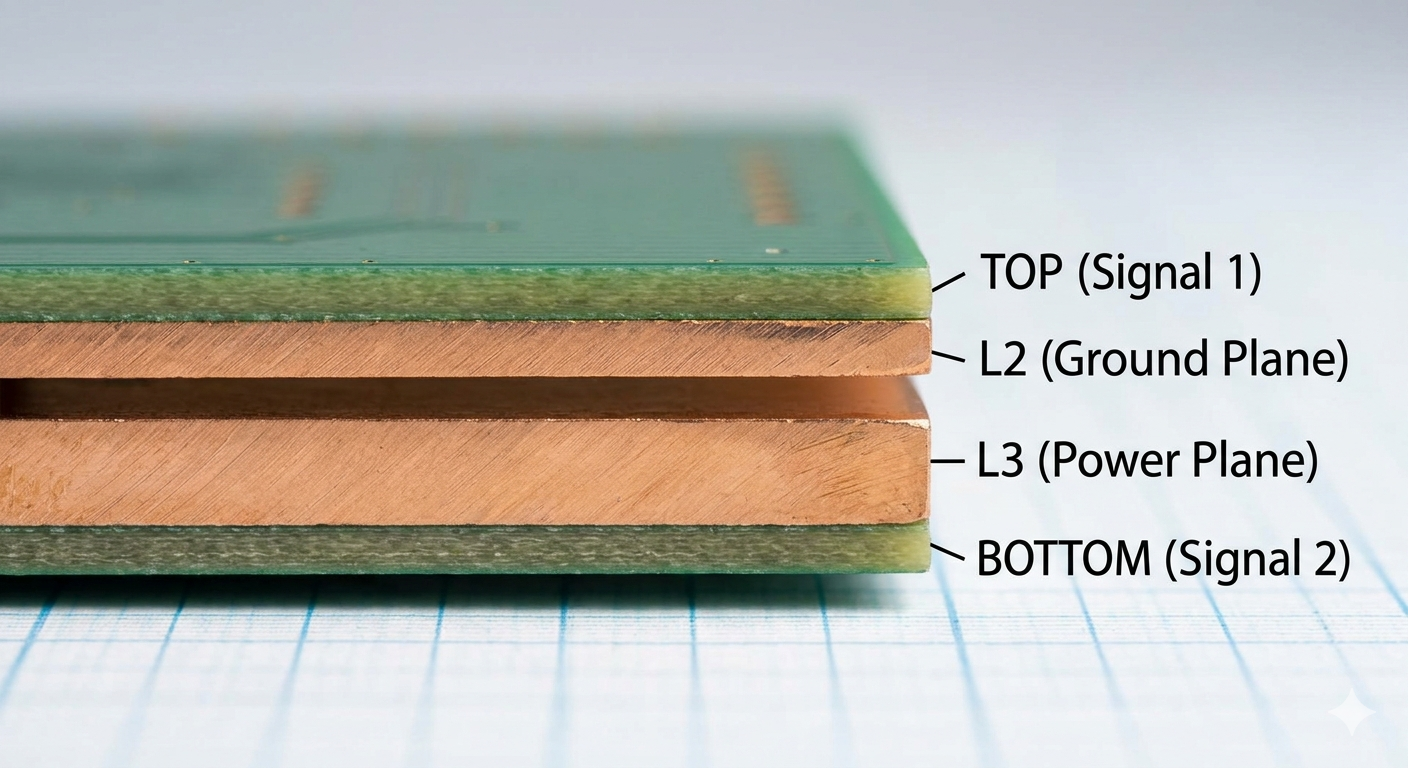
Every PCB designer hits the same wall: budget constraints versus performance needs. For most simple projects, the standard 4-layer board (Signal-GND-PWR-Signal) is the ideal starting point. It's inexpensive, easily manufactured, and sufficient for low-speed analog and simple digital logic.

But as soon as your design incorporates modern high-speed interfaces, think USB 3.0, DDR3, or PCIe, the landscape changes. Those extra layers increase performance and reduce risk, but when is that cost increase (often 30–50%) truly justified?

image.png

The starting point: A classic 4-layer stackup (SIG-GND-PWR-SIG). Cheap, but limited.

When 4-Layers Fail the Signal Integrity Test

Signal Integrity (SI) issues, crosstalk, impedance mismatch, and power delivery noise, arise when traces have no reference. A 4-layer board provides one internal ground reference plane.

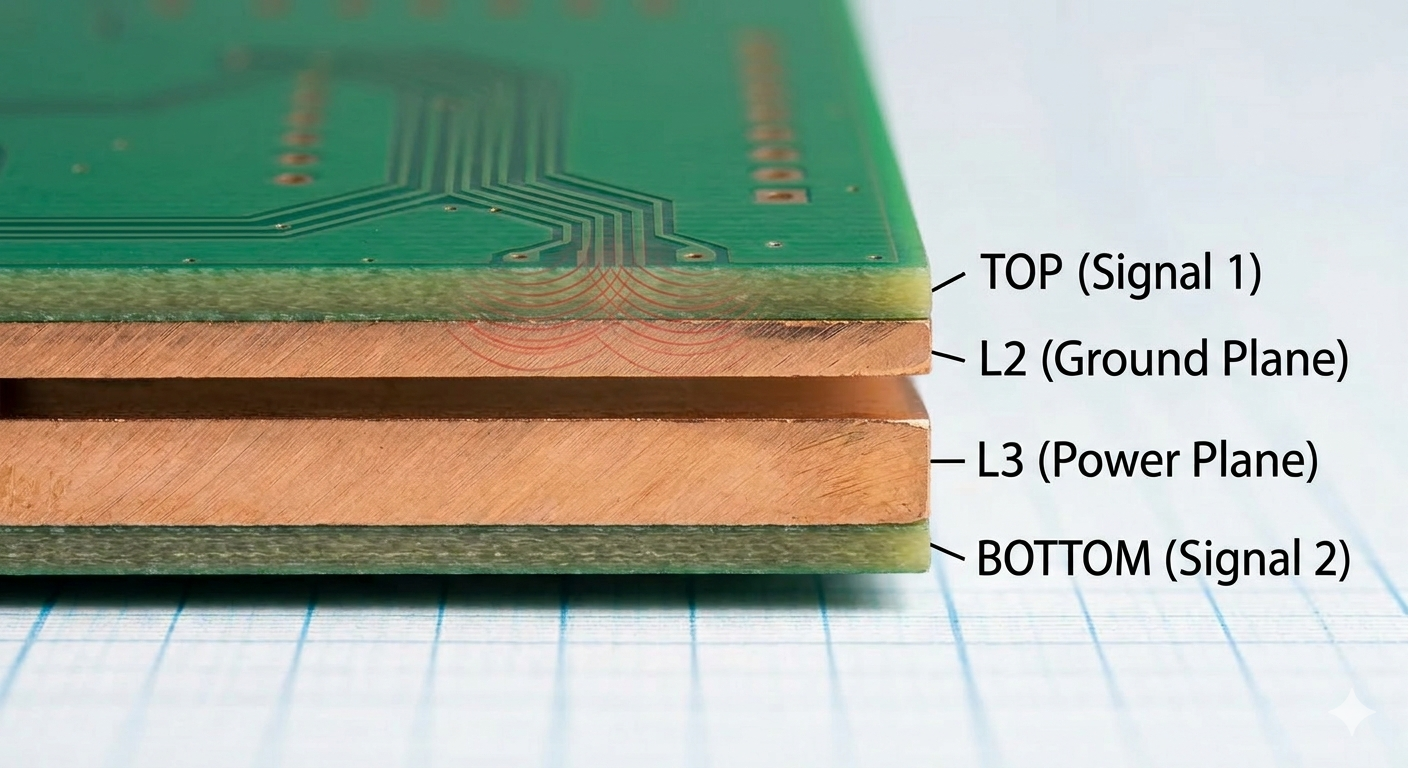
If you route high-speed differential pairs (like the USB signals shown below in Image) on the TOP layer, they have L2 GND for a return path. That seems fine. However, as your routing complexity increases, the tight trace widths and strict spacing required to maintain impedance on 4-layer boards are extremely difficult to manufacture. They start to couple, causing crosstalk and making controlled impedance a bottleneck, increasing manufacturing costs and risk. This visual congestion highlights where the SI problems begin.

image.png

The 6-Layer Solution

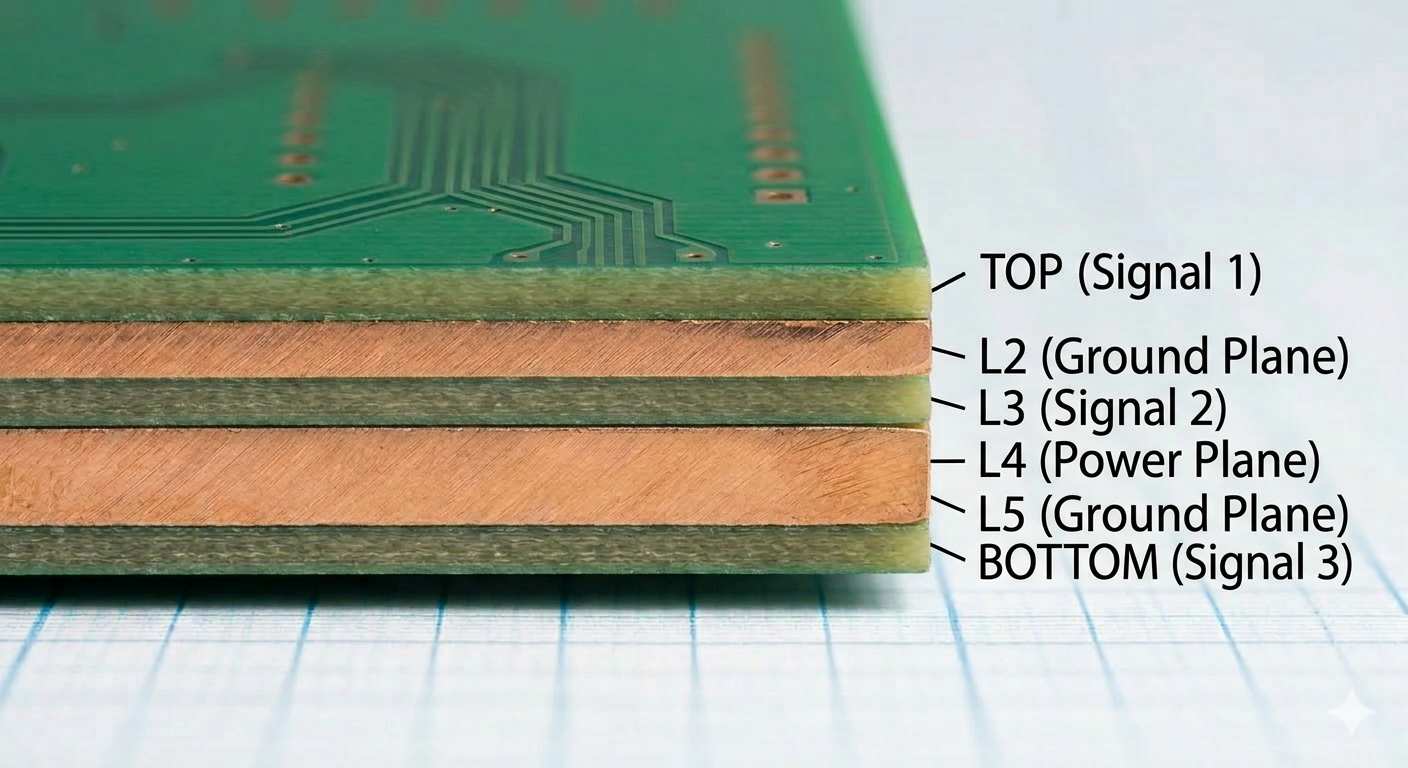
The third image will show a cross-section of a 6-layer board, explicitly showing how it solves the issues from Image 2.

It will feature the core stackup with two additional internal layers. It must show a dedicated internal solid ground reference plane (e.g., L2) positioned directly below the sensitive TOP (Signal 1) layer, perfectly shielding the high-speed differential pair from Image 2. This diagram will use clean labels (TOP, L2-GND, L3-SIG, L4-PWR, L5-GND, BOTTOM) and maintain the exact professional diagram style, lighting, and grid paper background seen in Image 1 and Image 2.

image.png

The Seamless Solution: EasyEDA Pro + JLCPCB

Transitioning from 4 to 6 layers can feel like a leap, but the EasyEDA Pro and JLCPCB ecosystem turns it into a simple workflow. Using the Layer Manager in EasyEDA Pro, you can instantly upgrade your stackup and define dedicated internal planes.To ensure your high-speed signals stay clean, you can use the JLCPCB Impedance Calculator to get precise trace widths for your 50 ohm or 100 ohm lines, which you then plug directly into your EasyEDA Design Rules.

Build with JLCPCB
How to Navigate the JLC SMT Parts Library Like a Pro

Navigating thousands of surface-mount components can be overwhelming. The JLCPCB SMT Parts Library is a powerful tool, but like any powerful tool, it requires some finesse to master. If you are tired of scrolling through endless generic resistors, here is how to streamline your sourcing workflow.

Step 1: Start with Specificity

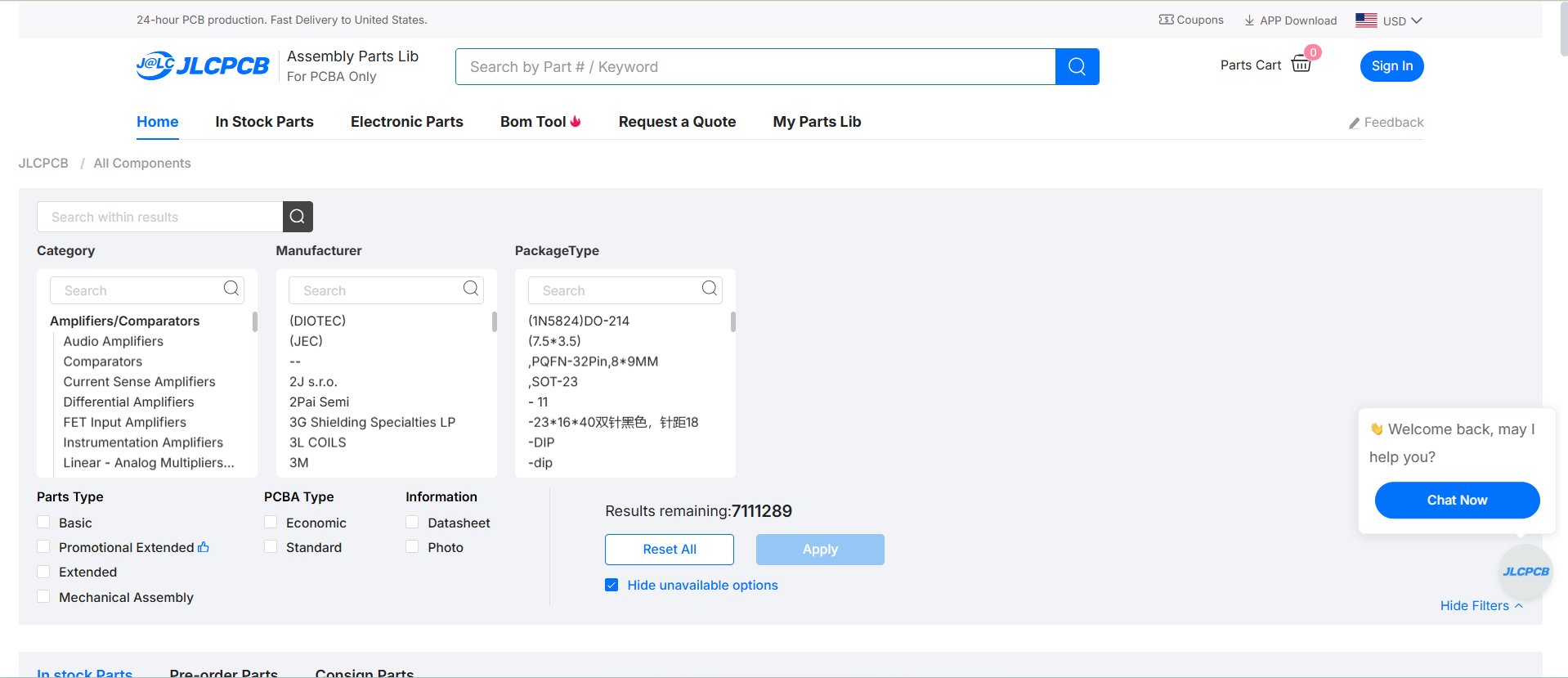
The initial search is where many go wrong. Avoid generic terms like "capacitor" unless you enjoy sorting through 50,000 results. Instead, use specific attributes or, ideally, the manufacturer's part number if available. If you are looking for a basic generic component, use the library’s categorization structure first rather than the global search.

image.png

The starting point: Use specific keywords or Part Numbers in the main search bar to avoid over-saturation.

Step 2: Master the Parametric Filters

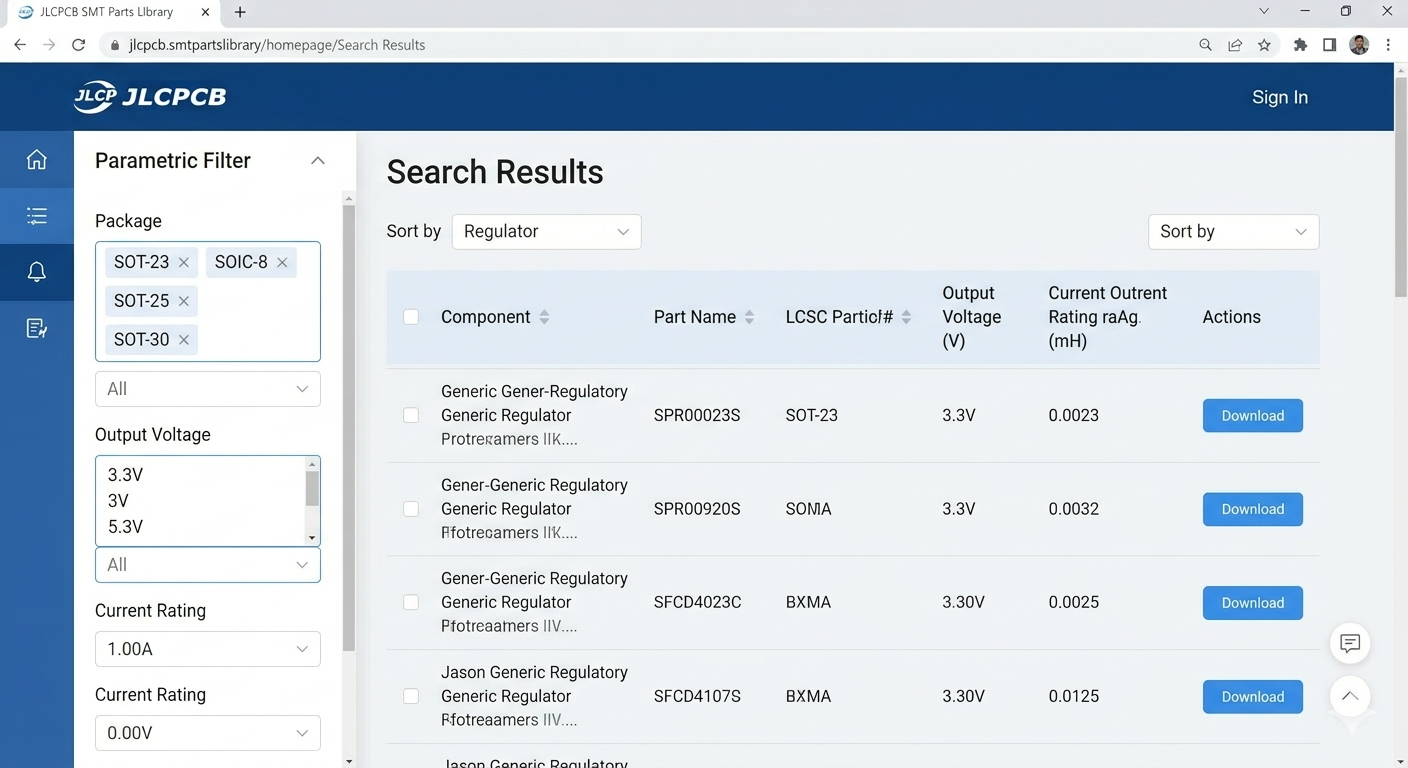
Once you have a baseline result (e.g., all 3.3V regulators), it's time to slice and dice. The left-hand sidebar is your filter command center. Experienced users immediately use these parametric filters.

Define your requirements precisely: select your desired package (e.g., SOT-23, SOIC-8), output current, and tolerance. This instantly reduces the field from hundreds of options to the five or ten that actually fit your design constraints.

image.png

Use the Parametric Filter sidebar (left) to drill down by package, voltage, or current.

Step 3: Verify and Select (Don't Guess)

The final critical step is verification. Before clicking "Select," confirm three things on the component detail page:

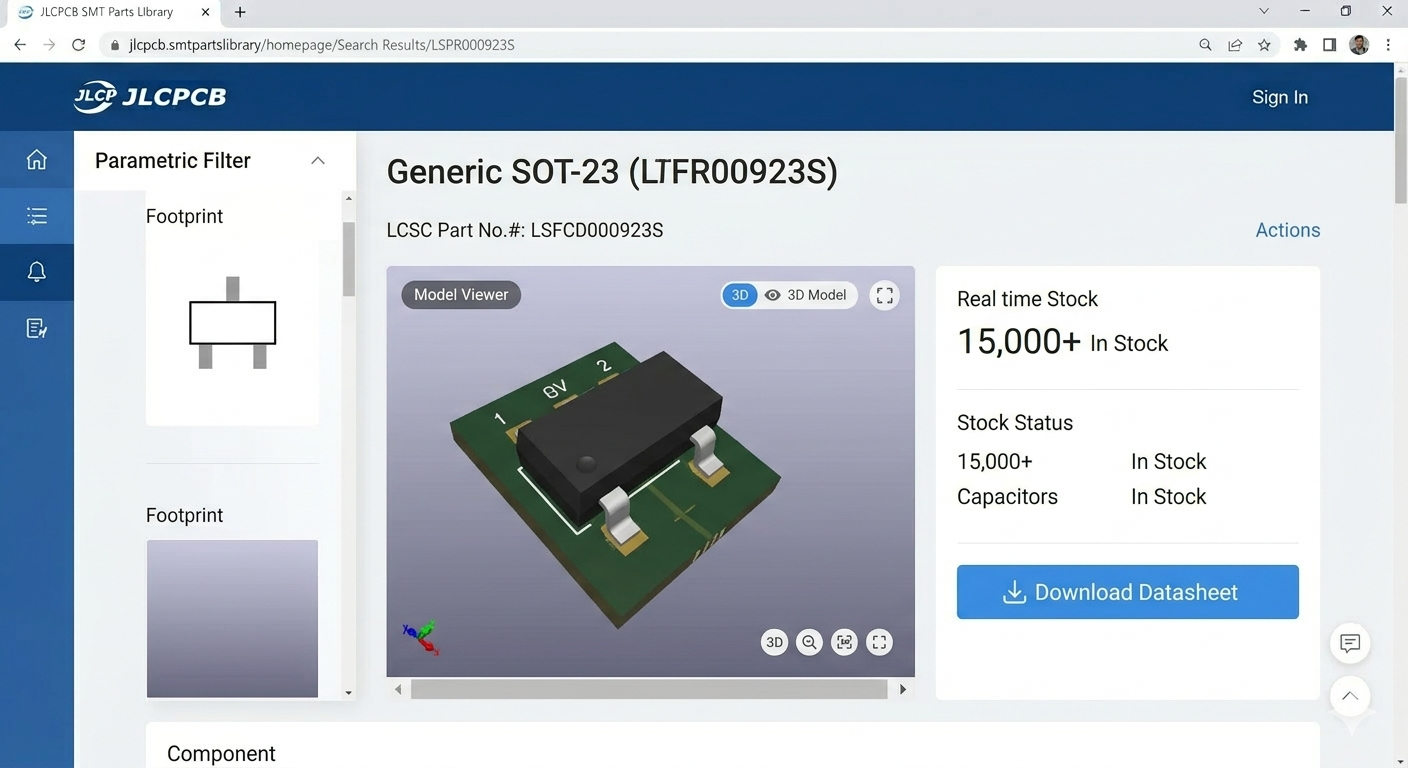
  1. 3D Model/Footprint: Use the 3D viewer to confirm the footprint matches your PCB layout.
  2. Datasheet: Always click the datasheet link to verify electrical characteristics.
  3. Stock Status: Ensure there is sufficient 'In Stock' quantity for your production run.

Pro tip: Favor components listed in the "Basic" library when possible, as they are pre-loaded on the SMT machines and save you setup fees.

image.png

Before final selection, always verify the 3D model, check the stock status, and download the datasheet.

#Built with JLCPCB##PCB#

Build with JLCPCB
Troubleshooting electronics is one of those skills you don’t really learn from textbooks—it comes from things going wrong at the worst possible time.

8724448748396490752

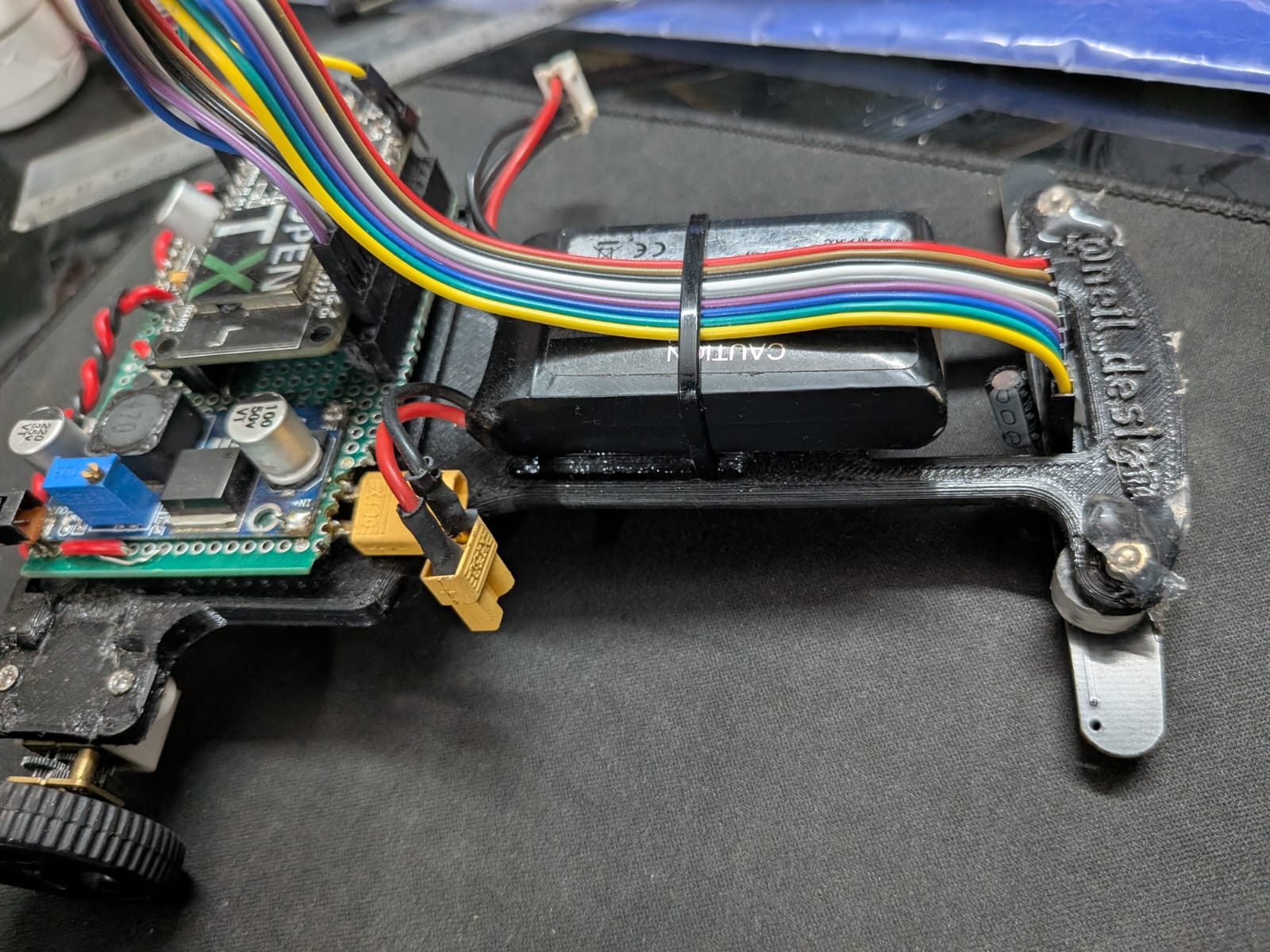
I experienced this firsthand during a line follower robot (LFR) competition where I secured 4th place. My bot was built around an ESP32, paired with a Robojunkies 7A sensor array and a DRV motor driver. On paper, everything was solid: tuned PID, calibrated sensors, and decent mechanical stability. But during the run, the robot started wobbling aggressively, especially on straights where it should have been stable.

Initially, I assumed it was a tuning issue. I spent hours tweaking PID constants—kp, ki, kd—trying to dampen the oscillations. I also adjusted speed profiles and re-ran calibrations multiple times. Nothing worked consistently.

That’s when I shifted approach from “tuning” to systematic troubleshooting.

First, I revisited all electrical connections—checked solder joints, continuity, and grounding. Then I used serial prints to monitor live sensor values. At a glance, everything seemed normal, but I noticed occasional spikes in the middle sensor readings.

To isolate the issue, I tested each sensor individually. That’s when the anomaly became clear—one sensor was producing unstable values intermittently. After closer inspection, I found that a small ceramic capacitor near the middle sensor was the culprit. It was likely introducing noise or affecting signal stability due to its placement and condition.

Replacing that capacitor immediately stabilized the readings. Once the input became clean, the PID behaved exactly as expected, and the wobbling disappeared.

This experience reinforced a key lesson: not all problems are algorithmic. Sometimes, a tiny passive component can completely destabilize an otherwise well-designed system. Debugging electronics requires both logical analysis and patience to dig down to the smallest details.

Electronics Troubleshooting
Designing a Fuzzy Logic–Based Automatic Irrigation System with IoT Monitoring

Efficient irrigation requires adaptive decision-making rather than simple threshold-based switching. In this project, a fuzzy logic–based automatic irrigation system was developed using NodeMCU ESP8266, soil moisture sensing, environmental monitoring, and IoT-based supervision through Blynk.

Unlike conventional systems that rely on fixed moisture limits, this implementation applies fuzzy inference to regulate irrigation duration dynamically, improving water efficiency and plant stability.

System Architecture

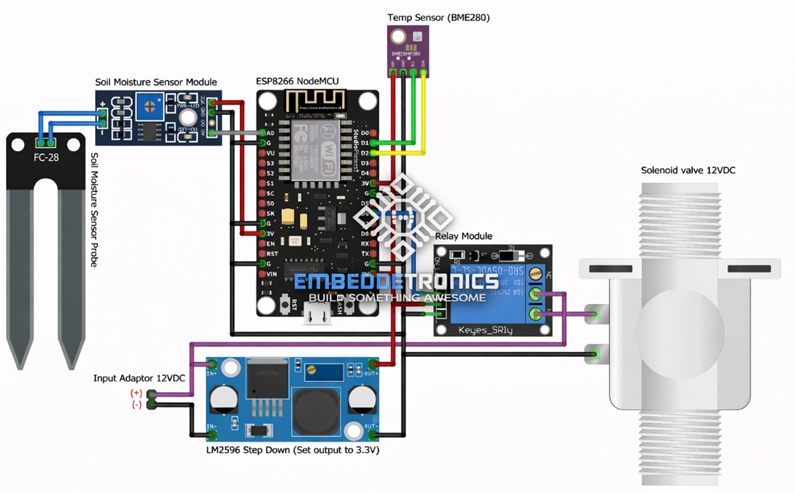
The system integrates sensing, processing, actuation, and cloud monitoring in a single architecture.

Main components:

  • NodeMCU ESP8266
  • Soil Moisture Sensor (FC-28)
  • Temperature Sensor (BME280)
  • Relay Module
  • 12V Solenoid Valve
  • LM2596 Step-down Converter (3.3V output)

The soil moisture sensor measures ground humidity levels, while BME280 provides ambient temperature data. The ESP8266 processes both inputs using fuzzy logic and drives the relay module to control the irrigation valve.

image.png

Fuzzy Logic Control Strategy

Instead of binary ON/OFF logic, fuzzy logic enables gradual decision-making.

Input Variables

  1. Soil Moisture
    • Dry
    • Medium
    • Wet
  2. Temperature
    • Low
    • Normal
    • High

Output Variable

  • Valve Activation Duration
    • Short
    • Medium
    • Long

Example Rule Base

  • IF Soil is Dry AND Temperature is High → Valve = Long
  • IF Soil is Medium → Valve = Short
  • IF Soil is Wet → Valve = OFF

This rule-based inference produces smoother control transitions and prevents overwatering.

Membership Function Engineering

Membership functions were defined using experimental calibration data.

Soil Moisture Membership

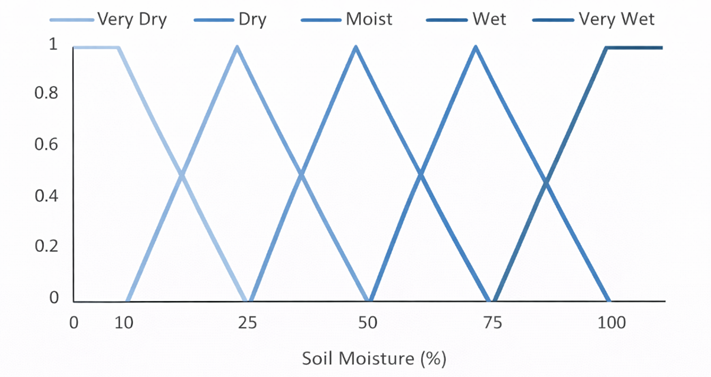
The ADC value from the soil sensor is mapped into three overlapping fuzzy sets:

  • Dry → High membership at low moisture percentage
  • Medium → Peak around optimal plant humidity
  • Wet → Dominant at saturated conditions

Triangular and trapezoidal curves were used to ensure smooth transitions between states.

image.png

Temperature Membership

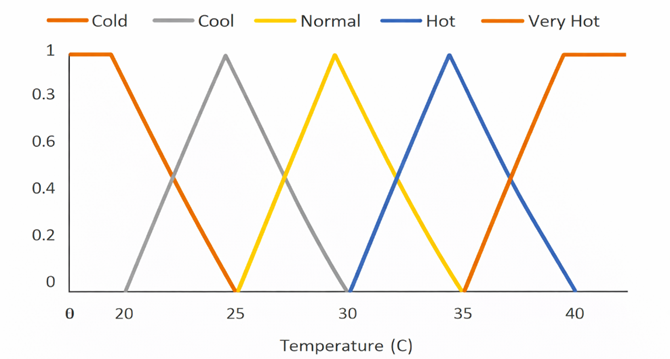
Temperature is classified into:

  • Cold
  • Normal
  • Hot

Overlapping membership regions prevent abrupt switching and provide stability during environmental fluctuations.

image.png

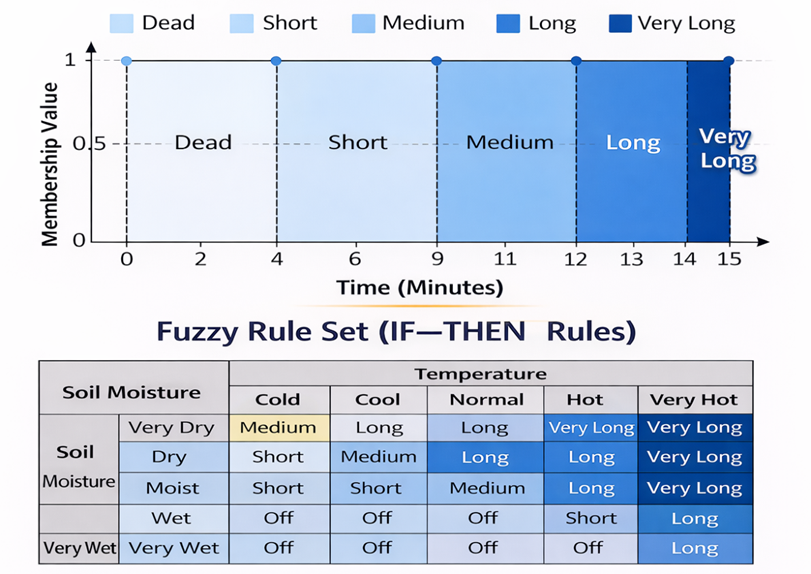
Output Duration Membership

The output fuzzy variable determines solenoid valve activation time:

  • Short duration → minimal irrigation
  • Medium duration → moderate watering
  • Long duration → extended watering

Defuzzification converts fuzzy results into real-time valve activation intervals.

image.png

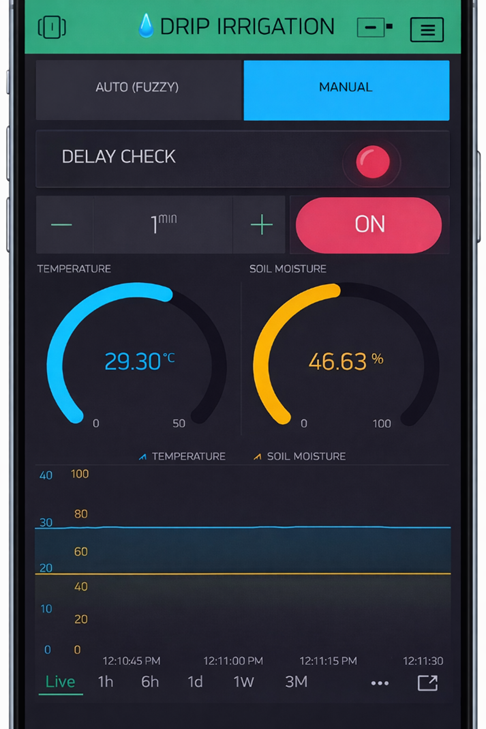
IoT Monitoring and Manual Override

The system integrates Blynk for remote supervision.

Available features:

  • Auto (Fuzzy) / Manual mode selection
  • Real-time soil moisture display
  • Temperature monitoring
  • Valve status indicator
  • Adjustable delay check timer
  • Historical graph visualization

If WiFi is unavailable, the system continues operating locally in autonomous mode.

image.png

Control Stability Features

To ensure reliable operation:

  • Minimum activation delay prevents rapid relay switching
  • WiFi auto-reconnect routine is implemented
  • Offline fallback logic ensures continuous irrigation control
  • Separate fuzzy inference loop and IoT communication loop

This separation prevents cloud latency from affecting irrigation timing.

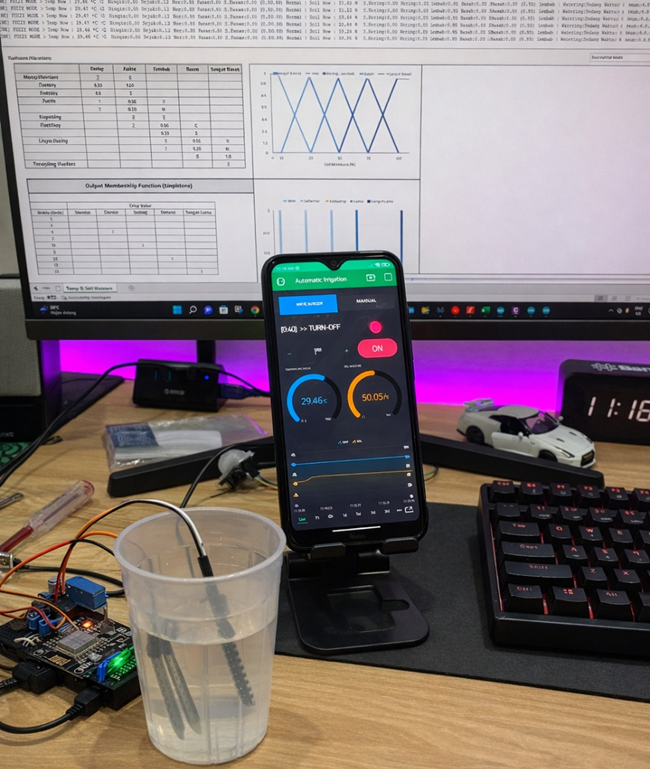
Prototype Implementation

The physical prototype includes:

  • NodeMCU board
  • Relay module
  • Soil moisture probe
  • BME280 sensor
  • External 12V valve supply

image.png

Conclusion

This fuzzy logic–based irrigation system demonstrates how adaptive control improves agricultural automation. By integrating calibrated membership functions, structured rule bases, and IoT monitoring, the system achieves:

  • Improved water efficiency
  • Stable environmental response
  • Remote monitoring capability
  • Reduced mechanical stress on valves

The design can be extended to greenhouse automation or large-scale irrigation networks.

#IoTProject#
#FuzzyLogic#
#SmartIrrigation#
#ESP8266#
#EmbeddedSystem#
#Automation#

IoT Project