Common Footprint Mistakes That Can Ruin Your SMT Order

The significance of a perfect schematic diminishes if your footprint is not accurate. In SMT assembly, even minor errors in the footprint can lead to costly production failures very rapidly.

image.png

SMT Assembly line/Pick and place

First of all, pad sizing errors are very common. Making solder joints can be weak when using pads that are smaller than what is needed. In contrast, when using larger pads you may experience loss of solder from tombstoning (when part of the electronics component lifts off of the printed circuit board). Make sure your land pattern matches the one recommended by the manufacture. This is the best method to achieve accurate solder joints.

image.png

Close-up of soldered SMD components

Secondly, make sure that there are no errors in pin pitch or spacing. Even a slight difference between pin pitches can cause the component not to fit. This is especially critical with fine pitch ICs such as QFN or BGA packages; tolerances for these components are very tight.

Another major issue is incorrect orientation of the footprint. If the pin 1 indicator is not aligned properly, an entire reel of components may be incorrectly installed, which may not be immediately obvious until the assembly is completed and tested.

Missing or unclear silkscreen markings are another piece of the puzzle that could cause assembly issues. You have a much lower probability of making a successful assembly if you can't find any obvious polarity markings (e.g. diodes, capacitors or chips).

Another reason for comparing parts in your design with their datasheet is that you can't assume that all parts that have a common part number will be compatible with each other with regards to the footprint. However, you should verify the footprint matching part number in the datasheet for all connectors and power parts.

image.png

PCB design software layout screenshot (conceptual)

Courtyard and clearance violations are two areas that are critical to any assembly process. If courtyards overlap one another, it may cause confusion with pick and place machines, or worse, actual assembly collisions.

The thermal design of a product is important; missing thermal pads on power ICs will cause them to overheat or have poor soldering, especially on packages designed to dissipate heat.

Also make sure to do a 3D assembly check before ordering the products, as doing so is beneficial to identify placement issues not found in the schematic or 2D layout.

PCB Design
How to Design a PCB for 20A Current Without Melting Traces

Designing a PCB for 20 A shouldn't be left to chance; it’s the result of sound engineering regarding heat, resistance, and copper management.

The first guiding principle is the importance of trace sizes. For example, according to IPC guidelines, a 20A trace on an external conductor (2 oz of copper per square foot) experiencing a temperature rise of 10 °C will require approximately 2.6-3 mm in width. Anything narrower than 2.6 mm will eventually heat the trace enough to melt, rendering it a fuse.

image.png

PCB copper traces close-up

The second principle is that you should always use the largest-gauge copper conductor you can. For example, if you are switching from 1oz copper conductors at 20A to 2 oz or larger-gauge copper conductors, you will substantially reduce the resistance and heat generated by the conductor. Think of this as increasing the water pipe's diameter and reinforcing the walls.

The third principle is to avoid the use of thin trace conductors completely; instead use copper pours or planes. Distributing the current over a larger surface area improves thermal performance by reducing hot spots and increasing the area available to dissipate excess heat, thereby also reducing voltage drop.

The fourth guideline is to use the shortest and most direct trace routing possible. Any time you lengthen a trace, you will substantially increase the resistance (R= ρL/A), which in turn will increase the heating and the voltage drop. Therefore, try to keep your high current paths as short as possible.

The fifth suggestion is to consider the use of multiple vias when routing power as a single via can cause a current bottleneck; Thus, to properly share the load and dissipate heat create multiple vias in parallel when the current load permits.

image.png

High-current PCB / power electronics

Finally, be aware of your thermal strategy. External traces will have better cooling characteristics than internal traces, and also the use of airflow and copper planes can greatly enhance the amount of current a trace can carry.

What’s the takeaway? When designing for 20A isn’t making sure there is a single “perfect trace width”; it’s increasing cross-sectional copper and minimizing resistance throughout the entire length of the trace. By doing this, your board should stay cool, perform well, and not melt.

image.png

Trace width comparison

PCB Design
Star Grounding: The Ultimate Way to Reduce Analog Noise.

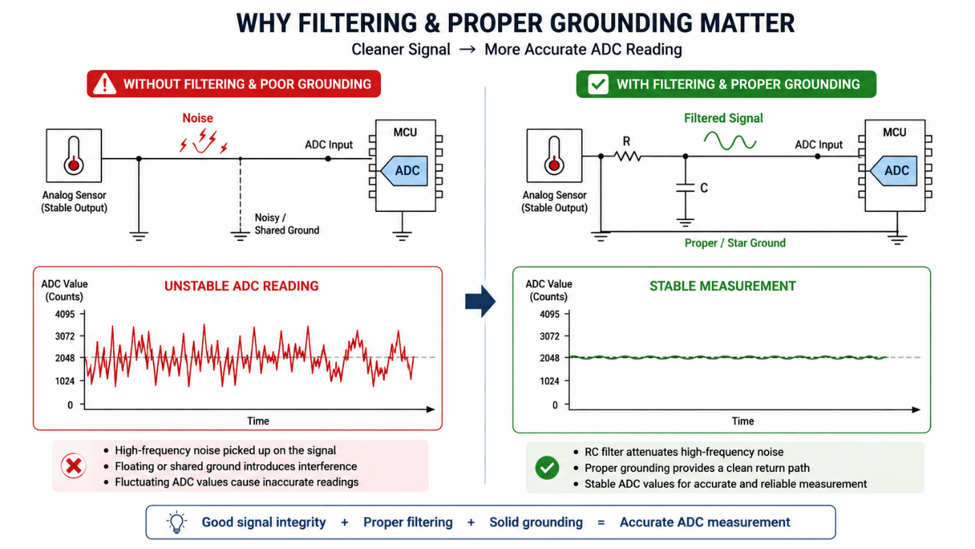
If you’re experiencing noise, unpredictability, or overall annoyance when working with an analog circuit, it’s probably due to the method used to ground the circuit; not because of any components. Enter star grounding, which is a rather straightforward way of helping to significantly improve your signal by reducing interference.

Star grounding connects all ground returns from the circuit(s) to a single central connection point instead of allowing current to flow through shared paths. The primary benefit of this method is that, because multiple circuits share ground paths (resulting in mixed return circuit currents), the mixing of return circuit currents generates voltage drops – or noise – when there is a shared circuit of low-level analog and/or high-level digital signal.

image.png

Canonocal Star grounding Schematic

Think of the shared path as a street that is shared by all return currents (mixed) at which to get to their destination (central star point). A street that has only one lane will be very congested; whereas, multiple streets with only one lane each will not be congested.

image.png

Star Grounding Reference Bus

In mixed-signal designs (digital switching noise and fragile analog signal), this becomes critical, as analog and digital signals can and will interfere with one another.

In practice, star grounding separates high-current (power stage, motor) and low-level analog (sensor, amplifier) returns by creating pathways from each section back to the central star point; thereby reducing the amount of interference. This becomes especially crucial with systems that use precision components, such as an operational amplifier circuit; as even a small voltage change (due to movement of the common ground point) will create distortion in the measurement.

But star grounding will not solve all problems. On newer multilayer printed circuit boards (PCBs), such as those designed with easyEDA Pro, using a solid ground plane typically has better electrical performance than a star ground layout due to having lower impedance return paths. Understanding which approach to use in what situation and when they can be combined is critical.

So if you’re dealing with analog noise, don’t first blame the components of your design. Instead, reevaluate how you have established ground on your PCB. A star ground properly implemented can sometimes mean the difference between a clean signal and hours of aggravating debugging!

image.png

General star grounding

PCB Design
Mastering EasyEDA Pro: Top 10 Features You Aren't Using

You can’t master EasyEDA Pro by simply putting down some components, clicking on generate gerbers and moving on to the next project. This is the basic level of mastery. You will experience your biggest gains at the next level due to the features within this program that are potentially “hidden”, but can add so much value to your designs, and sanity!

First, start with Custom Design Rule Checks (1). Default design rule checks are just considered to be “cross your fingers and hope for the best”. If you set these up correctly, you will create an environment for yourself where you can catch mistakes before making an expensive coaster out of your PCB. Next, use the built-in real-time 3D visualization (2) tool to answer the age-old question of “does this fit?” before your enclosure gives you an answer of “no”.

image.png

3D visualization Tools(conceptual)

Next, utilize the built-in signal integrity tools (3). While these tools may not provide precision laboratory results, they will provide you with enough information to notice when your high-speed traces look like chaos noodles. Pair these two features with differential pair routing (4) and length tuning (5), and all of a sudden your USB and high-speed traces no longer have a mind of their own.

image.png

PCB Design close-up

Last, the Footprint Manager (6) is also a hidden gem, because there isn't a better way to humble yourself than from a mismatched footprint. Meanwhile, using the version history (7) feature will also save you from your own “just one little change” disasters.

Don’t forget to include LCSC integration (8) as part of your processes; this is another chance to validate whether your design is manufacturable from a parts perspective. You should also use** panelization tooling (9)to reduce production costs, plus you should also use the Gerber viewer (10) as your final check for assuring you are going to send the right files to manufacturing.

By using these items together, EasyEDA Pro will transition from being just a tool, and become a design partner that will occasionally help you avoid heartache.

image.png

Printed Circuit Board close-up

PCB Design
Student resources for getting into CAD

I personally started out with Fusion 360 by Autodesk. Back then, I had joined an edtech course where they were teaching SolidWorks—but they asked us to download a cracked version, which didn’t sit right with me.

So I did a bit of research and found out about Autodesk’s official student license. That turned out to be a much better option since it gives free access to tools like Fusion 360 and Inventor for students.

To apply, you just need to be an active student (school, college, or university). You can register using your college ID or student email. Once your account is verified, you can directly download and start using the software.

Fusion 360 is widely designed to be beginner-friendly compared to tools like SolidWorks and NX, especially for people from non-mechanical backgrounds and hobbyists. At the same time, it still has all the capabilities needed for serious work and is currently being adopted by many industries—especially for its CAM features.

I mostly learned the basics on my own since the interface is quite intuitive, but there are also some great resources online. One series I’d highly recommend is “Fusion 360 in 30 Days” by Product Design Online.

If all this feels a bit overwhelming, I’d suggest starting by designing some basic parts. The series I mentioned really helps with that. You can also check out Tinkercad if you want something even simpler to get started.

Fusion 360 in 30 Days:
https://www.youtube.com/watch?v=d3qGQ2utl2A&list=PL2fGAHZdlxHOZfYOupIXibtlFG1WCl-ta

Autodesk student license:
https://www.autodesk.com/in/education/edu-software/overview

8723041083170902016

#CAD# #Fusion360# #Student Resources#

Mechatronic Components
Evaluating JLC’s Lead-Free SMT Process for Medical Prototypes.

For medical electronic prototypes, the stakes are significantly higher than for consumer gadgets. Reliability, biocompatibility, and regulatory compliance (like RoHS) are non-negotiable.When you evaluate JLCPCB’s Lead-Free SMT process for a medical application, you are looking at a system designed to meet RoHS (Restriction of Hazardous Substances) standards while maintaining high precision.


1. The Chemistry: Lead-Free (RoHS) Solder

Medical devices must be Lead-Free to prevent toxic heavy metals from entering clinical environments.

  • The Alloy: JLCPCB typically uses SAC305 (96.5% Tin, 3.0% Silver, 0.5% Copper) for their lead-free process.
  • The Challenge: Lead-free solder has a higher melting point and lower "wettability," meaning the solder doesn't flow as easily.
  • Medical Impact: SAC305 joints are generally stronger and more resistant to "creep" (deformation under stress), which is vital for devices that might undergo vibration or thermal cycling in a hospital setting.

[!IMPORTANT]

Because lead-free solder is less shiny than leaded solder, a "dull" joint in a medical prototype isn't necessarily a "cold" joint—it’s just the nature of the alloy.


2. Precise Component Placement (Pick and Place)

For medical prototypes involving tiny sensors or BGA/QFN packages, manual placement is too risky.

  • Automation: JLC uses high-speed Yamaha and Panasonic Pick-and-Place machines. These machines use high-resolution cameras (Vision Systems) to align components with micrometer precision.
  • Medical Accuracy: This ensures that parasitic capacitance and inductance, which can ruin the readings of a sensitive medical analog front-end (AFE), are minimized by perfectly centering components on their pads.
    For medical electronic prototypes, the evaluation of an SMT process centers on three pillars: Compliance (RoHS), Reliability (Solder Integrity), and Traceability.

When using JLCPCB for medical prototypes, you are essentially leveraging an industrial-scale automated line for small-batch runs. Here is how their lead-free process stands up to medical-grade requirements.


1. RoHS Compliance & Material Safety

Medical devices must be Lead-Free to ensure they are non-toxic in clinical environments.

  • The Alloy: JLCPCB uses SAC305 (96.5% Tin, 3.0% Silver, 0.5% Copper). This is the gold standard for lead-free soldering.
  • The Finish: For medical boards, you should pair lead-free SMT with an ENIG (Electroless Nickel Immersion Gold) surface finish. This provides a perfectly flat surface for tiny medical sensors and prevents oxidation over long-term use.
  • image.png

2. High-Density SMT: The "Medical-Grade" Machine

Medical prototypes often use tiny components (like 0201 or 0402 resistors) to save space.

  • Pick-and-Place (P&P): JLC uses advanced Yamaha and Panasonic machines with Vision Alignment. Before placing a component, a high-resolution camera checks the pads and the component's center.
  • Precision: This is critical for medical ICs like 24-bit ADCs or tiny BLE (Bluetooth Low Energy) modules, where a misaligned pad could introduce parasitic noise or a bridge.

3. Verification: AOI and X-Ray

For medical prototypes, "it looks okay" is not enough. You need Automated Inspection.

  • AOI (Automated Optical Inspection): A series of cameras and lights sweep the finished board. In the lead-free process, AOI is tuned to recognize the dull, grainy appearance of SAC305 as a "good" joint, rather than a "cold" joint.
  • X-Ray: For QFN and BGA packages (common in high-end medical microcontrollers), JLC uses X-Ray Inspection. This is the only way to catch hidden shorts or "voids" under the chip.
  • Medical Impact: In a diagnostic device, a single void in a thermal pad can cause the processor to overheat and fail during a surgery or test.
  • image.png
Build with JLCPCB
Ordering Stencils: Why You Should Never Hand-Solder QFNs Again

QFN (Quad Flat No-leads) packages are standard for modern microcontrollers and RF ICs because they are small and have excellent thermal properties. However, their design makes them a nightmare for a traditional soldering iron.

When you order a Frameless Stencil from JLCPCB (usually for just $7), you move from "hacking it together" to professional-grade assembly. Here is why stencils are mandatory for QFNs.

1. The "Invisible" Thermal Pad

The biggest reason to avoid hand-soldering QFNs is the large center pad (Exposed Pad or E-Pad). This pad is not just for ground; it is the primary heat sink for the chip.

  • The Hand-Solder Struggle: You cannot reach this pad with a soldering iron because it’s directly under the chip. Some designers try to drill a large "thermal via" and solder it from the bottom, but this often results in a weak connection or localized overheating of the substrate.
  • The Stencil Solution: The stencil applies a perfect square (or window-pane pattern) of solder paste on that center pad. When it hits the reflow oven or hot plate, the heat is distributed evenly, ensuring the chip stays cool during operation.
  • 8722942633988587520

2. Precise Solder Volume (Avoiding Shorts)

QFNs have tiny "pads" with no leads sticking out, often at a 0.4mm or 0.5mm pitch.

  • The Hand-Solder Struggle: If you apply solder wire by hand, even the smallest amount is often too much for a QFN. This leads to Solder Bridging (shorts between pins) under the chip, where you can't see them. You would need an X-ray to confirm if your board is dead.

  • The Stencil Solution: A laser-cut stencil from JLCPCB ensures exactly the right volume of solder paste is deposited. This is measured in microliters. This precision is what makes high-density boards possible.

    8722942710350086144

3. Surface Tension and Self-Alignment

This is a "magic" moment in PCB assembly.

  • The Hand-Solder Struggle: Trying to hold a 5mm x 5mm QFN in place while soldering one corner will almost certainly tilt it. This leads to tombstoning or pads not making contact.
  • The Stencil Solution: When the solder paste on all pads melts at once (in a reflow oven or on a hot plate), the surface tension of the liquid metal pulls the chip into its perfect center. If the chip was slightly misaligned, it "clicks" into place automatically. This only works with a stencil-applied layer of paste.

4. Professional Reliability

For high-speed or RF designs, hand-soldering QFNs can introduce parasitic inductance and capacitance.

  • The Hand-Solder Struggle: Blobs of solder on RF pins can act as antennas or change the impedance of the signal path.
  • The Stencil Solution: Uniform, thin solder joints provide the cleanest signal path for high-frequency microcontrollers and sensors.
  • 8722942851736555520
Build with JLCPCB
How traces talk to each other ||Crosstalk

Crosstalk is a phenomenon where a signal transmitted on one copper trace on a PCB creates an unwanted effect on a neighboring trace. This happens because of electromagnetic coupling between the conductors.

In any high-speed design, crosstalk is a critical factor because it can lead to signal integrity issues, data errors, and EMI (Electromagnetic Interference) problems.

How Crosstalk Happens

When a signal moves through a trace (the Aggressor), it creates an electromagnetic field around it. If another trace (the Victim) is close enough, that field induces a current and voltage in it. This happens through two primary mechanisms:

  • Capacitive Coupling (Electric Field): Mutual capacitance between two traces allows a change in voltage on the aggressor to "inject" current into the victim.

  • Inductive Coupling (Magnetic Field): Mutual inductance between two traces allows a change in current on the aggressor to induce a voltage on the victim, similar to how a transformer works.

    8722937279376523264

Types of Crosstalk

Crosstalk is generally categorized based on where it is measured on the victim trace:

  • Near-End Crosstalk (NEXT): This is the crosstalk that travels back toward the signal source (the transmitter) on the victim trace. It is often the more significant of the two in many digital designs.

  • Far-End Crosstalk (FEXT): This is the crosstalk that travels in the same direction as the signal on the aggressor trace, reaching the receiver side of the victim trace. In homogeneous environments (like an internal layer with a consistent dielectric), FEXT can actually be zero.

    #PCB#

Build with JLCPCB
My 2026 Workflow: EasyEDA Pro to JLCPCB One-Click Ordering

Let’s be honest: back in 2022, the "design to delivery" workflow still had friction. We generated Gerbers, double-checked BOMs, manually synced LCSC part numbers, and crossed our fingers during the final upload. But it’s 2026, and that entire headache has evaporated.

I just finished a tight-deadline project: a dense, 6-layer BGA development board (remember those impedance rules we set up?). Here is exactly how I went from final routing to 'order confirmed' in under two minutes using EasyEDA Pro and JLCPCB.

The Design Is Done (and Verified)

The design phase is complete. I've finished routing the high-speed lines on TOP and L3, using solid ground planes for reference. In 2026, EasyEDA Pro will have real-time DRC, so I know it's ready. I'm looking at my completed layout, the 3D view confirms everything fits, and I'm ready to pull the trigger.

The old workflow required exporting dozens of files. In 2026, I just looked at the top toolbar and found the icon that changed everything: the direct link.

8722563627816853504

8722563627703472128

Push, Verify, and Confirm

I hit that 'One-Click JLCPCB Order' button, and a seamless data sync takes over. There’s no secondary file upload anymore. My 6-layer structure (with those Via-in-Pad/POFV rules), the BOM, and the CPL (Pick-and-Place data) are instantly and accurately pushed directly to the JLCPCB manufacturing interface in my web browser.

The screen immediately shows a visualization of the final board (which is identical to what I designed, just manufactured). Crucially, the system confirms: 'Stackup Verified: 6-Layer, Via-in-Pad (POFV) enabled from EasyEDA Rules'. Every part is matched from LCSC, the DRC runs automatically on JLCPCB’s side using their actual machine capabilities, and I have perfect confidence.

Fast Production and Perfect Delivery

From the delivery order, the workflow is invisible, yet flawless. In 2026, JLCPCB will use full automation to speed up my 6-layer ENIG order. Just a few days later, my completed boards arrive. The manufacturing quality is superb, handling the complex BGA and POFV structures without issues. What used to be a point of stress is now just... handled.

Build with JLCPCB
6-Layer vs. 4-Layer: When Does the Signal Integrity Justify the Cost?

Every PCB designer hits the same wall: budget constraints versus performance needs. For most simple projects, the standard 4-layer board (Signal-GND-PWR-Signal) is the ideal starting point. It's inexpensive, easily manufactured, and sufficient for low-speed analog and simple digital logic.

But as soon as your design incorporates modern high-speed interfaces, think USB 3.0, DDR3, or PCIe, the landscape changes. Those extra layers increase performance and reduce risk, but when is that cost increase (often 30–50%) truly justified?

image.png

The starting point: A classic 4-layer stackup (SIG-GND-PWR-SIG). Cheap, but limited.

When 4-Layers Fail the Signal Integrity Test

Signal Integrity (SI) issues, crosstalk, impedance mismatch, and power delivery noise, arise when traces have no reference. A 4-layer board provides one internal ground reference plane.

If you route high-speed differential pairs (like the USB signals shown below in Image) on the TOP layer, they have L2 GND for a return path. That seems fine. However, as your routing complexity increases, the tight trace widths and strict spacing required to maintain impedance on 4-layer boards are extremely difficult to manufacture. They start to couple, causing crosstalk and making controlled impedance a bottleneck, increasing manufacturing costs and risk. This visual congestion highlights where the SI problems begin.

image.png

The 6-Layer Solution

The third image will show a cross-section of a 6-layer board, explicitly showing how it solves the issues from Image 2.

It will feature the core stackup with two additional internal layers. It must show a dedicated internal solid ground reference plane (e.g., L2) positioned directly below the sensitive TOP (Signal 1) layer, perfectly shielding the high-speed differential pair from Image 2. This diagram will use clean labels (TOP, L2-GND, L3-SIG, L4-PWR, L5-GND, BOTTOM) and maintain the exact professional diagram style, lighting, and grid paper background seen in Image 1 and Image 2.

image.png

The Seamless Solution: EasyEDA Pro + JLCPCB

Transitioning from 4 to 6 layers can feel like a leap, but the EasyEDA Pro and JLCPCB ecosystem turns it into a simple workflow. Using the Layer Manager in EasyEDA Pro, you can instantly upgrade your stackup and define dedicated internal planes.To ensure your high-speed signals stay clean, you can use the JLCPCB Impedance Calculator to get precise trace widths for your 50 ohm or 100 ohm lines, which you then plug directly into your EasyEDA Design Rules.

Build with JLCPCB
How to Navigate the JLC SMT Parts Library Like a Pro

Navigating thousands of surface-mount components can be overwhelming. The JLCPCB SMT Parts Library is a powerful tool, but like any powerful tool, it requires some finesse to master. If you are tired of scrolling through endless generic resistors, here is how to streamline your sourcing workflow.

Step 1: Start with Specificity

The initial search is where many go wrong. Avoid generic terms like "capacitor" unless you enjoy sorting through 50,000 results. Instead, use specific attributes or, ideally, the manufacturer's part number if available. If you are looking for a basic generic component, use the library’s categorization structure first rather than the global search.

image.png

The starting point: Use specific keywords or Part Numbers in the main search bar to avoid over-saturation.

Step 2: Master the Parametric Filters

Once you have a baseline result (e.g., all 3.3V regulators), it's time to slice and dice. The left-hand sidebar is your filter command center. Experienced users immediately use these parametric filters.

Define your requirements precisely: select your desired package (e.g., SOT-23, SOIC-8), output current, and tolerance. This instantly reduces the field from hundreds of options to the five or ten that actually fit your design constraints.

image.png

Use the Parametric Filter sidebar (left) to drill down by package, voltage, or current.

Step 3: Verify and Select (Don't Guess)

The final critical step is verification. Before clicking "Select," confirm three things on the component detail page:

  1. 3D Model/Footprint: Use the 3D viewer to confirm the footprint matches your PCB layout.
  2. Datasheet: Always click the datasheet link to verify electrical characteristics.
  3. Stock Status: Ensure there is sufficient 'In Stock' quantity for your production run.

Pro tip: Favor components listed in the "Basic" library when possible, as they are pre-loaded on the SMT machines and save you setup fees.

image.png

Before final selection, always verify the 3D model, check the stock status, and download the datasheet.

#Built with JLCPCB##PCB#

Build with JLCPCB
Troubleshooting electronics is one of those skills you don’t really learn from textbooks—it comes from things going wrong at the worst possible time.

8724448748396490752

I experienced this firsthand during a line follower robot (LFR) competition where I secured 4th place. My bot was built around an ESP32, paired with a Robojunkies 7A sensor array and a DRV motor driver. On paper, everything was solid: tuned PID, calibrated sensors, and decent mechanical stability. But during the run, the robot started wobbling aggressively, especially on straights where it should have been stable.

Initially, I assumed it was a tuning issue. I spent hours tweaking PID constants—kp, ki, kd—trying to dampen the oscillations. I also adjusted speed profiles and re-ran calibrations multiple times. Nothing worked consistently.

That’s when I shifted approach from “tuning” to systematic troubleshooting.

First, I revisited all electrical connections—checked solder joints, continuity, and grounding. Then I used serial prints to monitor live sensor values. At a glance, everything seemed normal, but I noticed occasional spikes in the middle sensor readings.

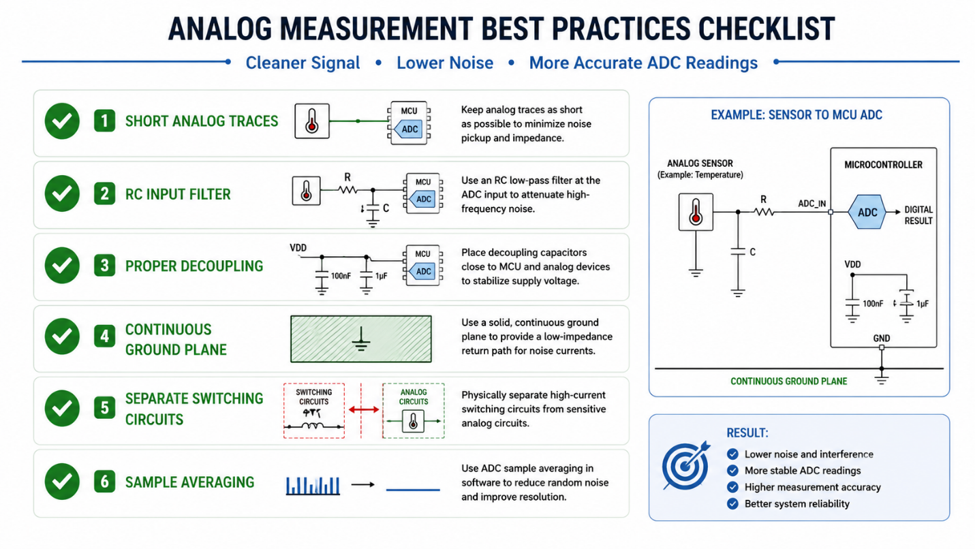
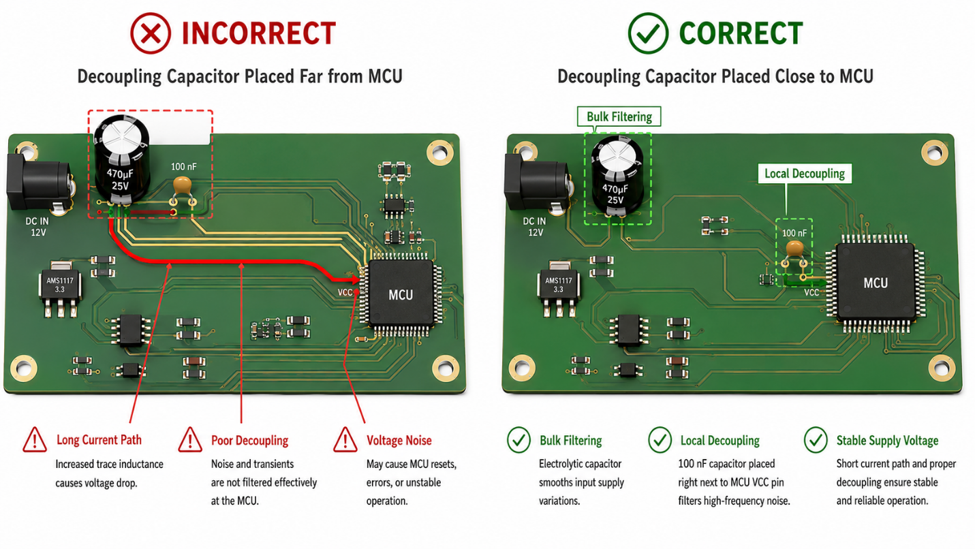
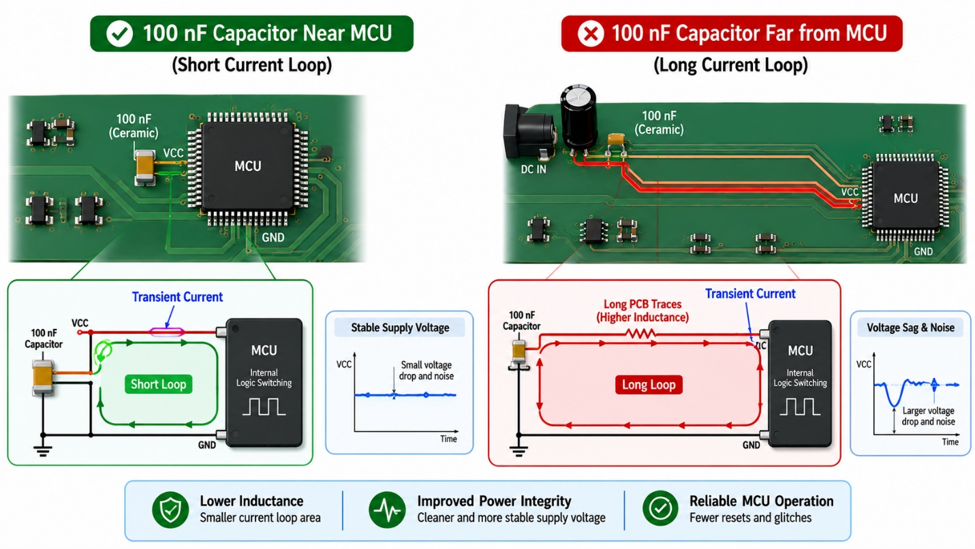
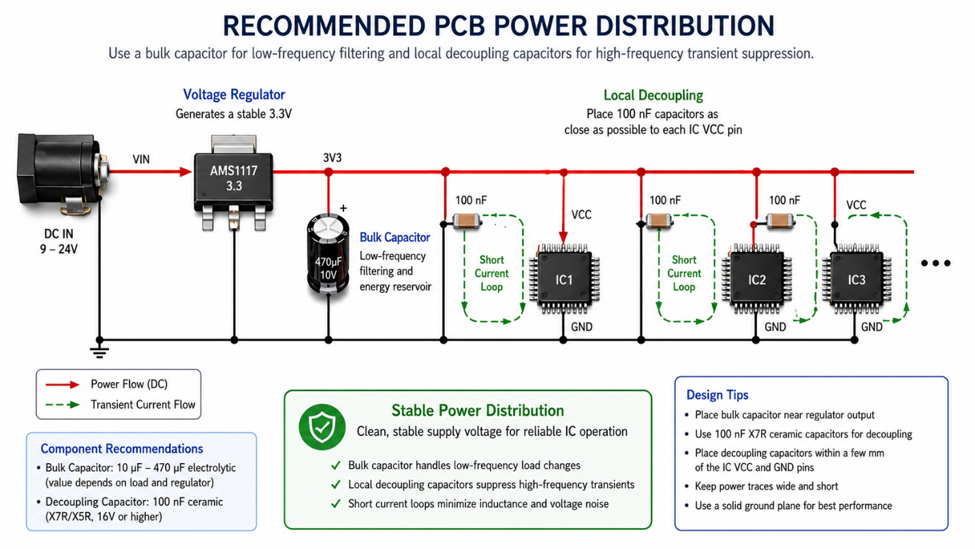
To isolate the issue, I tested each sensor individually. That’s when the anomaly became clear—one sensor was producing unstable values intermittently. After closer inspection, I found that a small ceramic capacitor near the middle sensor was the culprit. It was likely introducing noise or affecting signal stability due to its placement and condition.

Replacing that capacitor immediately stabilized the readings. Once the input became clean, the PID behaved exactly as expected, and the wobbling disappeared.

This experience reinforced a key lesson: not all problems are algorithmic. Sometimes, a tiny passive component can completely destabilize an otherwise well-designed system. Debugging electronics requires both logical analysis and patience to dig down to the smallest details.

Electronics Troubleshooting