I Built a 100W Stereo Class-D Amplifier Using TPA3221

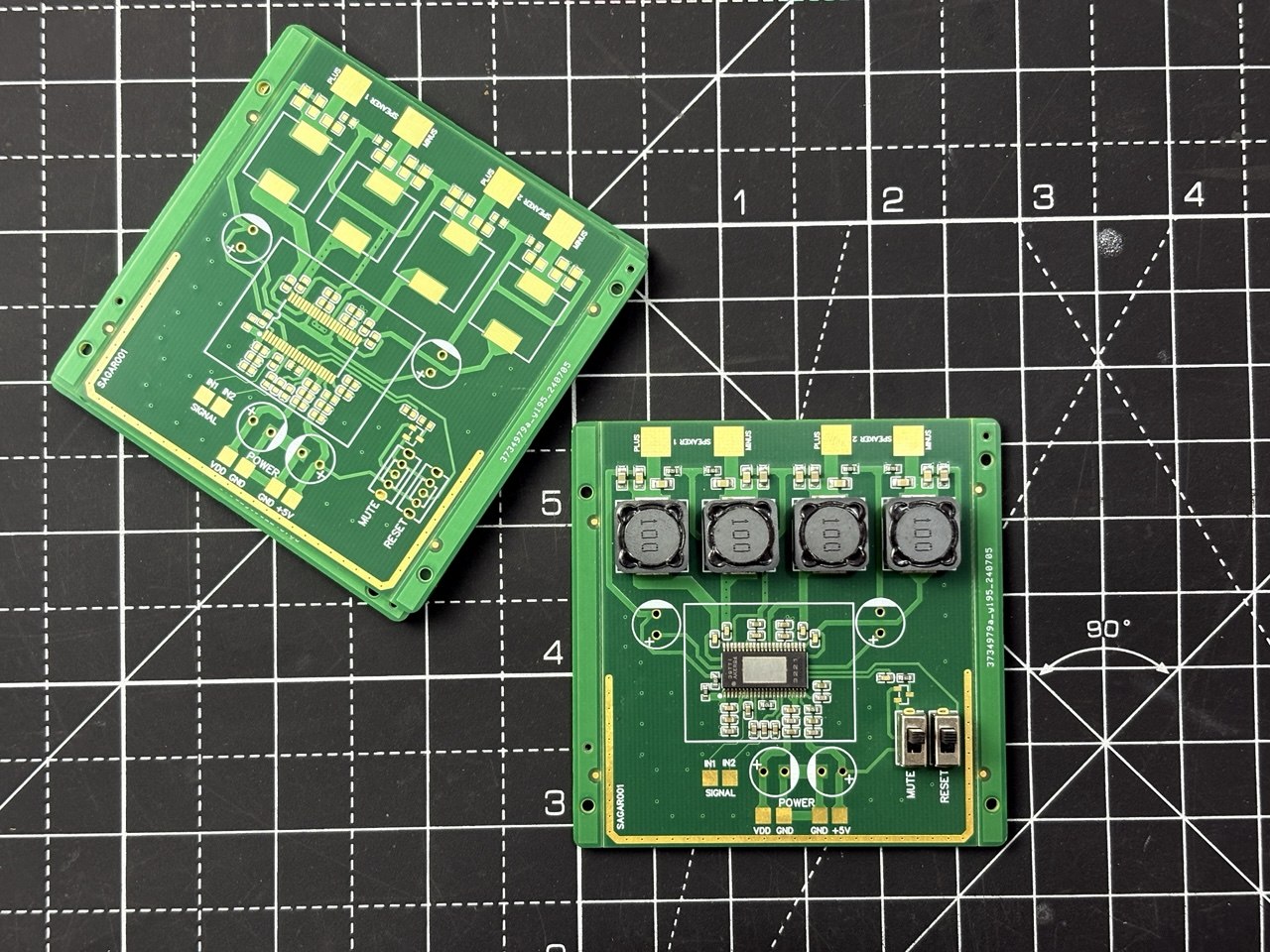
I am a fan of audio technology as it is cleared from most of my articles. I always try some new ICs or audio related things here. And today is the time for class D amplifiers. I made a subwoofer speaker that can handle upto 200W in stereo but I don’t have any good amplifier system that I can directly fit into my car. And that thing brings me towards TPA3221 IC. For the same price, anyone can get cheap Bluetooth speakers. But they distort at half volume, the bass rolls off a cliff. I want to drive my TP3221 amplifier directly from the car battery in this case.
8736804848261009408

So that it can actually push real power into real speakers, with clean audio and proper engineering behind it. The goal was simple: a compact, high-efficiency stereo amplifier that can deliver 100W per channel into 4-ohm speakers. Just a clean analog-in, speaker-out power amplifier that I could pair with any source. In this article, I will walk you through the full design. Schematic and PCB layout with a real-world audio test and listening demo, check out the YouTube video linked with this project.

Testing and Results

For the full audio test you can refer to the video attached here. I have tried music playback, frequency sweep, bass response, and real listening impressions with actual speakers. Audio quality is one of those things that does not translate well to text. You need to hear it. What I can say here at moderate listening levels, the amplifier is dead silent. No hiss, no hum, no audible switching noise. The closed-loop feedback does its job and the sound is noticeably cleaner than open-loop Class-D designs I have tried before.

#audio# #amplifier# pc #pcbdesign#

Design & Manufacturing
Start Your IoT Journey with ESP32 - Choosing the Right Communication Protocol

8736606615786098688

Most beginners focus on hardware first.

But in IoT, your protocol choice defines your entire system behavior.

Using a board like ESP32, you have multiple communication options—but they are not interchangeable.

The Real Question

Not “How do I send data?”

But “What kind of communication does my system need?”

When to Use What

🌍 HTTP / HTTPS → Request–Response Systems

Use when:

  • You send data occasionally
  • You interact with REST APIs
  • You need compatibility with web services

Characteristics:

  • Simple
  • Reliable
  • Higher overhead

👉 Best for:

  • Data logging
  • Trigger-based communication

🔄 WebSocket → Real-Time Two-Way Communication

Use when:

  • You need continuous connection
  • Real-time updates matter
  • Low latency interaction

Characteristics:

  • Persistent connection
  • Full duplex (send + receive anytime)

👉 Best for:

  • Live dashboards
  • Remote control systems

📡 MQTT → Scalable IoT Communication

Use when:

  • Multiple devices communicate
  • You need low bandwidth usage
  • System must scale

Characteristics:

  • Publish/Subscribe model
  • Broker-based
  • Very lightweight

👉 Best for:

  • Sensor networks
  • Cloud-connected IoT systems

📶 BLE (Bluetooth Low Energy) → Short Range, Low Power

Use when:

  • Power consumption is critical
  • Communication is local
  • Mobile app interaction

Characteristics:

  • Low energy usage
  • Limited data rate
  • Short range

👉 Best for:

  • Wearables
  • Smart sensors

📲 Classic Bluetooth → Continuous Data Streaming

Use when:

  • You need stable, continuous data transfer
  • Power is less critical

Characteristics:

  • Higher throughput than BLE
  • More power consumption

👉 Best for:

  • Audio streaming
  • Serial communication replacement

📡 LoRa → Long Range, Low Data

Use when:

  • Devices are far apart
  • Infrastructure is limited
  • Data size is small

Characteristics:

  • Very long range (km-level)
  • Extremely low data rate

👉 Best for:

  • Agriculture monitoring
  • Remote sensing

🧠 The Core Insight

Protocol choice is a tradeoff between:

  • Range
  • Power
  • Latency
  • Data rate

You can’t optimize all four.

⚠️ Beginner Mistake

Trying to use one protocol for everything.

👉 Example:

  • Using HTTP for real-time control
  • Using BLE for long-range communication

This leads to unstable systems.


For more context about ESP32:

https://jlcpcb.com/blog/how-to-choose-an-esp32-development-board-beginner-friendly-guide
https://jlcpcb.com/blog/esp32-vs-arduino

Microcontrollers
Start Your Embedded Systems Journey - ESP32 or Arduino?

If you're starting embedded systems, the first confusion is:

👉 “Should I begin with Arduino or ESP32?”

Here's the simplest way to decide without getting overwhelmed.

Step 1: Learn How Hardware Works

Start with → Arduino Uno

Why this is the best starting point:

  • No WiFi, no background complexity
  • Code runs step-by-step (easy to debug)
  • Helps you understand:
    • GPIO (input/output)
    • sensors
    • actuators (LEDs, motors)

Programming Language (Arduino)

  • Uses C/C++ (Arduino-style)
  • Simplified functions:
    • setup()
    • loop()

👉 Very beginner-friendly—no need to manage OS or multitasking


Step 2: Build Real Connected Systems

Move to → ESP32

Why upgrade to ESP32:

  • Built-in WiFi + Bluetooth
  • Supports multitasking (FreeRTOS)
  • Suitable for real applications:
    • IoT
    • remote control
    • cloud integration

Programming Language (ESP32)

  • Also uses C/C++ (Arduino IDE or ESP-IDF)
  • Advanced features:
    • multitasking (FreeRTOS)
    • networking stacks

👉 Slightly more complex, but much more powerful

Beginner Project Roadmap

Level 1 (Arduino)

  • Blink LED
  • Button input
  • Temperature sensor
  • Motor control

👉 Goal: Learn hardware + basic C/C++ logic

Level 2 (ESP32)

  • Web server (control LED from browser)
  • WiFi sensor dashboard
  • Bluetooth control

👉 Goal: Learn networking + system design

Common Beginner Mistake

Starting directly with ESP32:

  • More complex debugging
  • Background tasks (harder to understand)
  • Requires better coding understanding

👉 Result: confusion instead of learning


The Smart Learning Path

Arduino → Learn C/C++ basics + hardware
ESP32 → Apply it to real connected systems

For a deeper comparison:
https://jlcpcb.com/blog/esp32-vs-arduino

8736603601482555392

Microcontrollers
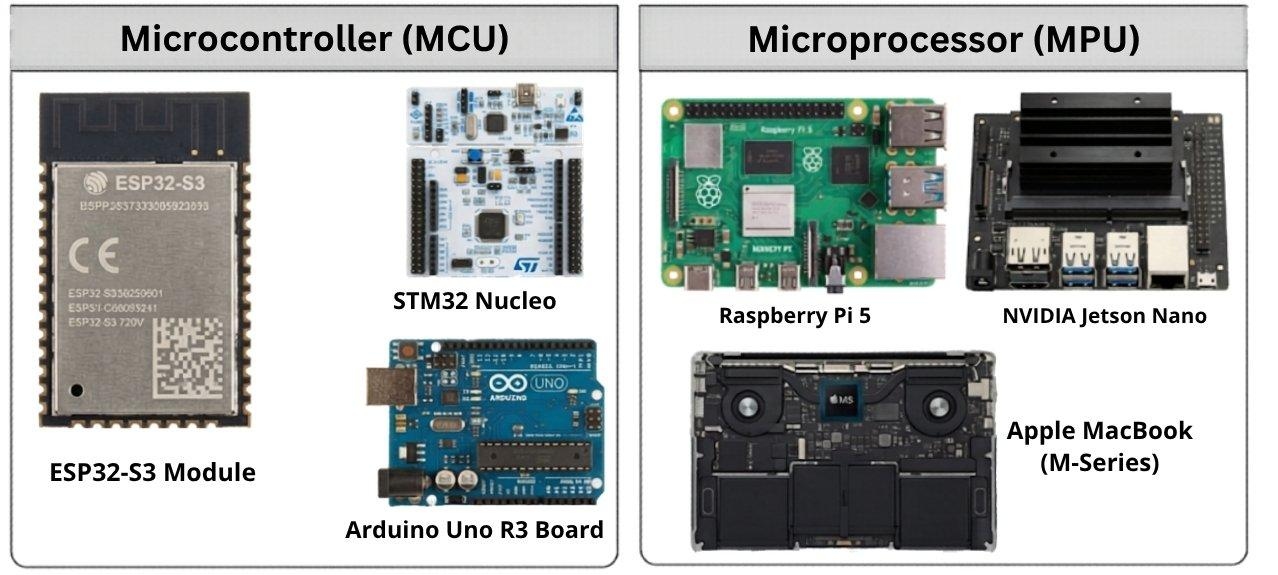
Microcontroller vs Microprocessor - Project-Based Selection Guide

8736599939083001856

Instead of theory, here's how to choose based on real project scenarios:


🔋 Project 1: Battery-Powered IoT Sensor Node

(e.g., temperature + humidity + LoRa/WiFi)

Choose → Microcontroller (MCU)

Why:

  • Ultra-low power (µA sleep modes)
  • Built-in ADC, GPIO, communication interfaces
  • Instant wake-up (no OS overhead)

📌 Examples:

  • ESP32
  • STM32L4

🤖 Project 2: Motor Control System

(e.g., BLDC motor, robotics, inverter)

Choose → Microcontroller (MCU)

Why:

  • Deterministic real-time control
  • Precise PWM + timers
  • Low latency interrupt handling

📺 Project 3: Smart Display / HMI System

(e.g., touchscreen UI, dashboards)

Choose → Microprocessor (MPU)

Why:

  • Requires OS (Linux/Android)
  • Handles graphics + touch + networking
  • Needs external RAM

📌 Example:

  • Raspberry Pi 4

📷 Project 4: Camera / Vision System

(e.g., face detection, surveillance)

Choose → Microprocessor (MPU)

Why:

  • High data throughput
  • Image/AI processing
  • Large memory + OS support

🔌 Project 5: Power / Energy System

(e.g., solar controller, UPS, BMS)

Choose → Microcontroller (MCU)

Why:

  • Analog sensing (voltage/current)
  • Real-time control loops
  • High reliability

🌐 Project 6: IoT Gateway / Edge Device

Choose → Microprocessor (MPU)

Why:

  • Runs Linux + networking stack
  • Handles multiple devices + protocols
  • Cloud connectivity + local processing

🔄 Project 7: Smart Industrial System (MCU + MPU Together)

(e.g., industrial automation panel, smart EV charger, advanced robot)

Choose → Hybrid (MCU + MPU)

Architecture:

  • MCU → Real-time control layer

    • Sensors, actuators, safety loops
  • MPU → Application layer

    • UI, cloud, analytics, networking

Why this split works:

  • MCU guarantees deterministic timing
  • MPU handles complex processing + OS tasks
  • Improves system reliability and scalability

📌 Example combination:

  • MCU: STM32F4
  • MPU: Raspberry Pi 4

📌 Communication between them:

  • UART / SPI / CAN / Ethernet

🔥 Core Decision Rule

Control + Real-time → MCU
Processing + OS + UI → MPU
Both needed → Split architecture (MCU + MPU)


🚀 Final Takeaway

  • MCU = Efficiency, control, low power
  • MPU = Performance, flexibility, complex systems
  • MCU + MPU = Industrial-grade architecture

👉 Most advanced products today use a hybrid approach.


🔗 Reference

For a more detailed breakdown:
https://jlcpcb.com/blog/microcontroller-vs-microprocessor

Embedded Systems2
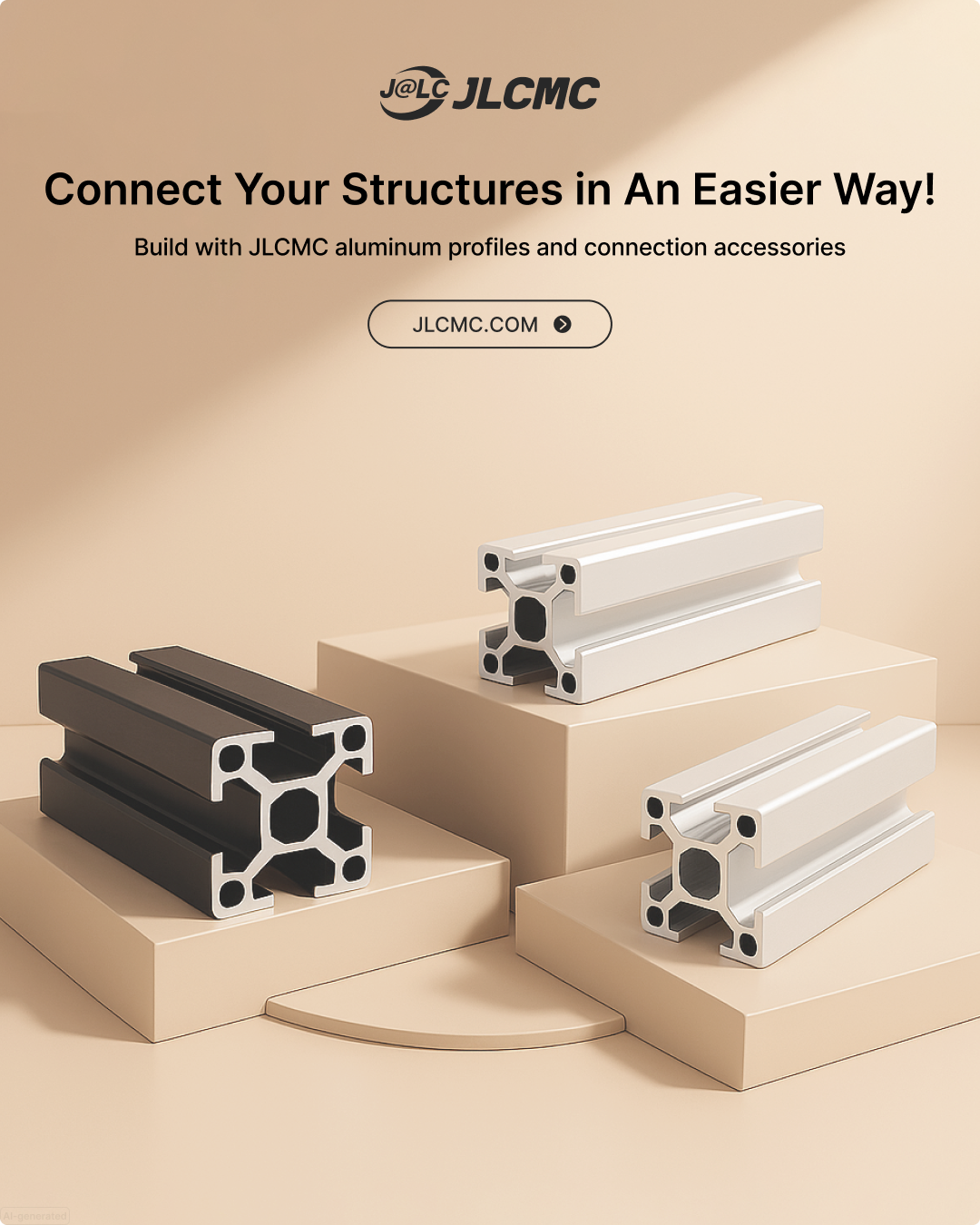
No welding needed - choose flexible and lightweight solutions!

Just bolts, nuts, and standard components to quickly assemble sturdy and flexible structures. https://jlcmc.com/campaign/aluminum-profile?from=snsprofile JLCMC modular aluminum systems, perfect for modular and lightweight designs that save cost and time!✨

💡 T-Slot Design: Connect, adjust, and expand your structures

🛠Angle Brackets: Secure 90° or custom angles easily.

⚙️Expand Functionality: Casters or leveling feet for mobility or stability

8735226864070352896

Mechatronic Components
Practical Guide: How to Select a Supercapacitor Bank with a 12V Battery System

In a real supercapacitor vs battery design, the goal is to choose a supercapacitor that can handle startup current spikes without causing voltage sag or stressing the battery. Selection is based on three parameters: voltage, capacitance, and ESR.

1. Voltage Rating (Series Cells)

Supercapacitors are rated ~2.5–2.7V per cell, so series connection is required.

  • 12V system peak ≈ 14.4V
  • Required cells: 14.42.7≈ 6

Design choice:

  • Use 6–8 cells in series (≈16V rated bank)
  • Include cell balancing (passive or active) to prevent overvoltage

2. Capacitance (Farad Selection)

Capacitance determines how effectively voltage sag is reduced during transients.

Note: Despite high capacitance (F), supercapacitors store less energy than batteries due to lower voltage.

Quick sizing guideline:

  • Small loads → 0.1–1 F
  • Medium loads → 1–10 F
  • High surge (motors, inverters) → 10–50 F+

Oversize by ~2× for stability and aging margin

3. ESR (Critical for High Current)

Voltage drop under load: V=I×ESR

Example: 20A × 0.1Ω = 2V drop (unacceptable for 12V rail)

Target ESR:

  • Moderate load → < 50 mΩ
  • High surge → < 10–20 mΩ

4. Choosing Supercapacitor Type

  • Cylindrical EDLC cells → best flexibility and performance
  • Pre-balanced modules → simpler integration for higher voltage systems

5. Pre-Charge the Supercapacitor Bank (Critical Step)

A discharged supercapacitor behaves like a near short circuit, causing dangerous inrush current if directly connected.

Procedure:

Step 1: Insert a pre-charge element

  • Power resistor (5–50Ω, high wattage) or NTC thermistor

Step 2: Estimate initial current: I_initial=V✖R

  • Example: 12V / 10Ω ≈ 1.2A (safe)

Step 3: Allow gradual charging:

  • Time constant: τ=R✖C

Step 4: Monitor voltage

  • Wait until: Supercapacitor voltage ≈ battery voltage (within ~0.1–0.2V)

6. Switch to Direct Parallel Connection

Once pre-charged:

  • Bypass the resistor using:

    • Relay / contactor (simple)
    • MOSFET switch (preferred for modern systems)

*******Connection sequence:

  1. Pre-charge through resistor
  2. Verify voltage match
  3. Close bypass switch

→ Supercapacitor now directly in parallel


8734577937826775040

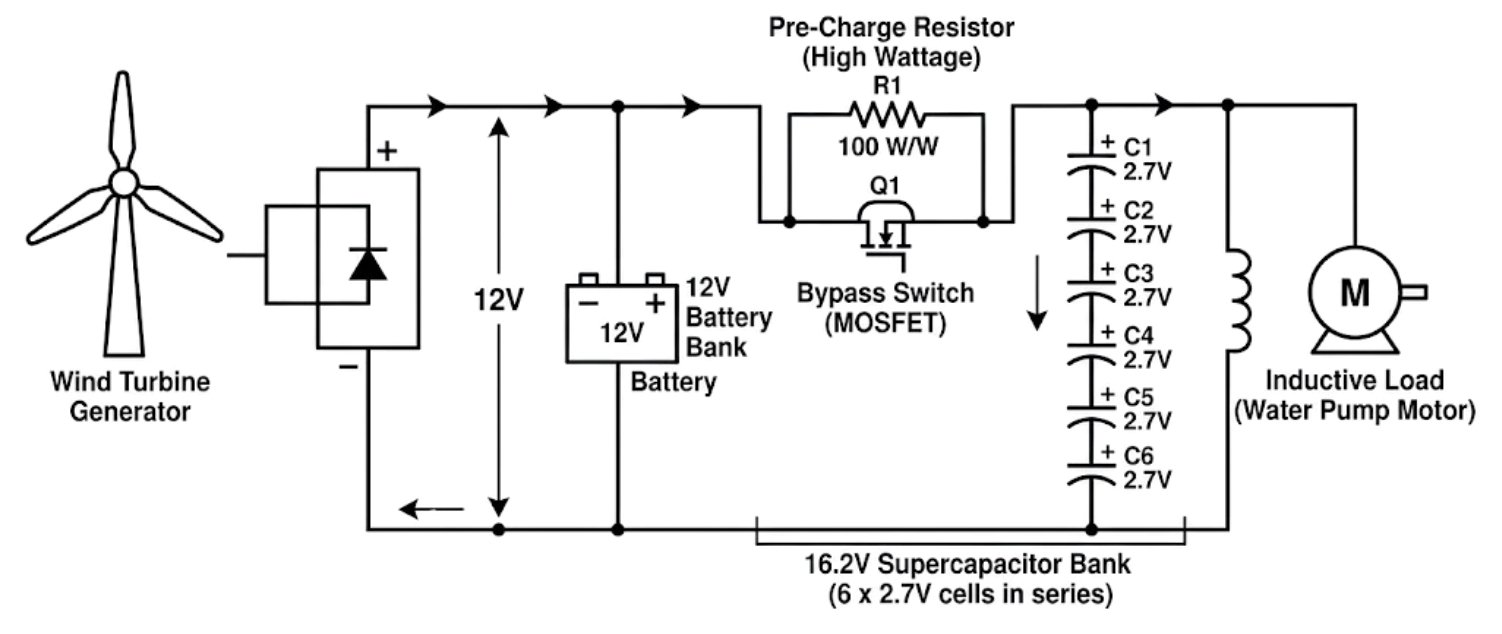
Figure: Circuit schematic of a 12V wind turbine hybrid power system. It details a 12V battery connected in parallel with a 6-cell supercapacitor bank, featuring a current-limiting pre-charge resistor and a bypass switch to safely manage inrush current.

⚠️ Engineering Notes

  • Never connect a 0V supercapacitor directly to a battery

  • Use proper wire gauge (high current path)

  • Keep connections short (minimize inductance)

  • Add protection:

    • Fuse or current limiting if required

\

Result

  • Supercapacitor handles startup surge current

  • Battery provides continuous energy

  • System avoids:

    • voltage sag
    • battery stress
    • premature degradation

Key Takeaway: Always pre-charge a supercapacitor before connecting it in parallel with a battery - this prevents destructive inrush current and ensures stable hybrid operation.

Learn More: https://jlcpcb.com/blog/supercapacitor-vs-battery

**##supercapacitor# ##battery# ##supercapacitor_vs_battery#**

Power & Engery
Handheld accurate sound level dB meter

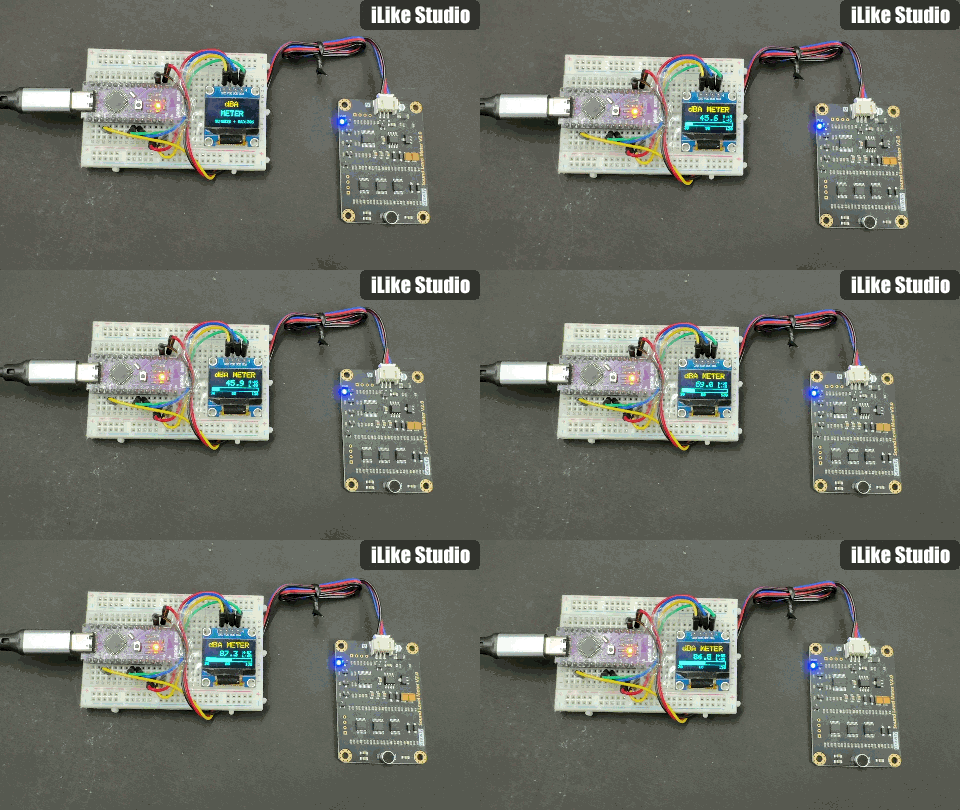
Because I am a sound lover, and in recent times I have done a lot of research on audio-related products. But I am always curious to measure the sound performance in terms of dB(A). In that way, when the amplifier is in steady state, I can measure the total output noise due to the surroundings. Because decibels are a logarithmic scale, it usually starts from a very light value, and it can also measure very high values. I have many options, as someone on the internet says, there are phone apps that claim to measure sound levels, but let's be honest, a phone microphone is designed for voice calls, not calibrated acoustic measurement.

So if you want to measure actual sound output, there are professional sound level meters, but they start at a couple of hundred dollars. But I wanted something in between a handheld dB meter that's actually accurate and battery-friendly. When I was searching the web, I came across the DFRobot Gravity Analog Sound Level Meter. This little board has a professional-grade MEMS microphone with proper signal conditioning. It has an A-weighting filter and a beautifully simple analog output. The voltage coming out is linearly proportional to decibels. So, no complex DSP, no FFT, just read an analog pin and multiply. I paired it with my own designed Arduino from JLCPCB and a 0.96" OLED display, and that’s how I got myself a proper handheld dB meter.

How the Code Works:

Because the sensitivity and conversions are based on ADC and they work on a reference. If that reference voltage is stable the readings are accurate. Arduino's 5V rail can vary from 4.6V to 5.2V depending on the host. And when running on battery, over the time as the battery discharges, there will be variations. To eliminate this issue, we used the `readVcc() function which takes the reference from the internal 1.1V bandgap of Arduino. This gives us the true supply voltage in millivolts, which we use in the dB calculation.

Raw sensor readings can be noisy. The code uses a circular buffer of 10 samples to compute a running average. This smooths out spikes while still responding quickly to changes (10 samples x 125ms = 1.25 seconds of averaging).

Here is how the ADC conversion is done:

A perfectly linear 0.6V-to-2.6V range mapping to 30-130 dBA. No lookup tables, no polynomial curve fitting, no complex calibration. Just multiply by 50. That's it. 0.6V = 30 dBA, 2.6V = 130 dBA.

dbValue = (analogRead(A0) / 1024.0) \* Vref \* 50.0;

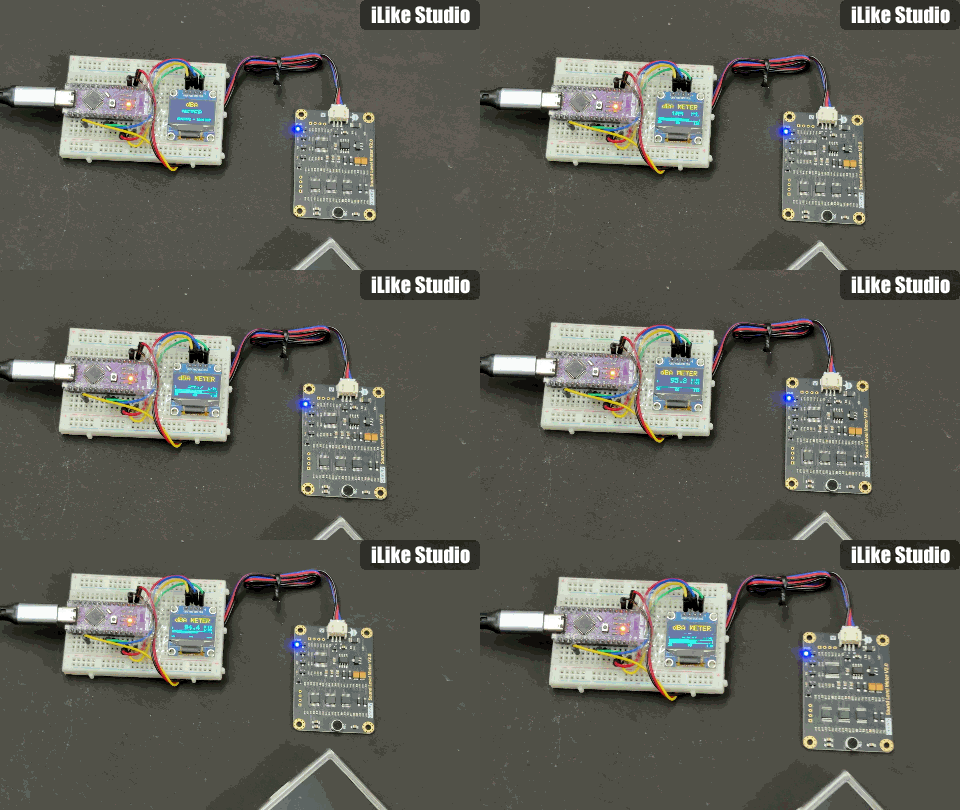
Testing and Working:

I have tested the output in different scenarios, and it is working perfectly. Best to pair it directly with the Arduino with a soldering connection; a loose one may give you noise.

Testing with Songs:

8734494598990336000

Testing during conversation:

8734494663079571456

#PCB# #SOUND# #DB METER#

Analog & Signal
How to send edge plating annotation diagram to JLCPCB?

Q: JLCPCB edge plating guideline says this - "supply an annotated diagram showing which edges to plate".

I have this edge plating annotation diagram ready. However, there is no place to actually include this diagram during the PCB order process in the JLCPCB website. So my question is, where to attach this edge plating annotation diagram?

On a side note, I also included detailed fabrication notes (board dimensions, stackup, controlled impedance, drill summary, etc.) with my PCB and exported this with the Gerbers for JLCPCB, in case they have any questions. However, they mentioned that they would discard all these fabrication notes in an email. How do y'all send fabrication notes to JLCPCB? Is it not required?

A:

1:Edge plating diagram

For edge plating, you can directly design the plating area in the Gerber file (normally on a separate layer). When placing the order, please also add a remark such as “Edge plating as per the dedicated layer in the Gerber”. In addition, we strongly recommend selecting the option “Confirm Production File” during checkout, so our engineers can confirm with you before fabrication.

2: Fabrication notes (dimensions, stackup, impedance, drilling, etc.)

Our engineers mainly follow the Gerber data for production. Other supplementary files in your compressed package (such as English notes, DXF, Excel, etc.) will not be referenced to avoid any conflict with the Gerber. Therefore, please ensure all required parameters are correctly defined in your Gerber files, as these will be used as the sole basis for manufacturing.

① Board dimensions: Just make sure the outline in the Gerber is correct. The website will also automatically recognize the size. If you find the detected size to be inaccurate, you can include the correct dimension in the remarks.

② Stackup: You can select the required stackup when placing the order. For impedance-related designs, you may refer to our impedance calculator to choose the most suitable stackup: https://jlcpcb.com/pcb-impedance-calculator.

③ Controlled impedance: By default, impedance tolerance is ±20%. If you require tighter control (±10%), please contact our online customer service or email our support team (support@jlcpcb.com) to enable the whitelist option. Once enabled, you can select ±10% tolerance. Please also include the impedance details (trace width/spacing, layer location, etc.) directly in the Gerber package and mention in the remarks where this information can be found.

④Drilling: Please design drills in the drill layer. Supplying a drill drawing file in the Gerber package is also recommended.

Overall, as long as your Gerber files are designed clearly, no extra documentation is needed. But for special requirements, remarks + confirm production file are the most effective way to ensure your instructions are followed. #JLCPCB#

PCB