


 Electronic Community Mechanical Community OSHWLab JLCPCB JLC3DP JLCCNC JLCMC JLCONE EasyEDA JLCCAN LCSC Cable LCSC Panel









Hi makers!
This time, the PCB color is very important for the project I want to build. I had a white PCB made at JLCPCB that features many LEDs in white packages as well. I plan to build a more animated and at the same time more interactive panel, practically the easiest way is to do this using LEDs, but not just any LEDs, but the addressable WS2812B ones. Why wouldn't I use LED strips? Because they don't produce the desired effect, I've tried this in the past, by just sticking an LED strip on the interior walls I don't get a really good looking panel. That's why I want to use PCBs because I will basically have a perpendicular view over the LEDs.
-
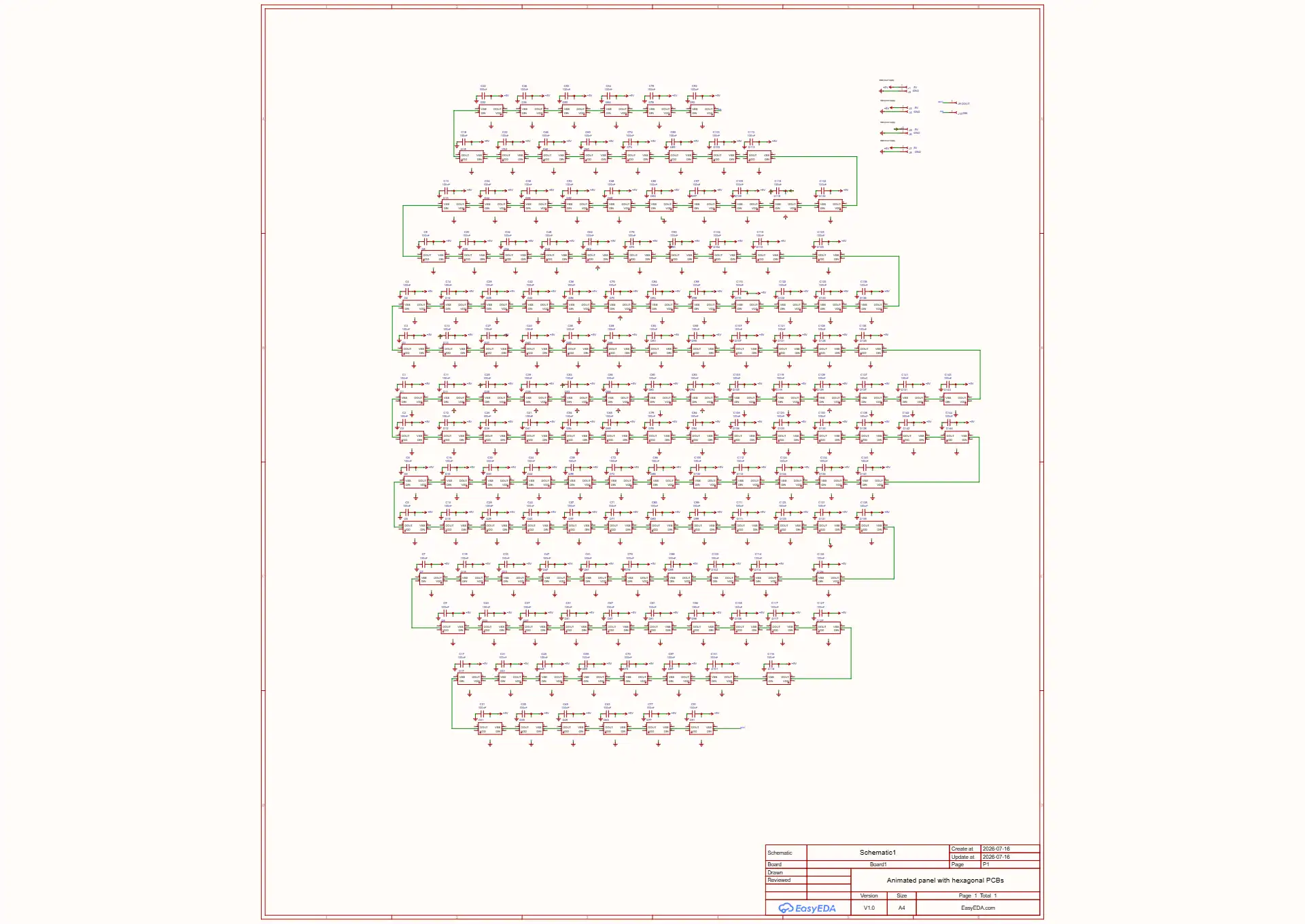
I was inspired by the classic LED matrix, basically the panel is built from PCBs but in the shape of a hexagon, placed together, on which I place 144 LEDs and capacitors. I thought of separating the panel like this 6+4, meaning 6 PCBs placed vertically on 2 columns to create a kind of waterfall effect, I will have to experiment with SW libraries, FadeLed rather (to obtain a Matrix-like effect), and the other 4 PCBs will be placed in such a way that the overall appearance of the panel is not too linear, having different, more dynamic and diverse effects.
-
I will also need an enclosure for these PCBs, this is where 3D printing comes in, which allows me to build enclosures the way I want, on a puzzle model. I have a friend who owns a printer. The cover will be white, but I will have to experiment when I have the PCB with LEDs, I will try to make the panel hangable but at the same time placeable on a table stand for example. But I will have to make durable joints because it will add some weight.
For the power supply I will need a 5V with high current capability, because these LEDs will consume some current. -
Now, addressable LEDs are not called that by chance, I will need a microcontroller, and for that I will use the well known Nano and Arduino IDE. This allows me to create some scenes or operating modes. I do not exclude the use of an ESP32 and control via phone, but the internet connection is unstable. Maybe things will improve along the way. 😁
For the interactive and control part I will start with a button/touch button to change the color of the 6 cascade PCBs, and the other 4 will have different effects (wheel, stars, Gaussian Pulse, etc). By experimenting I can even use an IR sensor or ultrasonic, which will allow me to control touchless. -
The manual work will mainly consist of soldering a lot of wires, each hexagon PCB would have 6 power points, which I have to gather in a single point at the power supply. Then there are 2 more wires that connect the PCBs. Fortunately there is no need for many wires connected to the microcontroller board.
Maybe I can manage to get a good design in the 3D printing stage that does not involve drilling holes, screws, but at the same time it has to be a solid design.f56c6b13f2214874807957972fd2221d.webp


#PCB# #WS2812B#



Hi makers!
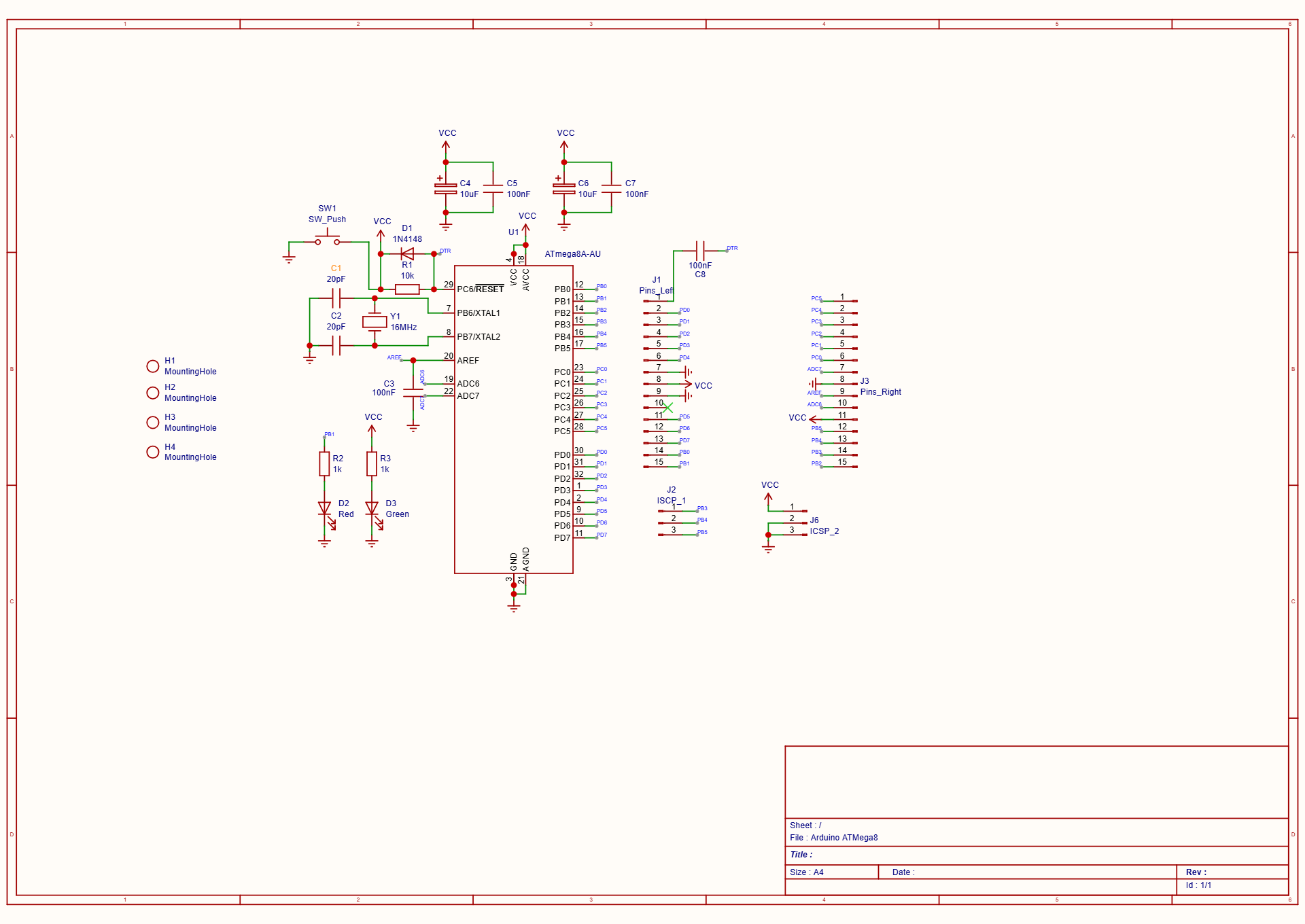
Another PCB completed, and a different color chosen—blue. I created a simple, minimalist PCB (again via JLCPCB) that allows me to use a microcontroller from the ATMega family. I made this minimal platform for me, I can use it with an ATMega8 or ATMega328 microcontroller, or any compatible microcontroller. I made a simpler version, giving up the programming circuit via USB and others, like voltage regulator, resulting in a PCB that allows us access to the GPIO of the microcontroller.
For microcontroller programming, you can use a method similar to that of Arduino platforms, load a bootloader in the microcontroller, and with an FT232RL TTL to USB adapter you can program the microcontroller very easy , as it is done on Arduino boards. There is also a green LED indicator on the PCB for voltage, and a red LED that we can use to load and run a Blink sketch.
eb558b3f2c744803bf98c13f00515ba7.webp
1. Microcontroller & Clock Circuit (The Core)
- U1 (ATmega8A-AU / ATmega328): This is the brain. The schematic shows the TQFP-32 SMD package pinout. It is compatible with both ATmega8 and ATmega328 (pin-compatible for the most part).
- Y1 (16MHz Crystal) & C1, C2 (20pF): This is the external clock circuit. 16MHz is the standard speed for Arduino boards (running at 5V). The capacitors C1 and C2 are load capacitors required for the crystal to oscillate stable.
2. Power Supply & Indicators
- Decoupling Capacitors (C4, C5, C6, C7, C3): 10µF (bulk) and 100nF (high-frequency noise filtering) capacitors near the VCC pins (AVCC and VCC) and the AREF pin. This is crucial for stable operation, especially for the ADC (Analog to Digital Converter).
- D3 (Green LED) & R3 (1k):Power Indicator. It is connected directly to VCC (through a current-limiting resistor). It will light up as soon as the board is powered, confirming voltage is present.
- J6 (ICSP_2): Power header (VCC and GND), likely used to supply power to the board or tap power from it.
3. Reset Circuit
-
R1 (10k): A pull-up resistor keeping the RESET pin (Pin 29) HIGH (active state) during normal operation.
-
SW1 (SW_Push): A tactile button that pulls the RESET pin to Ground when pressed, manually resetting the microcontroller.
-
Auto-Reset Circuit (C8, D1, "PTR" net):
- The label "PTR" connects to the DTR (Data Terminal Ready) pin of your FT232RL adapter.
- C8 (100nF): This capacitor couples the DTR signal to the RESET pin. When you open the serial port to program (like in the Arduino IDE), the DTR line pulses, pulling RESET low momentarily to put the chip into the bootloader. This allows for "Auto-Reset" programming just like a real Arduino.
- D1 (1N4148): This diode is there to protect the reset line or ensure fast discharge of the capacitor C8 when the button is pressed, preventing conflicts between the manual button and the auto-reset circuit.
4. User Interface (The "Blink" LED)
-
D2 (Red LED) & R2 (1k): LED for testing.
- Note on Pinout: On an ATmega328, PB1 corresponds to Arduino Digital Pin 9.
- Standard Arduino Note: The standard "Blink" sketch usually uses Pin 13 (PB5). Since your LED is on PB1 (Pin 9), you would need to change the pin number in the Blink sketch to
9(or defineLED_BUILTIN 9) to see it blink, unless you have customized the bootloader/board definition.
5. Connectivity & Headers (GPIO Access)
The main purpose of this board is to break out the pins.
-
J1 (Pins_Left) & J3 (Pins_Right): These headers break out almost all the GPIO pins (Port B, C, D) and Analog pins (ADC6, ADC7, AREF). This allows you to easily connect sensors, modules, or wires.
-
J2 (ISCP_1): This is the ICSP (In-Circuit Serial Programming) header.
- It exposes PB3 (MOSI),** PB4 (MISO), and PB5 (SCK)**.
- This is used to burn the bootloader initially using a programmer like a USBasp or AVR ISP. Once the bootloader is installed, you can switch to using the FT232RL method you described.


The circuit description was created using A.I.
*****The circuit is presented as is, made for hobby projects.
#PCB# #Microcontroller#


Let me also show you a lighter PCB color: yellow. Its the only shade available from JLCPCB, but its actually quite good and uniform—meaning there are no spots or imperfections—even though its a PCB with a lot of traces.
I salvaged an electronic board that contains an AT90CAN128 in a QFP package. Initially I thought it was an ATMega128 MCU (I also use an ATMega328, but I don't know all of them 😅), but then I did a search on the internet and discovered that it is a similar MCU that has some extra capabilities.
I plan to use this MCU to create a programmable board, through methods known to me, that is, by consulting the internet (forums and so on), and I even found information to program it using the well-known Arduino IDE (and from here we all know what a wide world has formed around Arduino 🤓), but I also have difficulties on this path. Given that the MCU I found is in an SMD package, I cannot use it in optimal conditions on a test wiring, perforated, so I need to design a good PCB. t will be a 2 layers PCB, it is relatively minimalist, in the center of attention being the AT90CAN128, and next to it I will place male pin headers to facilitate access to the GPIOs. This is the electronic circuit (quite complicated to understand 😆😅):
Maybe you think the dimensions are a bit generous, but I don't mind, it's one sample.
Let's not forget the bill of materials, except for the pin headers, of which I don't have many, the rest of the components are recovered from other electronic boards. Regarding the other components (resistors, capacitors) I will use both SMD and TH, I have them on hand (just what I said at the beginning). This board will be powered by 5V, so it's definitely handy, plus many electronic modules work at 5V.
With the help of the Arduino IDE and the available libraries, I will install the board and program the AT90CAN128 via a USB AVR programmer (from the MCU I need the signals: Reset, Mosi, Miso, Sck). What I can do next I have many options, if I have a board with many ports I can use it with environmental sensors, 16x2 display, common modules after all. I have enough ports to attach many LEDs, and for some time I have been thinking about an application with TTP223 touch buttons and RGB LEDs, to create a dynamic light panel or a small table, depending on resources (3D printing would also be needed and this part is a bit tricky) and time. But I also have a more feasible and equally brilliant alternative, 4x4x4 LED cube.In the end, I think that the outline of an application goes something like this:
e002ed22dc7b468993c1db60fec6186e.png

So, to successfully build this board I would need:
- Manufacture a professional PCB;
- Assemble the components that I recovered from other boards;
- Check the programming instructions with Arduino IDE and software libraries;
- Take out the USB AVR programmer from the monkeys box 🙈.
So, after solving all the above, I still have to experiment with the programming tools and then we are ready to go.


Just a quick tip—in case anyone hasn't noticed this yet—JLCPCB and LCSC share something in common: they use the same part numbers, meaning you can search for components on both sites. They also use the same Manufacturer Part Number (MFR/MPN), so you can be certain you won't mix anything up.
quick-tip-for-components-searching-v0-3s3tiv9a78th1.png?width=1366&format=png&auto=webp&s=940d97aa4407958826788a19cbaa40815de556d8
Search on LCSC

quick-tip-for-components-searching-v0-mwsdr24c78th1.png?width=1423&format=png&auto=webp&s=c9989aed810be848dc764d59d84b82e59be40e44
Search on JLCPCB

👍😉